Localization and personalization have become a standard expectation for marketing teams.
Gone are the days when we could ship a single “global” asset and call it a day. Now, creative teams are expected to produce hundreds of region-, language-, channel-, and audience-specific versions.
The reality on the ground? It’s a mess:
- Design teams get buried under an avalanche of repetitive tasks: resizing, tweaking, and localizing content over and over.
- Revenue teams are stuck waiting on the right assets
- Approvals are a bottleneck.
- But if you prioritize speed or let people self-serve content creation…off-brand, non-compliant content slips through the cracks.
The challenge is meeting growing demand for personalized content without forcing marketing leaders to say “no” or sacrificing brand control.
Enter Marq 2.0.
This new chapter of Marq’s platform brings together the capabilities high-performing teams already rely on, alongside new AI-driven automation.
Built to govern distributed content creation at enterprise scale, Marq allows teams to localize and personalize content faster, while reducing manual effort and minimizing the brand risk that comes with mass production.
In this article, you’ll learn:
- How Playbooks personalizes content without manual input
- A rapid solution to map sub-brands or locations across multiple templates (Multi Brand)
- Why end users need to find content quickly, using Quicklinks
- New updates for QR codes, automated translations, and approval workflows
1. AI Marqet App to automate translations
For marketing teams tasked with creating localized content at scale, there’s a constant struggle to meet demand while maintaining brand consistency and compliance.
If you deliver content to diverse audiences and locations, you’ll also need to adapt your messaging and visuals to different languages. Typically, managing that process manually is inefficient and error-prone.
The pressure only increases in industries where the stakes are high (like healthcare) where even the smallest mistranslation can have serious consequences.
Enter Marq 2.0’s AI Marqet app.
Powered by AI, this app automates the translation of content, turning a single template into many localized versions with just a few clicks. Whether you’re in healthcare, finance, or any other regulated industry, you can generate multilingual content that’s accurate, compliant, and on-brand.
Here’s a real-world example:
- A healthcare company needs to quickly create multilingual content for a seasonal flu shot campaign, and time is tight.
- They create a template in Marq, designed to be easily localized across multiple languages.
- Using the AI Marqet app, they automate the translation process, generating 10 language-specific versions of the flyer in just a few clicks.
- The result? Accurate, compliant, and on-brand content at scale, all without the need for manual translation or extra resources.
This Marqet App empowers you to launch multilingual visual content at scale, all while ensuring clinical accuracy and brand consistency.
What’s more? Marq 2.0 offers a catalog of additional Marqet Apps to help automate the entire content creation process, from translations to templating, making it easier than ever to manage large-scale campaigns.
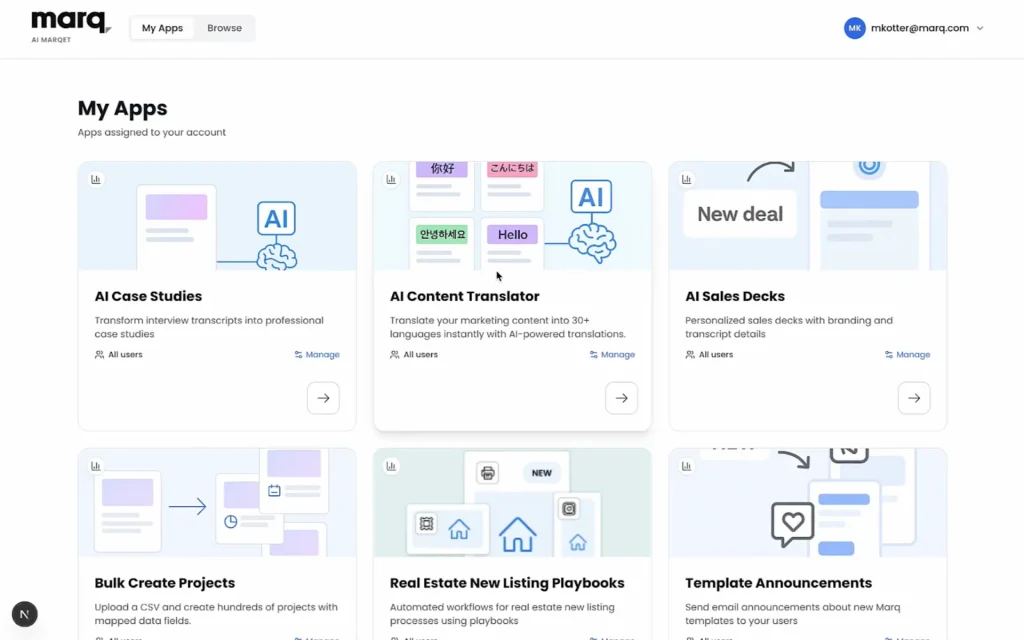
Choose the AI Content Translator from the Map Apps page in AI Marqet to get started.

Select the Marq template you want to translate into multiple languages.

Enter English text for the Template Fields in your template to prepare for translation.

Test your translation by previewing it in a specific language before finalizing the changes.
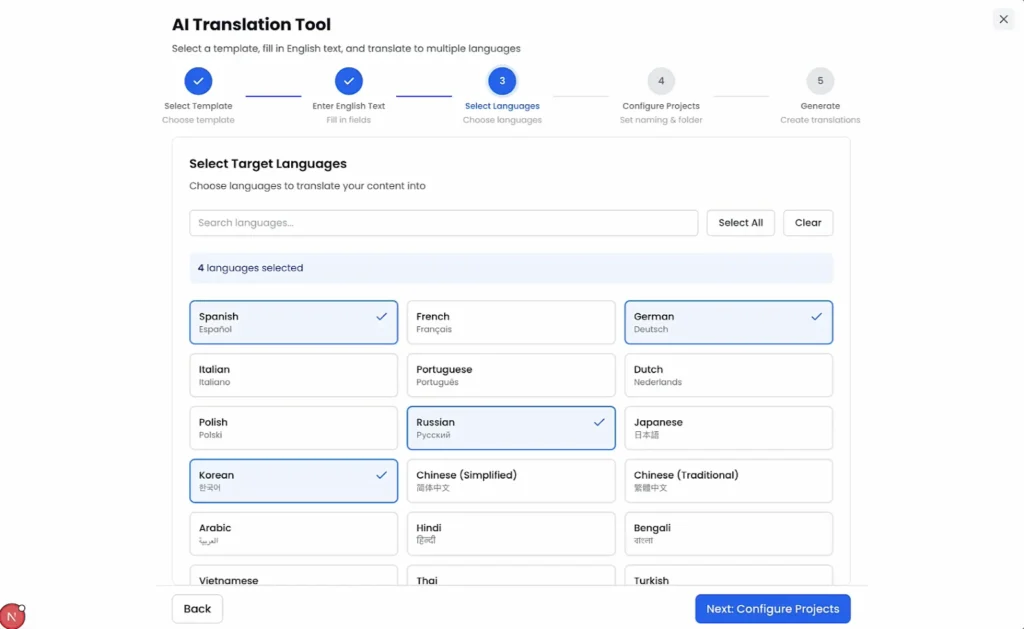
Select the languages you want to translate your Marq template into for multilingual content creation.

View your translated templates directly in the Marq dashboard once the process is complete.
2. Manage sub- and regional brands with Multi Brand
Managing multiple brands, locations, or franchises can quickly become overwhelming for marketing teams.
The bottlenecks are especially clear when personalized templates are required for each new sub-brand or client. Overstretched teams are then left with two options:
- Drown in repetitive copy-pasting and tweaking of the same elements: primary and secondary colors, logos, text, and fonts
- Speed up the process and risk off-brand content leading to compliance and brand issues.
It’s a lose-lose situation.
Modern marketing teams need a centralized, scalable approach to managing branded templates across multiple sub-brands – with a focus on speed and consistency.
Marq’s Multi Brand is designed to streamline that one-design-to-many-brands issue.
With Multi Brand, template admins create a single master template that automatically adapts to any brand in your account at the click of a button. You can preview how templates appear for each sub-brand, location, or franchise to verify that all brand mappings (colors, logos, fonts, etc.) are correct.
This eliminates the time-consuming task of template duplication.
Here’s a quick look at Multi Brand:

The Multi Brand feature in Marq 2.0 provides a drop-down with all your sub-brands, directly in the Marq editor, for easy access.

Click through to a sub-brand and instantly watch your template update with the associated colors, fonts, logos, and more.

The drop-down is also available in the templates dashboard, allowing you to personalize a series of templates for your required sub-brands at the touch of a button.
3. Template Collections
Getting the right piece of content to users can feel like scavenger hunt. But for many marketing teams, it’s a daily frustration: wasted time, repetitive tasks, and constant requests to find specific assets.
Here are some common situations your team might run into:
- Template hunting is a chore. End users struggle to find the right templates, clicking through multiple layers to get to what they need. (e.g., Click 1 = Social Media; Click 2 = Instagram; Click 3 = Stories)
- Stakeholders add to the burden. Everyone needs content, but some bypass the marketing team entirely, creating off-brand content or adding to an already overwhelming workload.
- End users can’t find what’s been created. Marketing teams invest time designing templates, but end users can’t locate them, leading to frustration and inefficiency.
Marq’s Template Collections features are designed to make template organization and access a breeze. With customizable Quicklinks, users can now create intuitive collections of templates that can be found instantly – no more scrolling or searching.
For example, a real estate company can create a “Open House Materials” set of Marq templates, with branded elements locked down, and make them available right away. End users can access them directly after logging in to the Marq dashboard.
This feature helps marketing teams organize and control the templates they’ve created, ensuring end users actually use them.
Additional Marq 2.0 template features include:
- Creating shareable links to template collections for easy sharing through external channels.
- Restricting template collections by user group or role, so only the intended audience (e.g., Sales vs. Customer Support) can access them.
- Displaying custom templates through Quicklinks on the home screen, so no scrolling is required to find the right asset.
- Automated pre-defined collection types and suggestions to assist marketing teams with inspiration and faster setup.
4. Advanced Approval Workflows (Connectors)
Getting approval on specific templates is critical to ensuring content is reviewed and approved before end users can download, print, or share it.
But let’s face it – the approval process isn’t always smooth sailing.
Here are some common issues teams run into:
- Requests get lost in the shuffle.
- Approvers miss notifications or see them too late.
- No central place to track approval status, leaving everyone in the dark.
A key problem is that approval tasks show up outside of existing project management workflows: in emails, Slack messages, or push notifications. Requests easily get lost in the noise. This adds unnecessary friction to the process, slowing down content delivery.
What teams need is a way to manage approval requests within their established project management systems.
That’s where Marq 2.0’s advanced approval workflows come in, with native integrations to six major project management tools:
- Monday.com
- Asana
- Jira
- Wrike
- ClickUp
- Smartsheet
Now, you can route approval requests, select an approver, and add comments – all without leaving Marq. This integration allows you to track approval status in real time, keeping everyone on the same page and accelerating the review process.The result? Brand-critical content is reviewed faster, ensuring it’s ready for download, printing, or sharing without unnecessary delays.

In the Marq editor, simply click “Request Approval” in the top right corner to initiate the approval process.

The approval request will appear right in your project management dashboard, keeping everything in one place.

Team members can click straight through to Marq, where a bar prompts them to approve the document.

Once the document is approved, the team member can notify all relevant parties directly through the project management platform.
5. Campaigns
Non-designers at distributed organizations face a major roadblock when it comes to running paid social ads – they simply don’t have the expertise (or time) to create them.
Speed-to-market is a competitive advantage; the longer it takes to launch campaigns, the more opportunities are missed.
What end users need (sales reps, agents, and franchisees) is a fast, foolproof way to create paid social ads and promote their products, listings, or services.
Enter Marq’s simplified paid social advertising tool, Campaigns.
This new feature allows non-designers at distributed organizations to self-launch brand-compliant Facebook and Instagram ad campaigns directly from the Marq editor in under 3 minutes.
This solves some major challenges:
- Complexity of ad creation. End users who lack design skills and platform knowledge can now access expertly designed templates that auto-populate with relevant data, making ad creation simple.
- Slow time-to-market. Forget waiting on agencies or marketing teams. With Marq, users can create and publish ads in under 3 minutes, cutting down on delays.
- Brand inconsistency at scale. Campaigns are built using Marq’s locked templates, ensuring all ads are brand-compliant every time.
- Poor ad performance. Ads are optimized based on best practices and collective platform learnings, improving performance.
- Inability to prove marketing value: With Marq 2.0, users can easily create and track paid ads, providing tangible results and insights into campaign performance.
Pre-built campaign templates with locked brand elements give account owners the confidence to enable self-service advertising, ensuring the process is streamlined and effective.
In summary, direct publishing from the Marq editor eliminates friction, reducing time-to-launch from hours to minutes, and empowering teams to run personalized ad campaigns quickly and efficiently.
6. QR Codes
QR codes have become a standard element in modern marketing materials, no matter the industry.
But let’s be honest. Creating and managing them today is often a messy, time-consuming process.
Here’s why it’s so frustrating:
- Fragmented workflow. You’re jumping between a third-party QR code generator, downloading the code, and then re-uploading it into your design tool. It’s inefficient.
- Inconsistent branding. Most QR codes look generic and don’t align with your brand’s colors or logo.
- Repetitive tasks. Every time a new URL is created, you have to regenerate the code all over again.
What’s needed is a frictionless way to add QR codes without ever leaving the Marq editor.
Enter Marq 2.0’s native QR code generation. Now, you can create professional, on-brand QR codes in seconds without any need for external tools.
Here’s how it works:
- Open the Marq editor.
- In the left menu (about halfway down), click on QR.
- Name your code, paste the destination URL, and you’re done!
Marq 2.0 offers several key capabilities to make QR code management seamless.
You can apply branded styling to ensure the QR codes align with your visual identity. Admin controls allow you to manage QR code usage, while dynamic link updating ensures that if you change the destination URL, it updates everywhere the QR code appears.
Plus, scan tracking enables you to monitor engagement and measure the effectiveness of your campaigns.
7. AI Marqet: Playbooks
The future of content creation is simple: teams get what they need, when they need it, already on brand.
This requires organizations to move from manual content requests to governed, self-service creation embedded directly into everyday workflows.
But the challenges are real:
- Time-consuming manual content creation. End users are forced to build every asset one-by-one, slowing down their workflow.
- Disconnected workflows. There’s no seamless way to trigger content creation from business events, which creates gaps and inefficiencies.
- Template Admin overwhelm. Marketing teams are overwhelmed with repetitive requests for the same content packages, making it impossible to scale their impact.
These bottlenecks erode productivity and competitive advantage. But how can you increase throughput beyond human limits without adding headcount?
Enter Marq 2.0’s Playbooks, part of the AI Marqet suite.
Playbooks are an automated workflow system where Template Admins define a set of templates that can be triggered to batch-create multiple projects using shared smart-field data. This system removes the manual work and ensures consistency across all outputs.
Apps, like Playbooks, that are part of the AI Marqet enable automated content creation workflows that are
- Triggered by business events or form submissions (e.g., New deal created, New product launched, New hire onboarded, New location opened, New campaign approved, new Event details submitted)
- Embedded in existing systems (like your CRM, DAM, project management and marketing ops tools)
- Batch-generated, not hand-built. That means multiple assets are created at once, shared data populates and customizes content automatically, and users stop having to open a design file or start from scratch.
Let’s take a real example scenario from a Real Estate customer:
- The Admin adds the Playbooks App from the AI Marqet.
- Business event occurs: “A new property is listed.”
- The trigger runs the playbook with listing photos and details, and outputs are generated in seconds – such as a Listing Magazine, Brochure, IG Story, and IG Post.
- The agent gets an email with a link to the assets, allowing them to print, download, post, and share within minutes.
- No manual input from the design team needed.
And one for a New Employee/Onboarding workflow:
- Triggered by the event: “New employee created” (external event).
- Instantly generates personalized assets – business card, LinkedIn cover, launch post, profile image, etc.
- New employee receives their assets via email in seconds.
The core payoff? Marq’s Playbooks remove the manual work of creating one-off assets and standardizes outputs, ensuring consistency across the board.
Plus, smart fields populate across every project in the set, meaning consistent data with no need for re-entry.
Final Thoughts
We’ve explored how Marq transforms the content creation process with powerful features like Multi Brand controls, AI Marqet Playbooks, and native QR code generation. Each feature is designed to streamline workflows and maintain brand consistency at scale.
Marketing leaders know that localization and personalization are now essential to successful content creation, but current workflows often lead to:
- Template admin overwhelm, as teams struggle to manage repetitive requests.
- Wasted productivity, with manual effort spent tailoring content.
- Lost competitive advantage, as slow content turnaround creates delays and missed opportunities.
The old models of control and brand management just don’t scale anymore. Marq is already a powerful templating platform, but with the addition of Marq 2.0 capabilities, it becomes the control plane for distributed brand creation, empowering teams to create, approve, and publish content faster and more efficiently.Ready to boost your team’s productivity and execute creative requests faster? Email sales@marq.com or schedule a demo with a brand-enablement expert today.