5 best Adobe Express alternatives reviews & compared in 2026

Adobe Express is a design tool built for speed. It handles social posts, presentations, short-form videos, and branded visuals well. But when it comes to brand governance, content automation, and scaling across distributed teams, it leaves much to be desired.
Plus, it works best inside Adobe’s ecosystem, so organizations that aren’t fully invested in Creative Cloud get less value from it.
This guide compares five of the best Adobe Express alternatives in 2026. We break down key features, where each tool shines, where it falls short, and how to choose the right Adobe Express alternative for your team.
How we selected the top Adobe Express alternatives
There are dozens of Adobe Express alternatives out there. We looked at the following criteria to narrow the field down to five:
- Ease of use: Can non-designers (sales reps, regional marketers, partners) pick up the tool and create polished content without design training or hand-holding from the creative team?
- Templates and creative assets: Beyond the raw number of templates, we looked at quality, industry coverage, and category depth. We also checked for built-in stock media, icons, and widgets, or integrations with libraries that provide them.
- Brand controls and governance: Can admins lock specific template elements, set role-based permissions, and control what different users can and cannot edit?
- Collaboration and workflows: Can multiple people work on the same project? Does the tool support design collaboration, comments, real-time editing, review cycles, and approval workflows?
- Customer reviews: We went beyond each tool’s marketing site and read through G2, Capterra, and Reddit to understand how real users describe their day-to-day experience.
5 best Adobe Express competitors in 2026
| Tool | Key features | Best for | Pricing |
| Marq | Object-level template locking, role-based permissions, creative automation, CRM/DAM integrations, AI-brand governance via Brand Guardian, AI Apps including language translation, content analytics | Scaling branded content across distributed teams | Custom pricing |
| Canva | Drag-and-drop editor, multi-format content creation, AI design tools, real-time collaboration | High-volume visual content creation | Custom pricing |
| Visme | 30+ chart types with live data, interactive content, 3D characters and data widgets, AI Hub, Brand Wizard | Data-driven visual content and interactive presentations | Custom pricing |
| Piktochart | 5,000+ infographic templates, Google Sheets data connection, Pikto AI Studio, video editor | Infographics and visual reports | Custom pricing |
| Animoto | Block-based video editor, licensed music library, brand presets, screen and webcam recording | Template-based marketing videos | Custom pricing |
1. Marq: Best for scaling branded content across distributed teams
Marq is a brand enablement platform that enables organizations to scale content creation beyond the design team.
It enables sales reps, franchise partners, regional marketers, and other non-designers to create on-brand assets through governed templates, while the brand team maintains centralized oversight of permissions and visual standards.
Key features
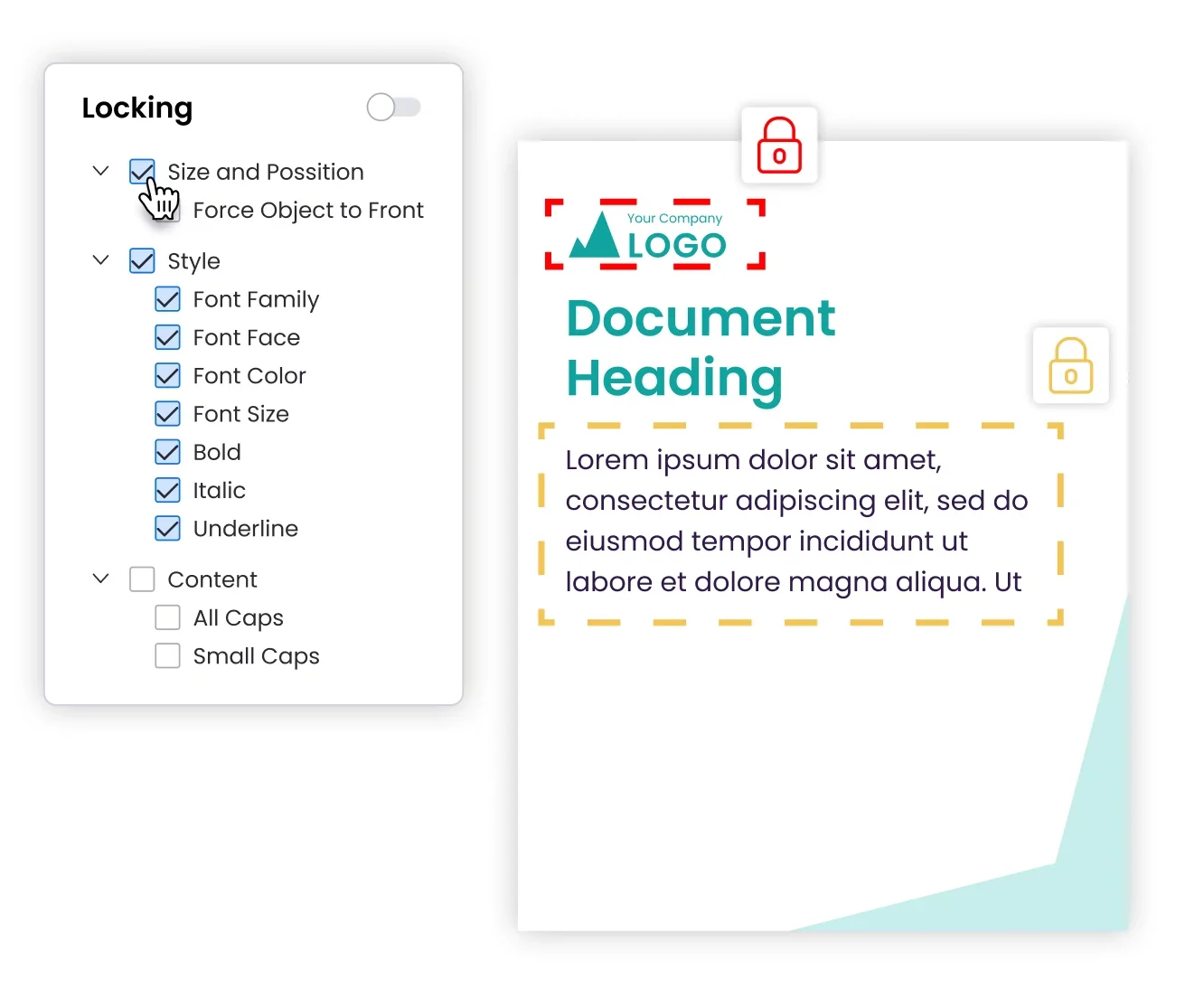
1. Template locking with role-based access
Marq lets brand teams lock design elements like logos, fonts, colors, and layouts at the object level. From there, admins assign role-based permissions so each user only sees and edits what is relevant to their function.
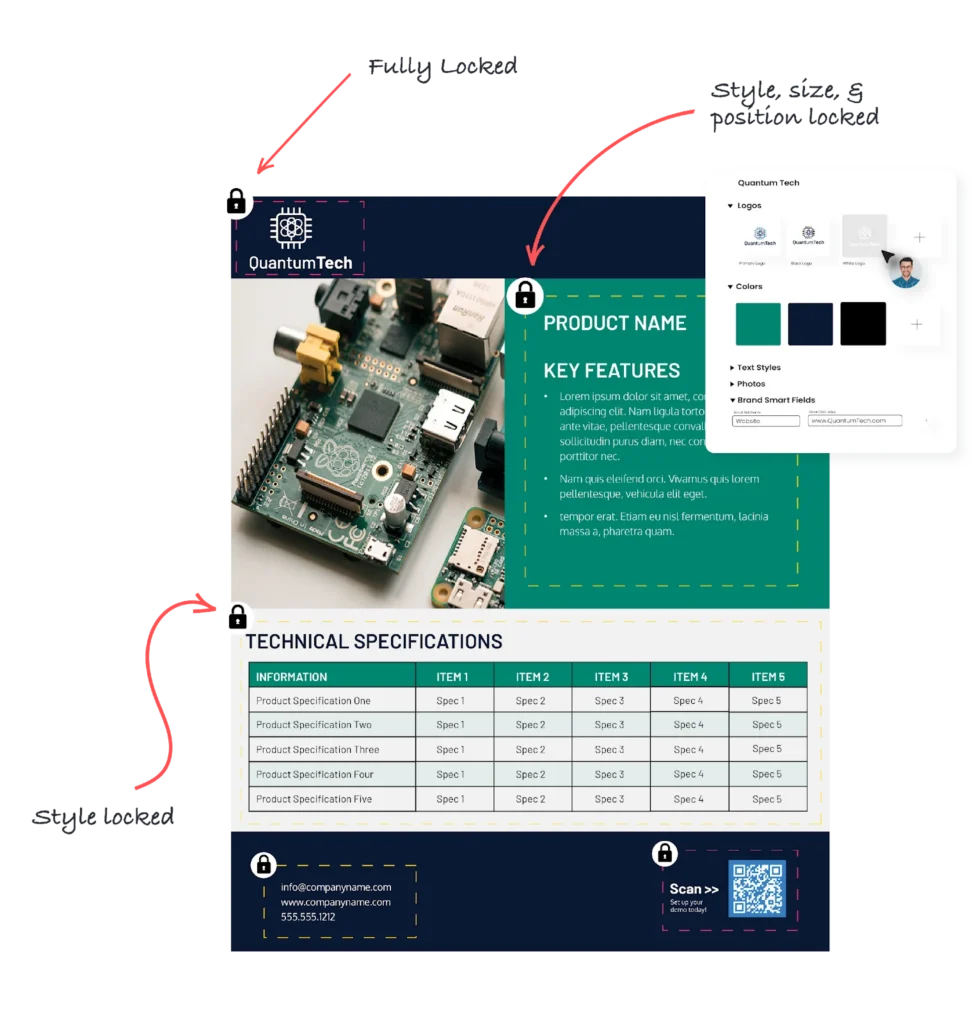
A regional office manager, for example, can update the address, phone number, and local promotion on a flyer. The logo, layout, and brand colors stay locked. Only the brand team can modify the master template or push structural updates.
This keeps off-brand content from going live and reduces the approval loops that slow down distributed teams.
2. Creative automation and data-driven personalization
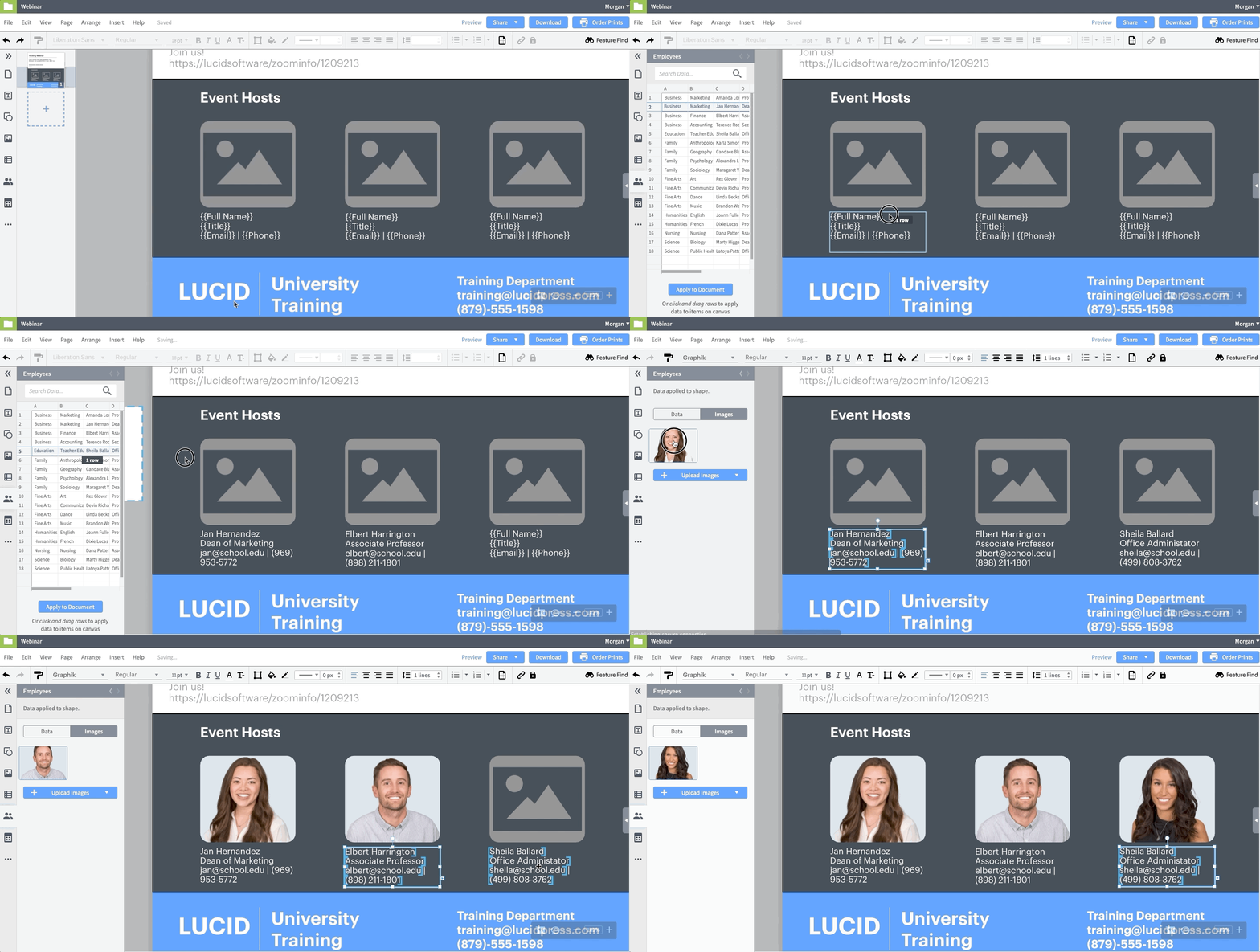
Marq’s creative automation pulls data directly from CRM (customer relationship management) tools, spreadsheets, and external databases to auto-populate templates with names, titles, locations, pricing, product details, and imagery.
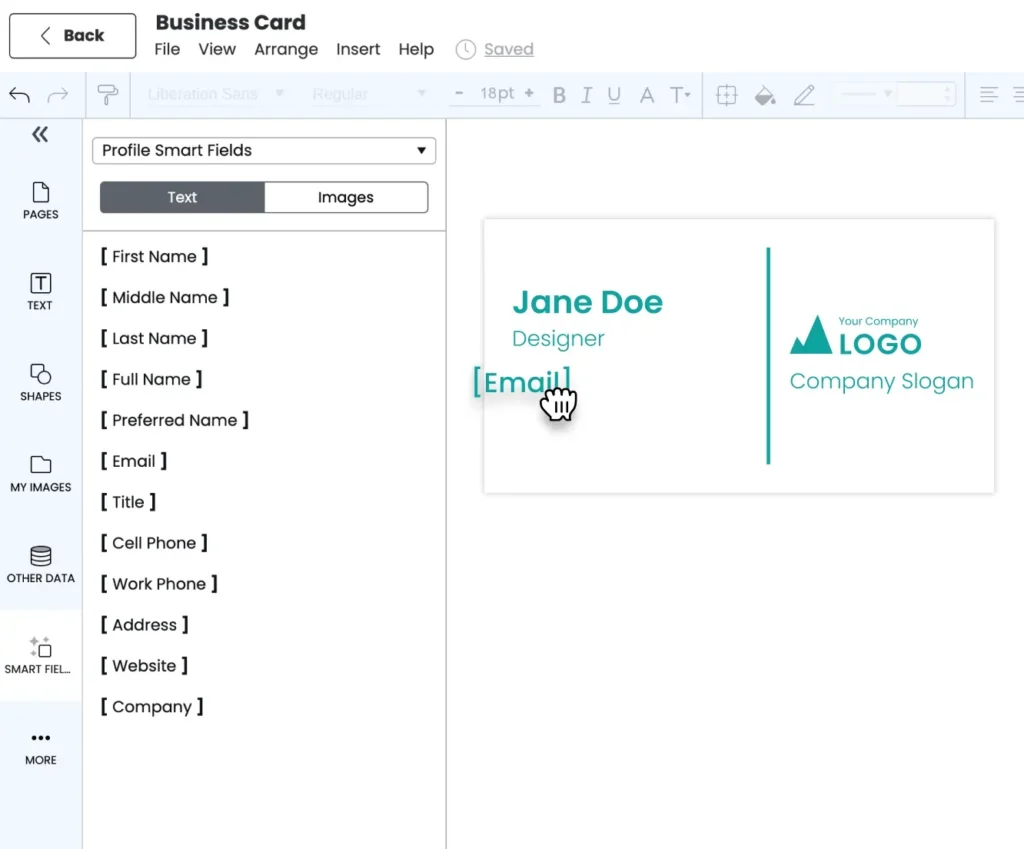
A real estate brokerage, for example, can connect its MLS (Multiple Listing Service) feed and auto-fill listing flyers with property photos, addresses, pricing, and agent details. All they need to do is select the property, apply it to the template, and the flyer is ready.
The same logic applies to insurance rate cards, employee directories, financial services proposals, and product spec sheets.
3. Integrations across your enterprise stack
Marq connects natively to the tools enterprise teams already use. This includes CRM integrations with Salesforce and HubSpot, DAM (digital asset management) integrations with Bynder, Brandfolder, and PhotoShelter, and direct print and digital distribution from the platform.
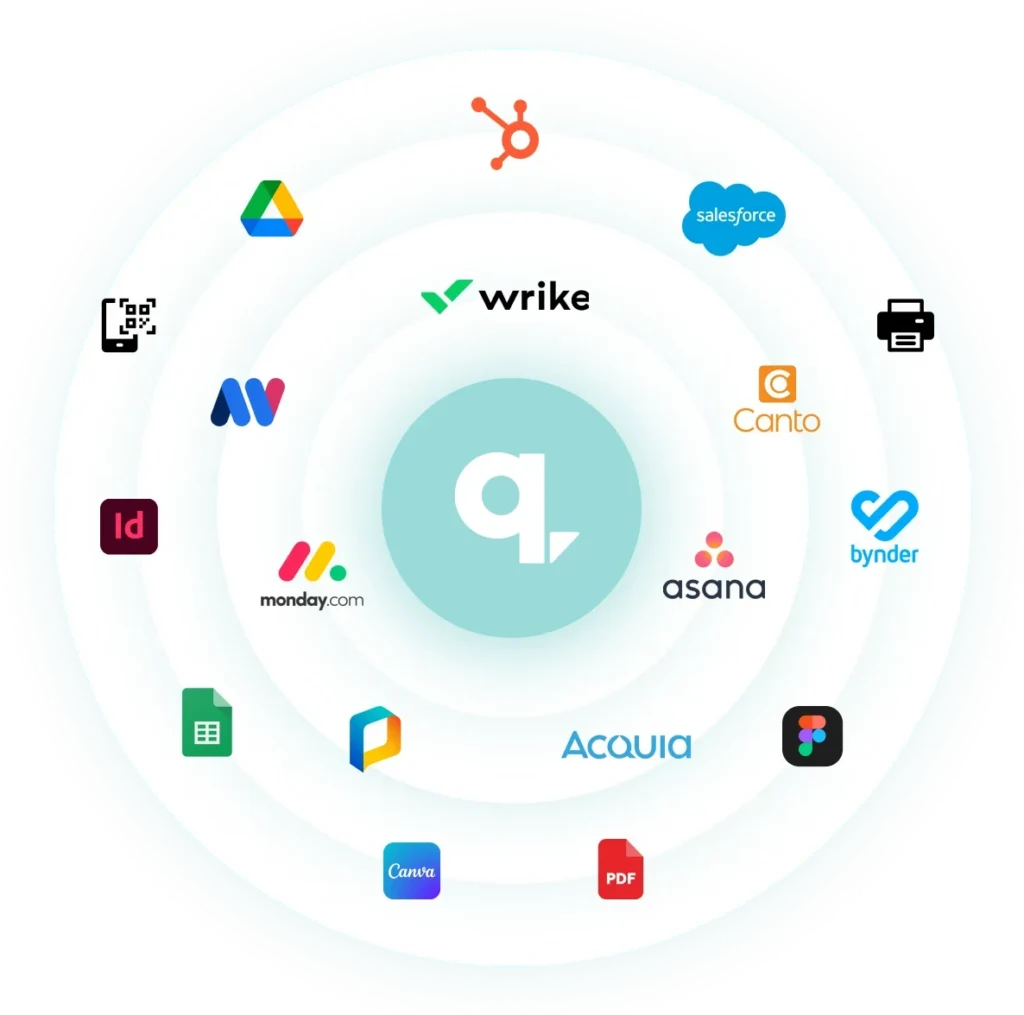
This matters exponentially more for enterprise teams because content creation rarely happens in isolation. Your templates need to pull approved assets from your DAM, personalize content from your CRM, and push finished materials to print vendors or email tools. Marq handles all of this natively.
Schedule a demo to see how Marq works for your team.
Where Marq shines
- AI Marqet workflow automation: Marq offers AI Marqet, which can trigger entire content workflows based on business events. A new listing, a campaign launch, or a new hire can automatically generate a complete set of branded materials, without anyone submitting a design request.
- Brand Guardian: Marq also offers Brand Guardian, which checks content against your brand standards for logo placement, fonts, colors, imagery, and tone so end users can self-correct before publishing. This reduces the review load on brand and compliance teams.
- Built-in translation: For distributed teams operating across regions and languages, Marq’s AI content translator can handle translations directly within templates, removing the need to export, translate externally, and reformat. It also integrates with translation platforms like Crowdin, Lokalise, and Blend for more complex localization workflows.
- Content analytics: Once content is live, brand teams can use Marq’s analytics dashboard to track which templates get used, how often, and by whom. They can use this data to decide what to build, retire, or refresh.
Where Marq falls short
- Not built for freeform creative work: Marq’s editor is designed for template-based content. Designers who need pixel-perfect control or advanced illustration tools will still reach for dedicated design software.
- Not built for individual users or solo businesses: Marq is designed for organizations where a central brand or creative team needs to enable content creation across multiple users, locations, or partners. Individual designers or solo business owners looking for a self-serve design tool will find more value in lighter platforms.
If your designers still rely on InDesign for original layouts, compare when InDesign alternatives make sense and when they work alongside it.
Customer reviews
“When we found Marq, we were sucked in by the ability to create branded templates, upload our colors and logos, allow campus partners to customize their designs… and still have complete control over our brand,” shares Doug Garcia, Colorado State University.
“Some agents didn’t feel it was necessary to include the Reinhart logo on their content. But now that we can lock down our brand assets on the templates, agents and brokers can’t accidentally mess things up somehow,” shares Mary Cox, Reinhart Realtors.
Who Marq is best for
- Multi-location organizations (real estate brokerages, franchise networks, healthcare systems, insurance agencies) that need brand-consistent content across dozens or hundreds of offices.
- Marketing and brand teams that want to empower non-designers to self-serve branded collateral without bottlenecking the creative department.
- Enterprise teams in regulated industries (financial services, insurance, healthcare) where every piece of content needs to pass through compliance review before distribution.
2. Canva: Best for high-volume visual content creation

Next on our list of the best Adobe Express alternatives is Canva. It is one of the most widely used design platforms in the world, with over 220 million monthly active users.
Key features
- Templates and asset library: Canva offers thousands of templates across dozens of categories. Many of these come from third-party creators, which means the library is updated regularly with new styles and formats. Beyond templates, the built-in asset library includes stock photos, videos, icons, illustrations, and graphics that teams can drag into any project.
- AI-powered design tools: Canva includes AI features throughout the editor, including Magic Design for generating layouts from a text prompt, Magic Write for copy drafts, AI image generation, and one-click resizing to adapt a single design across multiple formats. These tools work best for getting a starting point or handling repetitive tasks, though most users will still need to refine the output manually.
- Real-time collaboration: Multiple team members can edit the same design simultaneously, leave comments, tag reviewers, and route designs through approval workflows before anything goes live.
Where Canva shines
- Speed and accessibility: The drag-and-drop interface is one of the fastest to learn. Non-designers can create polished content in minutes without any training.
- Multi-format content creation: Canva covers a wide range of content types in a single editor (social graphics, presentations, short-form videos). Teams that need to produce across multiple formats without switching tools get the most value here.
Where Canva falls short
- Limited data-driven personalization: Canva offers integrations with HubSpot and Salesforce, including data autofill for sales assets, but these are limited to Enterprise plans and don’t support the kind of multi-source, event-triggered content automation that distributed teams need. Teams generating hundreds of personalized assets across locations, product lines, or agent profiles will still run into manual work.
- Limited template governance: Canva lets teams create brand kits and shared templates, but its template locking capabilities are surface-level compared to dedicated brand enablement platforms. Admins can’t lock individual design elements at the object level or set granular role-based editing permissions.
- Enterprise limitations: Canva works well for individuals and small teams producing content collaboratively, but its enterprise features lack maturity. It doesn’t offer the self-serve portal experience, granular role-based access, or distributed publishing workflows that multi-location organizations need to scale branded content safely.
Customer reviews
“I love that Canva has many templates that you can use or modify. Very often, I’m able to get an idea and find a template that’s close to what I want, allowing me to modify it from there,” says Mark B.
“When using it with more than one person, it’s sometimes hard to track and share who has access to which templates since the system doesn’t have a window that gives you an overall perspective,” shares Kim P.
Who Canva is best for
- Individuals and small businesses that need to create social, presentation, and campaign content quickly.
Want a closer look at Canva for enterprise teams? Check out our guide to the best Canva Enterprise alternatives.
3. Visme: Best for data-driven visual content and interactive presentations
Visme is another top Adobe Express alternative worth a mention in this roundup. It’s a visual content platform built for teams that need to turn data, reports, and ideas into interactive, visually rich formats.
Key features
- Data visualization and interactive content: Visme offers 30+ chart and graph types that connect to live data sources, including Google Sheets and Excel. Teams can use these to build interactive infographics, clickable reports, and animated presentations.
- Templates and visual assets: The template library covers dozens of categories, from presentations and infographics to proposals, social graphics, and reports. On the visual asset side, Visme stands out with animated icons, customizable 3D characters, interactive maps, and 3D data widgets designed by its in-house illustration team.
- AI design tools: Visme’s AI Hub includes an AI Writer for drafting and rewriting copy, an AI Presentation Maker that generates slide decks from a text prompt or uploaded document, an AI Image Generator, an AI Resize for adapting designs across formats, and an AI Text-to-Speech for narration.
Where Visme shines
- Brand kit: Visme’s brand kit stores logos, fonts, and colors, and the Brand Wizard can extract brand assets directly from a company website by entering a URL. This helps teams maintain visual consistency across projects without manual setup.
- Interactive and animated content: Visme supports hover effects, clickable hotspots, popups, embedded media, and animated elements. Teams can publish interactive reports and infographics as embeddable HTML or shareable links.
Where Visme falls short
- Limited brand governance enforcement: Visme offers a brand kit and templates, but it doesn’t enforce brand standards the way a dedicated brand enablement platform would. There is no granular template locking, no role-based editing permissions, and no controlled publishing workflows. Users can still deviate from brand guidelines without restriction.
Customer reviews
“I like how chart creation in Visme is super easy. Adding and changing text, and moving text blocks around is really straightforward. I also appreciate how easy it is to work with color coding,” shares Ryusei H.
“The editor can drag a bit when your file gets more complex, and there are moments where you want a specific formatting option and just… can’t find it,” says Samantha T.
Who Visme is best for
- Marketing and communications teams that create data-heavy presentations, infographics, interactive reports, and visual proposals.
4. Piktochart: Best for infographics and visual reports
Piktochart is a visual content platform focused on helping non-designers turn complex data and ideas into polished infographics, reports, and presentations.
Key features
- Infographic and report templates: Piktochart offers 5,000+ templates purpose-built for infographics, reports, and social media visuals. The templates are designed for content-heavy layouts, so they hold up well once you start filling them.
- Data visualization with live data: Teams can connect Google Sheets directly to charts and graphs inside Piktochart. The platform supports bar, line, pie, donut, and scatter charts, plus interactive maps.
- Pikto AI Studio: Piktochart’s AI suite includes a generator to create infographics and reports from a text prompt or uploaded document. You also get an image modifier, upscaler, background remover, and icon generator.
Where Piktochart shines
- Purpose-built for infographics: Every tool Piktochart offers is designed to make infographics and visual reports stronger. The platform doesn’t try to be everything; it focuses on doing data storytelling well.
- Video editing: Piktochart also includes a video editor that teams can use to add text overlays, subtitles, and social media formatting to video content. This lets teams repurpose their visual assets into short-form video without leaving the platform.
Where Piktochart falls short
- No brand governance or distributed team support: Piktochart offers a branding kit for storing logos, fonts, and colors, but it has no template locking, no role-based permissions, and no approval workflows. There is nothing stopping a user from going off-brand.
Customer reviews
“Ease of use and customization is very good. Some specific features that are in its competitors are lacking however,” says Gavin S.
“If you look across their template options, you might think the same thing I do: their examples of finished infographics look slightly cartoonish/unprofessional. I think it’s because of their database of icons,” says a user in higher education.
Who Piktochart is best for
- Teams that frequently create infographics and data reports.
5. Animoto: Best for template-based marketing videos
The last Adobe Express alternative on our list is Animoto. It’s a video creation platform designed for teams that need to produce good-looking marketing videos, social media clips, and internal communications.
Key features
- Block-based video editor: Animoto replaces the traditional video timeline with a guided, block-based workflow. Users select a template, drop in their photos, video clips, and text, and the platform handles transitions, pacing, and layout.
- Stock media and licensed music: Animoto integrates with Getty Images for stock photos and video clips, and includes a library of licensed music tracks.
- Brand presets and multi-format output: Teams can save brand kits with logos, fonts, colors, and watermarks, then apply them across every video. Animoto also supports one-click switching between vertical, horizontal, and square aspect ratios.
Where Animoto shines
- Speed for non-editors: The block-based approach eliminates the learning curve associated with timeline editors. Non-technical team members in sales, HR, or operations can produce a branded video in minutes with minimal training.
- Screen and webcam recording: Animoto includes built-in screen capture and webcam recording, which makes it a practical tool for product demos, team updates, onboarding walkthroughs, and internal training content.
Where Animoto falls short
- Limited creative control: The block-based editor prioritizes speed over flexibility. Teams that need fine-grained control over timing, layering, transitions, or motion graphics will find the editing options restrictive.
- No brand governance or distributed team support: Animoto offers brand presets for visual consistency, but there’s no template locking, role-based permissions, or approval workflows.
Customer reviews
“Animoto comes with an intutive UI that helps us to make videos easily for my marketing purposes. I have no prior experience in taking care of things like video editing. But animoto made ot easy for me,” shares Haritha C.
“If you are looking to make semi-professional tutorials this tool is not right for you. I wouldn’t even recommend it for personal use. I would expect a video editing tool to have clip editing capabilities beyond trimming and the pre-made templates to be editable with blocks to add/remove, etc.,” says Luz S.
Who Animoto is best for
- Teams that need to produce marketing videos, social media clips, and internal communications.
How to choose the right Adobe Express alternative
If you’re evaluating Adobe Express alternatives for your team, here are some of the factors that should guide your decision.
1. Scalability across distributed teams
Start by mapping out your content operations:
- How many people will create content?
- Are they centralized in one office or distributed across regions and locations?
- Are the primary users inside your marketing team, or outside it (sales reps, franchise partners, field agents, local office managers)?
- Will content needs grow as the organization scales into new markets or adds new locations?
Tools built for centralized creative teams often break down when content creation needs to scale across dozens or even hundreds of locations.
With Marq, organizations can manage multi-brand and multi-location structures with user tiers, sub-brands, and region-specific templates, scaling from dozens of users to thousands without outgrowing the platform.
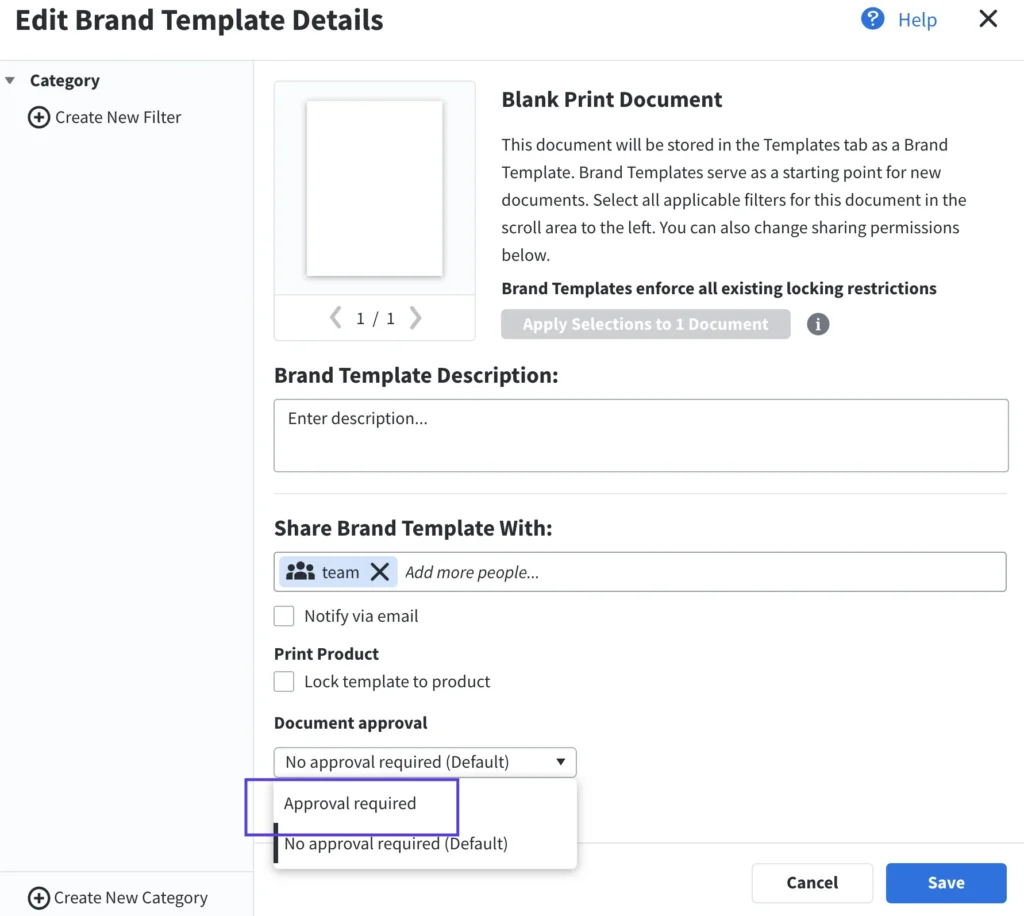
2. Collaboration, approvals, and distribution
Look at what happens after someone creates a piece of content:
- Can it be routed to a reviewer or approver?
- Can you set up multi-step approval chains so compliance or brand teams sign off before anything goes live?
- Does the platform track version history so you can see what changed and who changed it?
- Once approved, can the content be pushed directly to print vendors, email platforms, or digital ad channels from the same tool?
Most lightweight design tools stop at the creation step. For teams in regulated industries or organizations with strict brand standards, that means content can go live before anyone on the brand or compliance team has reviewed it.
With Marq, teams can set up multi-step marketing approval workflows, track version history, and distribute content directly to print and digital endpoints without leaving the platform.
3. Data-driven content automation
Think about the volume of similar content your team produces: listing flyers, rate cards, proposals, event kits, localized ads. If each variation requires manual editing, the workload compounds quickly.
Look for platforms that integrate with your CRM, spreadsheets, or databases and auto-populate templates with the right data.
Marq’s creative automation connects to sources like Salesforce and HubSpot to auto-fill templates with names, locations, imagery, and product details, replacing hours of repetitive editing with a few clicks.
4. Built-in translation and localization
If your organization operates across regions and languages, evaluate whether the platform can handle translation natively. Exporting content, translating it in a separate tool, and reformatting it back into the design adds time and introduces errors.
Marq’s AI content translator handles translations directly within templates, helping teams automate translation workflows without leaving the platform.
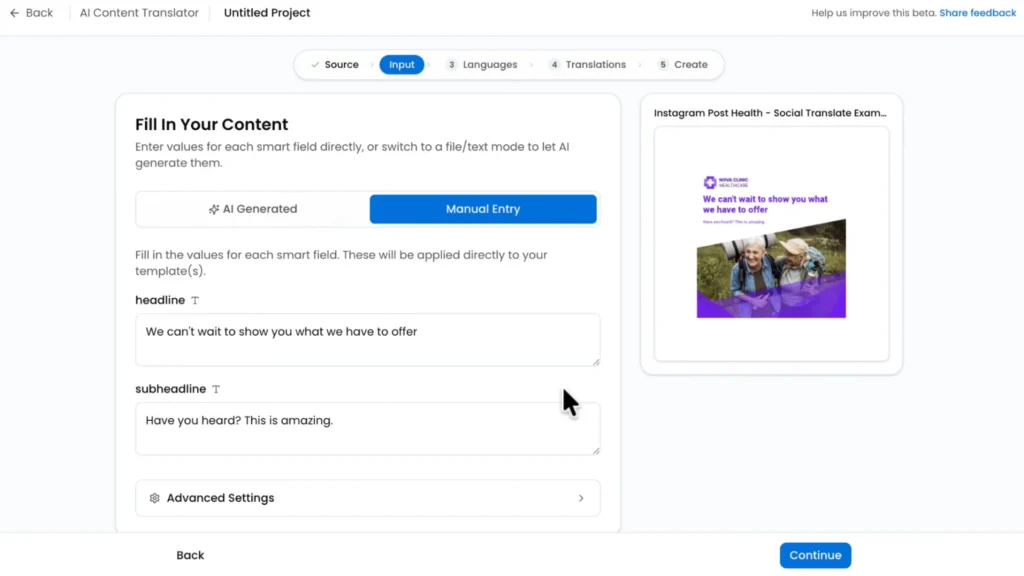
For more complex localization workflows, it also integrates with translation platforms like Crowdin, Lokalise, and Blend.
Which Adobe Express alternative is right for your team?
Adobe Express is a solid design tool for quick, individual content creation.
But as content demands grow and teams scale, there’s no getting around its limitations in governance, automation, and integrations.
Each tool discussed in this guide solves most, if not all, of those limitations, depending on your team’s priorities.
Marq is a brand enablement platform built for organizations where content creation extends well beyond the marketing department. It allows everyone on your team, whether that is sales reps, franchise partners, regional marketers, or field teams, to create on-brand content every single time.
And when it comes to template governance, data-driven personalization, multi-location scalability, and enterprise integrations, Marq gives brand and marketing leaders the control and infrastructure to scale content safely.
Ready to scale branded content with control? Book a demo to see how it works for your organization.