Brand compliance: 5 strategies for distributed teams

Brand guidelines set expectations for how an organization presents itself, but enforcing those standards across teams, locations, and content channels is a separate challenge. When employees use outdated logos, change approved messaging, or overlook required disclosures, these violations can undermine brand consistency and create compliance risks.
For enterprise brand leaders, the challenge is identifying where compliance breaks down and keeping brand standards intact as more teams create content.
This article explores the challenges of brand compliance at scale, ways to maintain consistency as companies grow, and software that helps enterprise teams implement these strategies.
What is brand compliance?
Brand compliance is the degree to which teams across your organization follow your brand guidelines when creating content. It covers four areas:
- Visual identity: Correct use of logos, colors, typefaces, photography, and layouts.
- Voice and messaging: Consistent tone of voice and use of approved claims and taglines.
- Legal and regulatory requirements: Required disclaimers, license numbers, and industry-specific disclosures.
- Approved assets: Use of current files instead of outdated versions that no longer meet brand guidelines.
As more teams create content, brand compliance helps your organization maintain a consistent brand identity and reduce the risk of noncompliant materials reaching customers.
What is the difference between brand compliance and brand management?
Brand management is the ongoing work of defining the brand: positioning, identity, guidelines, brand architecture, and asset library. Brand compliance measures whether people follow those guidelines when making content.
Why brand compliance becomes harder as companies grow
Brand leaders remain responsible for maintaining brand standards across the organization, but they can’t directly supervise every piece of content that teams create as the company grows.
As more teams create content across different departments and locations, several challenges make brand compliance harder to maintain:
- Central design teams struggle to review every asset. High volumes of design requests leave designers with less time to check whether each asset follows brand guidelines. When reviews get rushed or skipped, content with incorrect logos, inconsistent formatting, or unapproved messaging can reach customers.
According to an Adobe survey of more than 1,600 marketers, 58% of respondents spend over 40% of their time on reviews and approvals rather than developing high-impact strategies and creating content. - Poor communication leads to wasted design work. When changes to product information, messaging, or brand guidelines aren’t communicated to designers, completed assets can quickly become outdated or inaccurate. Designers have to revise completed work, and older versions may remain in circulation alongside updated materials.
- Tight deadlines lead to off-brand content. When non-designers need marketing materials faster than the design team can deliver them, they may create their own assets without following approved guidelines.
These materials can contain incorrect logos, inconsistent layouts, unapproved messaging, or visual elements that don’t match the brand identity. In the same Adobe survey, 33% of respondents said they struggled to meet the volume and speed needed for on-brand social media content. - Outdated or unavailable assets lead to inconsistent branding. Non-designers may use outdated materials when designers haven’t created the latest approved files, stored them in a central asset library, or shared them.
Without access to current files, employees may keep old logos, retired templates, or previously approved messaging in circulation. - No clear ownership means brand violations go unchecked. Without a brand manager responsible for enforcing guidelines and improving review processes, non-designers may apply brand standards inconsistently. Content can reach customers without the necessary checks, and recurring compliance issues can go unresolved.
- Complicated brand guidelines are difficult to follow. When brand rules are overly detailed, unclear, or difficult to find, non-designers may struggle to apply them correctly during content creation. They might misapply logos, use incorrect colors or typography, or overlook requirements for approved messaging.
Hiring more designers alone may not resolve these challenges. Organizations also need to improve workflows and give non-designers access to approved assets and clear guidelines so they can create on-brand content.
5 strategies for achieving brand compliance at scale
If your company has already tried creating brand guidelines, centralizing design requests, developing PowerPoint templates, and using design tools like Canva without improving brand compliance, try the strategies below.
These strategies let central brand teams maintain standards while non-designers create on-brand content independently.
| Strategy | Actions you take | Signs it’s working |
| Turn existing standards into enforceable controls | Define what users can change, what must stay fixed, and when approval is needed. | Fewer repeat errors involving logos, disclosures, messaging, and other core elements |
| Build brand rules into the design | Lock protected elements in templates and leave approved fields editable | Users create on-brand assets without routing design requests to the central team |
| Match access to risk and responsibility | Assign role-based permissions and limit access to relevant templates | Users access the templates and permissions they need |
| Build review and approval workflows | Determine which content is high risk and send it for manual review | Fewer compliance errors in high-risk content |
| Find and close gaps across the content ecosystem | Identify why teams bypass approved workflows and address the causes | Greater template adoption |
1. Turn existing standards into enforceable controls
Make brand guidelines easier to apply by specifying what employees must leave unchanged, where they have flexibility, and when they need approval.
Review your existing brand book and most-requested assets with your legal, compliance, and brand teams. Classify the guidelines into these categories:
- Protected visual elements: Identify which logos, brand colors, typefaces, and layout elements must remain unchanged across all materials.
- Approved messaging: Give employees pre-approved taglines, product descriptions, and claims to choose from. Require a review before they introduce new claims or change approved wording.
- Required disclosures: Identify all legally required statements and specify which materials need them, where they must appear, and what wording employees must use.
- Approved asset versions: Specify which logos, headshots, and images employees can use, and direct them to the latest approved files in your digital asset management (DAM) system.
Use the questions below to decide how strictly to enforce each rule:
- Could changing this element create legal or regulatory risk?
- Could the change affect how customers recognize or understand your brand?
Elements with legal requirements or a direct impact on brand identity need clear restrictions. Other elements can remain flexible when changes won’t create legal or regulatory risk or affect brand identity.

Turn brand guidelines into everyday controls using Marq
Give teams approved templates and clear editing rules so they can create branded materials without changing protected elements or approved messaging.
2. Build brand rules into the design
Once you’ve identified which brand elements must stay fixed and which can change, configure the templates non-designers use so protected elements stay fixed and approved fields remain editable.
For example, a hospital network creates a flu-shot flyer template with a fixed layout and approved copy. Clinic managers customize editable fields to add location-specific details, such as the clinic’s address and opening hours, without designing the flyer from scratch.
A brand enablement platform like Marq, brand admins can lock elements at the project, page, and content levels, while non-designers can edit only unlocked properties. If a project requires an exception, the admin can unlock a specific element for that project.
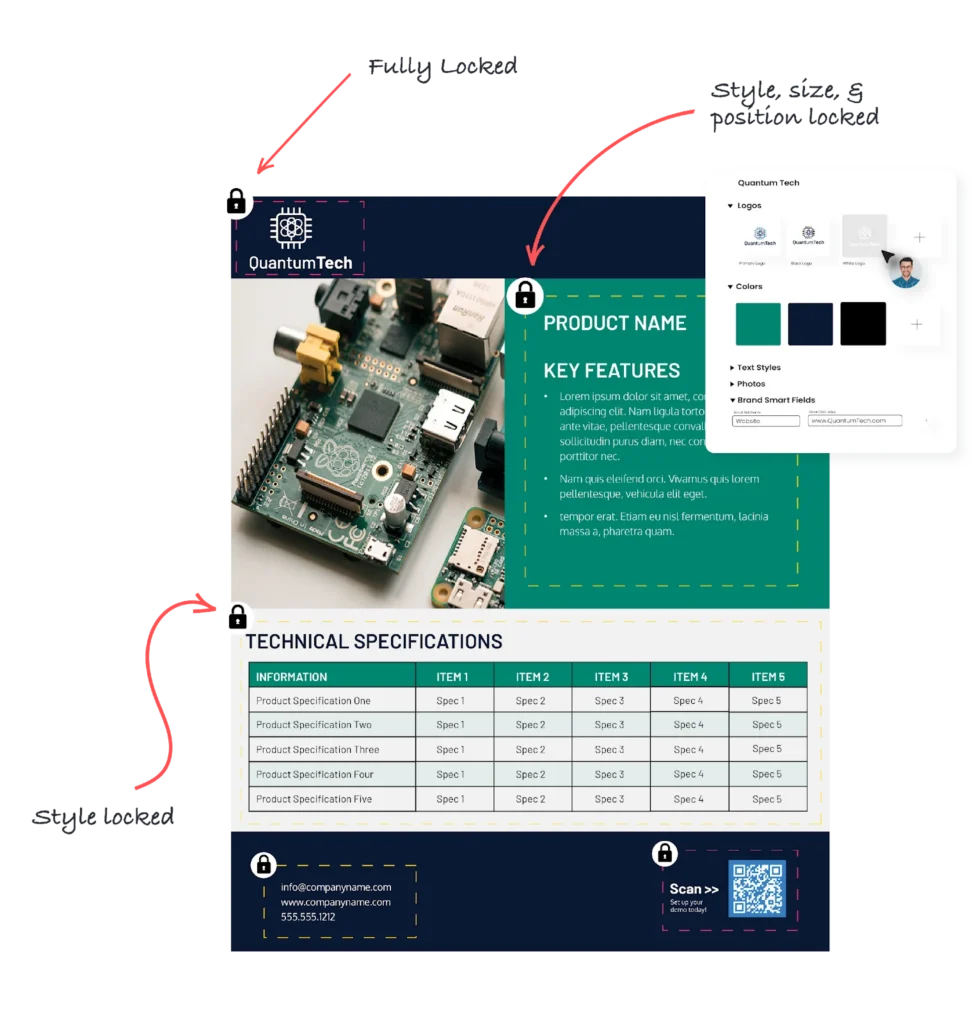
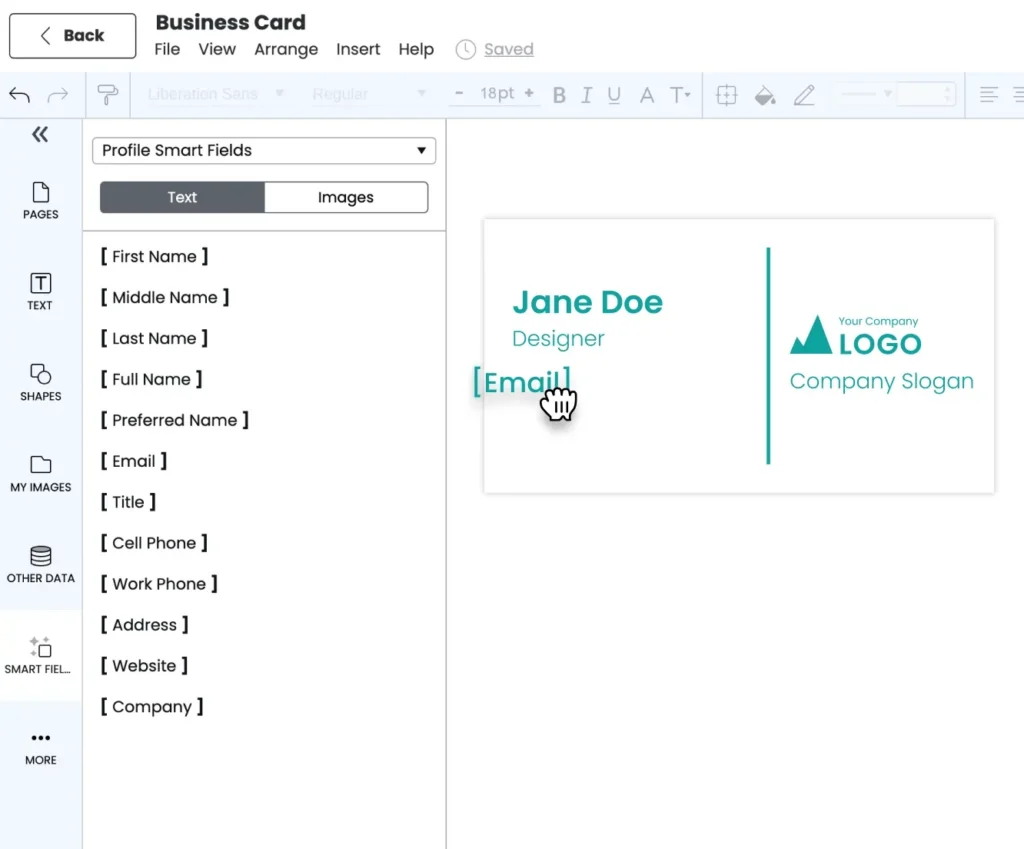
Marq’s Smart Fields populate names, titles, contact information, departments, locations, images, and custom fields to reduce retyping errors and help keep branded materials accurate.
Open-ended templates, such as those available in Canva, give users broad creative freedom, making it harder to protect core brand elements.
Marq’s governed templates provide more granular control by locking protected elements and defining editable fields. That said, they do not guarantee that employees will follow them or that populated data will be accurate. Central teams still need to review how employees use templates and verify the information they contain.
Enforce brand standards at scale with Marq
Lock logos, layouts, and required content while letting teams customize approved fields, helping distributed employees create consistent materials with fewer design requests.
3. Match access to risk and responsibility
Not everyone needs access to every template or the ability to change every element. Assign editing, approval, and publishing rights based on each person’s role and the content they handle.
| Role | Can edit | Can approve | Can publish |
| Central brand team | Templates, locks, brand assets | Yes | Yes |
| Compliance reviewer | No | Regulated content | No |
| Regional marketer | Customizable fields | Local content | Yes, from approved templates |
Template access should also reflect each team’s responsibilities. For example, a university’s admissions team needs viewbook templates, while its athletics department needs game-day graphics. Limiting access to relevant templates helps employees find the right resources and reduces the risk of unauthorized changes.
Marq controls template access through template-level permissions, administrative roles, groups, and content locks. Admins can assign roles such as approval admin, billing admin, and data admin, and designate users as view-only.
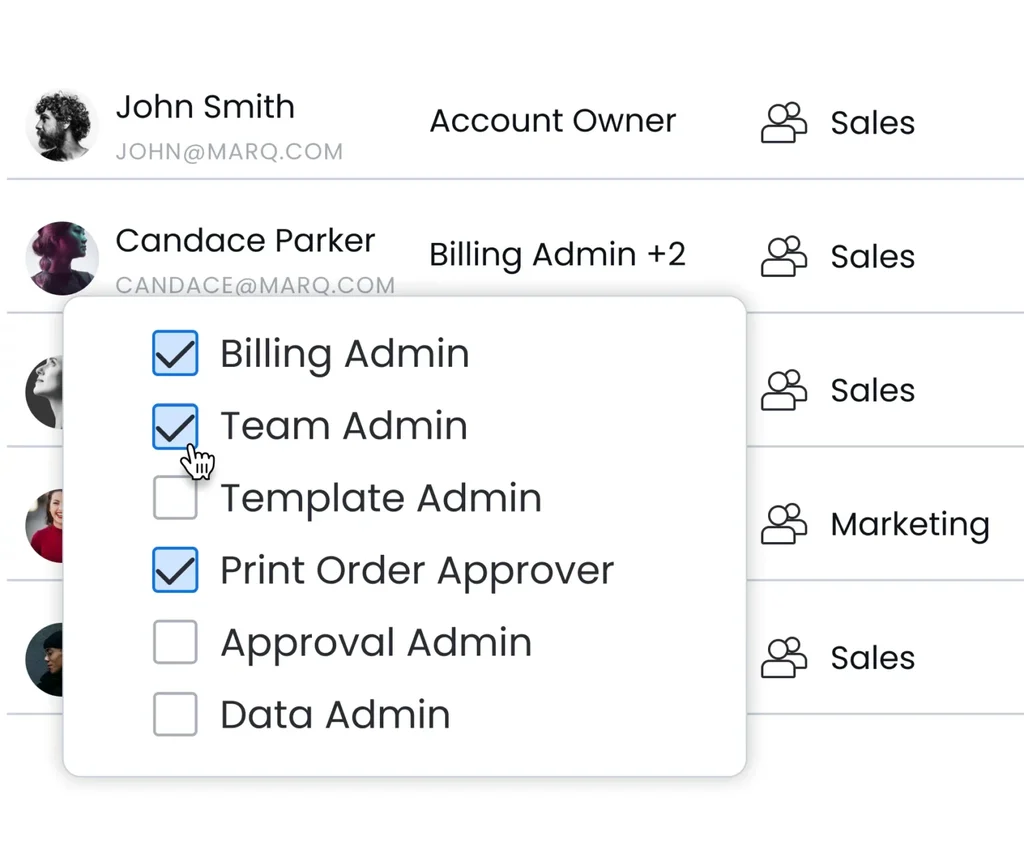
They can also organize employees into groups and subgroups based on departments, campuses, or regions, then share relevant templates and folders with those groups. Once employees open a template, content locks determine which elements they can edit.
4. Build review and approval workflows
Enterprise teams often already have approval processes in place. The challenge is deciding which content needs closer scrutiny. Adobe surveyed more than 1,600 marketers and found that 89% of respondents said content goes through three or more approval stages.
Applying the same level of review to every asset creates unnecessary work and can delay higher-risk content. Reserve manual review for higher-risk content so reviewers can focus on assets that need closer scrutiny.
Any changes to product claims, pricing, testimonials, legal disclaimers, or co-branded content may need review by brand, legal, compliance, or local teams before publication.
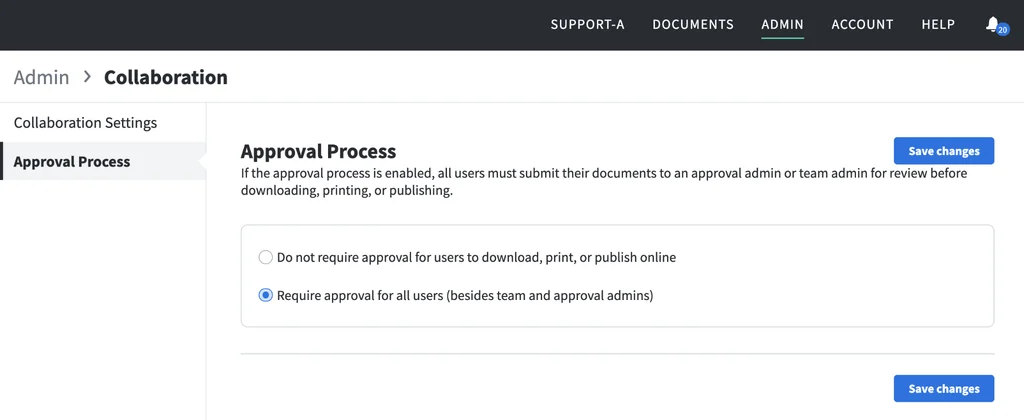
Marq supports risk-based reviews through flexible approval settings. Admins can require approval across an account, exempt a specific project, require approval for an individual template, or give specific users an approval bypass.
5. Find and close gaps across the content ecosystem
Employees sometimes bypass approved processes when existing templates don’t meet their needs or the process itself is difficult to use. Find out where these gaps occur and address their root causes to bring content creation back into the approved workflow and reduce compliance risks.
- Identify where content gets created. Ask regional marketers, sales leaders, and department heads which assets their teams created recently, where they created them, and which tools they used.
- Find shadow tools and local workarounds. Look for personal Canva accounts, PowerPoint files saved on local drives, and shared folders with duplicate or outdated versions.
- Learn why people bypass the approved process. Ask employees what stopped them from using the available templates or workflows. Common reasons include missing templates, difficulty finding existing assets, and limited editing options.
- Fix the underlying problems. Address the issues that lead teams to bypass the approved process and train them to follow it correctly.
- Monitor adoption and recurring issues. Check whether teams use approved workflows, then address recurring problems with templates or processes. Marq Analytics reports on template adoption, content categories and channels, content freshness, approval status, and usage by person, team, or location. Use these metrics to guide operational decisions rather than treating them as evidence of legal or regulatory compliance.
However, Marq can’t identify files created in Canva, PowerPoint, shared drives, or other tools outside the platform. Talk to regional and local teams to find out where they create content outside the approved process and why they use those tools.
Metrics to measure brand compliance
The Marq Analytics metrics above focus on operational performance and adoption. To assess whether published content follows your brand guidelines, review the following metrics regularly for recurring violations and inconsistent messaging.
- Brand consistency rate: Measure the percentage of audited assets that follow guidelines for logos, colors, typography, and layouts. A low rate indicates inconsistencies in how teams apply brand standards.
- Repeat compliance issues: Track recurring brand guideline violations identified in content audits. Repeated issues highlight areas where teams need clearer guidance or stronger controls.
- Brand voice and tone accuracy: Assess how closely external copy matches your brand’s prescribed voice and tone through editorial reviews or text-analysis tools. Poor alignment indicates that messaging may not reflect your brand’s intended personality.
- Brand messaging compliance: Measure the percentage of audited assets that contain approved messaging, including product descriptions, brand claims, and key talking points. A low rate indicates that teams may be using outdated, inconsistent, or unapproved messaging.
Best platforms for managing brand compliance at scale
Brand compliance platforms help companies control how employees use brand assets, apply approved messaging, and manage content reviews. The best fit depends on where your teams create content, how much creative freedom they need, and which compliance controls they require.
| Platform | Best for | G2 rating |
| Marq | Enforcing brand rules across high-volume, templated content | 4.5 |
| Frontify | Managing brand guidelines and digital assets in one place | 4.5 |
| Templafy | Maintaining brand consistency across Microsoft 365 documents | 4.4 |
Marq
Marq is a brand enablement platform for mid-market and enterprise organizations with a central brand team that supports content creation across many departments and locations.
It helps non-designers create content independently using templates with defined editing controls, so central teams can oversee brand consistency across channels and spend less time on routine design requests.
Best for: Brand control and scalable content creation.
Key strengths:
- Governed content creation: Admins can lock logos, layouts, and legal copy at the project, page, or content level. Smart Fields populate details such as names, titles, contact information, and locations from spreadsheets, multiple listing service (MLS) feeds or customer relationship management (CRM) systems.
- Approval workflows: Admins can require approval at the account, project, or template level, with bypass options for power users. Reviewers can comment directly on assets, keeping feedback and approval discussions in one place.
- DAM integrations: Marq integrates with platforms such as MediaValet and Canto to connect asset management with content creation. An integrated DAM stores and organizes assets, manages metadata, and controls permissions and usage rights. Employees can then access approved assets directly in Marq templates.
- Usage monitoring: Marq Analytics reports on template adoption, content freshness, approval status, and usage by person, team, or location.
Limitations:
- Marq works best for content that teams create regularly from templates. For one-off campaign designs that require detailed, hands-on control over every design element, other platforms are a better fit.
- Marq Analytics only reports on content created in Marq.
When to go for Marq:
- Choose Marq if your main challenge is keeping brand-compliant content consistent across teams and locations.
- Choose Marq with an enterprise DAM if you manage a large media library and need to control both asset storage and content creation. If your priority is storing, organizing, and distributing approved assets and your teams rarely need to customize content locally, choose a DAM-centered platform.
Frontify
Frontify combines brand guidelines, digital asset management, and design templates in one platform. It helps brand teams centralize brand information and assets so employees can find approved resources and understand how to use them.
Best for: Brand teams that want guidelines and assets managed in one place.
Key strengths
- Connected guidelines and assets: Employees can access brand guidelines alongside digital assets, so they can check how to use approved resources without repeatedly asking the brand team.
- Asset permissions and rights management: DAM permissions control who can access, download, or share assets. Rights management alerts teams when usage licenses are approaching expiration.
- Template approval workflows: Admins can create approval processes for specific use cases, assign reviewers, and require approvals for selected templates, according to Frontify’s help documentation.
- Centralized asset delivery: Frontify’s content delivery network (CDN) can update assets where they’re embedded when the source asset changes, helping teams use current versions.
Limitations
- Frontify’s help documentation states that its approval workflows don’t currently cover video publications.
- Frontify is a DAM platform first, with template configuration taking a secondary role. Its core focus is organizing, managing, and distributing brand assets.
Templafy
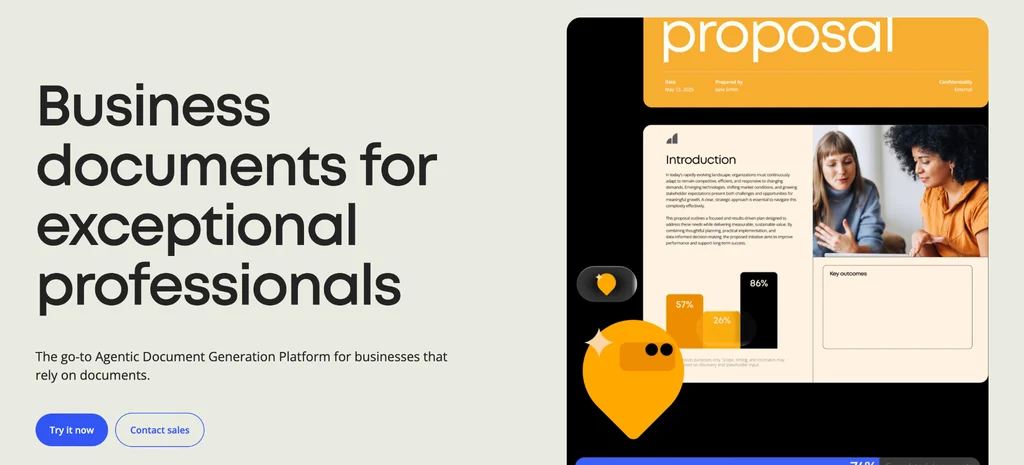
Templafy focuses on managing branded business documents created in Microsoft 365. It helps organizations standardize templates, document content, and required disclaimers across the applications employees use to create proposals, presentations, letters, and emails.
Best for: Organizations that rely on Microsoft 365 for business documents and need consistent branding and strict document compliance, particularly in insurance and financial services.
Key strengths
- Microsoft 365 integration: Employees can access approved templates and brand elements through applications such as Word and PowerPoint, as well as SharePoint and Teams.
- Context-specific legal disclaimers: Templafy can add approved disclaimer text to document templates and emails based on factors such as office, country, or region.
- Content management for administrators: Non-IT teams can manage and update approved document content through Templafy’s administration platform.
- Automated document assembly: Templafy’s document agents can assemble files using approved templates, business data, brand assets, and legal disclaimers.
Limitations
- Templafy’s core focus is Microsoft 365 document creation. Organizations that produce large volumes of print signage, direct mail, or social graphics should confirm that the platform supports their specific workflows and formats before choosing it.
Successful brand compliance case study: PT Solutions
PT Solutions is a physical therapy provider with 4,500 employees and 550+ locations across 25 states. As the company grew from 300 clinics to 550+, its creative team struggled to keep up with over 300 requests a month.
Outdated materials circulated with stretched logos, incorrect colors, and inconsistent messaging. Newly acquired clinics also needed co-branded materials during transition periods.
To maintain brand consistency without slowing down local teams, PT Solutions adopted Marq for templating and MediaValet for digital asset management.
The creative team built templates for flyers, referral cards, and event promotions, locking core brand elements while allowing employees to customize local details. MediaValet gave teams a central place to access approved logos, photography, and brand guidelines and made those assets available directly in the Marq editor.
Regional and clinic teams used approved Marq templates for routine materials, while the central creative team controlled the core brand elements.
The results:
- 93% faster turnaround: Sales reps went from waiting two to four weeks for flyers to creating them the same day.
- 300+ projects created through self-service each month: Regional and clinic teams create routine marketing materials without relying on the creative team for every request.
- More time for strategic work: Fewer routine requests allow designers to focus on campaigns and higher-priority projects.
As Senior Manager of Creative Solutions, Malia Hostetler explained:
“Now, when our sales team needs something, they don’t have to wait. They can open a template, drop in the details, and get it out the door the same day.”
– Malia Hostetler, Senior Manager at Creative Solutions
Create a brand compliance process with Marq that lasts
In a consistent brand compliance process, every team has clear responsibilities. The central brand team defines the rules, protects essential brand elements in templates, and sets approval requirements. Agents, financial advisors, and campus departments can then create approved materials using editable fields for their local needs. Requests that fall outside those rules go to the appropriate reviewer.
Marq combines brand guidelines, governed templates, user permissions, and approval workflows so organizations can apply brand standards across teams and locations, reduce errors and rework, and produce compliant content faster.
When these controls work together, companies can maintain consistent branding across locations, reduce errors and rework, and help teams produce compliant content faster.
Book a demo to see how Marq helps your organization maintain brand control as more teams create content.
FAQs
How do organizations maintain brand compliance across channels?
Organizations maintain brand compliance across print, email, social media, and other channels by using governed templates, approved brand assets, and consistent review processes.
Does brand compliance differ by industry?
Yes. Brand compliance requirements depend on the content an organization produces and the regulations it must follow. Financial services and insurance companies need accurate disclosures and approved product claims.
Healthcare organizations must keep materials consistent across clinics while meeting applicable advertising and privacy requirements.Real estate companies need to maintain consistent branding across agents, while universities need consistency across campuses and departments.
What is the difference between a DAM and governed content-creation software?
A DAM system stores, organizes, and distributes approved assets while managing metadata, versions, and usage rights. Governed content-creation software uses approved assets in templates with controlled editing options, helping local teams create branded materials independently.