2026 Marketing Approval Workflow: Optimization & Scaling Tips

Key takeaways
- Marketing approval workflows break at scale when ownership is unclear, briefs are vague, and content volume outpaces the team reviewing it.
- Most growing teams use a hybrid workflow where some reviews run in parallel and final sign-off stays sequential.
- To build yours, audit your current process, standardize briefs, build from locked templates, tier approval paths by risk, and review quarterly.
- Marq helps marketing and creative leaders in enterprise organizations reduce review cycles with locked brand templates, role-based permissions, data automations, and integrations to digital asset management (DAM) platforms and work management software.
Most marketing approval workflows work fine when you’re dealing with a small team. But as your company grows, adding regions, departments, and compliance layers, you’ll start to notice a few cracks.
A regional team sends out a flyer with last quarter’s logo.
Legal flags a disclaimer that was removed two versions ago.
A campaign stalls for a week because nobody knows whose sign-off is next.
98% of organizations reported year-over-year increases in content demand, and nearly three in four said workloads had grown beyond stable levels; meaning more reviews, more handoffs, and more chances for something to go wrong.
The solution isn’t another email thread or a Slack channel, but a well-structured workflow that catches brand and compliance issues before content reaches the review stage.
This guide breaks down why marketing approval workflows collapse at scale, what roles and structures hold up, and a step-by-step process for rebuilding yours from the ground up.
Why marketing approval processes fail when businesses scale
What works for a small marketing team breaks the moment you add regions, departments, and compliance layers. Here’s why:
- Unapproved materials are already circulating. Imagine that before a campaign clears the review queue, someone on the regional team has already sent a version. They needed a flyer urgently so they copied last quarter’s file, updated the date, and hit send. Now prospects are looking at a version with outdated claims or the wrong logo, and no one in marketing knows it happened until a customer asks about an offer that expired months ago.
- Non-designers bypass the review process entirely. When the creative team is backlogged and a sales rep needs a one-pager for tomorrow’s meeting, they stop waiting and make their own. The output might look close enough but the messaging won’t match the current campaign. That means customers see unverified, unofficial versions.
- Version control falls apart across review stages. Healthcare marketing teams live this reality daily. An event flyer passes through internal marketing review, compliance, and legal, with each round creating a new file. By version five, nobody knows which one has the final sign-off. The wrong file goes live, and now you’re spending more time untangling the compliance problem than you spent on the campaign itself.
- Approval ownership isn’t documented. When it’s unclear who signs off and in what order, things stall. Marketing assumes legal is on it. Legal assumes brand already approved. Meanwhile, the asset sits untouched in a shared folder, and the campaign misses its launch window.
- Every bottleneck compounds the last one. A slow review here, a missing sign-off there. Stack a few across one campaign, and what should take days takes weeks. The content volume problem makes it worse: teams are producing more than ever, but the review structure hasn’t scaled with it.
What this looks like in practice | Healthcare Marketing
When approvals take weeks, departments stop waiting.
For a multi-location healthcare system, a single event flyer requires sign-off from marketing, compliance, legal, and medical affairs. When the date changes, a speaker drops out, or the description gets rewritten, that process starts all over again. Approvals exist for good reason. But when it takes too long, people route around it. They might pull last quarter’s asset, update the date, and send it. The approved version never gets used. The unapproved one does.
The real cost of a slow approval process extends beyond inefficiency into compliance risk.
A deeper look into marketing approval workflow types and process
Every marketing approval workflow follows some kind of structure. Here’s a breakdown of the most common types and the stages that make up a typical process.
Types of marketing approval workflows
- Sequential. Reviewers go one at a time in a fixed order. Marketing reviews first, then compliance, then legal. This one’s easy to document and audit, but one slow reviewer can end up holding everything behind them.
- Parallel. Multiple reviewers look at the same asset at the same time. This one’s faster, but you need a clear system to reconcile conflicting feedback.
- Hybrid. This one takes the best of both. Creative and brand review happen at the same time, then legal gets the final sequential sign-off. This is what most mid-to-large marketing department workflow processes end up using at scale.
- Distributed (Regional/Local). Regional or local teams create content with central approval. This is the model most franchise, real estate, and multi-location organizations run. Without locked templates and role-based access, this model produces the most off-brand content at scale.
- Partner/Channel. External partners (co-branded campaigns, channel resellers, franchise operators) create content that still carries your brand. Brand risk is highest here. Without guardrails built into the templates themselves, you’re relying on partners to implement standards you can’t monitor.
Stages of a marketing approval workflow
Most marketing approval workflows follow more or less the same stages. Here’s where each one tends to break:
| Stage | Purpose | Where it breaks |
| Request and briefing | Define the asset, audience, and deadline | Vague briefs lead to multiple rounds of rework |
| Content creation | Design or draft the asset | Designers bottlenecked by high request volume |
| Internal review | Check brand consistency, messaging, accuracy | Feedback scattered across email, Slack, and docs |
| Compliance/legal review | Verify regulatory and legal requirements | Slow turnaround with unclear ownership |
| Final sign-off | Authorize the asset for distribution | Nobody knows whose approval is needed next |
| Distribution | Publish or send to market | Wrong version goes live |
For most growing teams, content design and internal review are where the most time gets lost. If what reaches the review queue is already on-brand, every stage after it moves faster.
Roles in the marketing approval process: Who should be responsible for what
A clear workflow means nothing if the roles within it aren’t defined. Each handoff should map to where brand risk or delay is most likely.
| Role | Responsibility | Where Friction Happens | How Marq Removes It |
| Requesters (Sales, field, partners) | Submit brief with asset details and deadlines | Vague briefs send designers back for clarification before work starts | Smart fields pre-fill requester details; templates set scope automatically |
| Designers | Build the asset | High request volume from non-designers creating off-brand content independently | Locked templates reduce from-scratch requests; non-designers self-serve safely |
| Brand Lead | Review for messaging and consistency | Reviewing every asset, including low-risk templated content, clogs the queue | Role-based access limits what gets created; most templated content skips brand review |
| Compliance/Legal | Verify regulatory requirements | Catching issues that should have been locked into the template from the start | Disclaimers and legal copy locked at template level; reviewers check what changed, not everything |
| Final approver (VP/Director) | Give the go-ahead | No visibility into where the asset is in the process | Approval workflows route assets with status visibility and automatic notifications |
| Marketing Oops | Keep the workflow moving | No single view of where every asset sits across teams and regions | Analytics and workflow tracking surface bottlenecks before they compound |
The less each role has to touch, the faster everything moves. Engel & Völkers used Marq’s role-based permissions to control what each office could see and edit, cutting down the number of assets that needed full review.
How to optimize and build a marketing approval workflow at scale
Here’s a step-by-step process for building a marketing approval workflow that doesn’t fall apart as your team and content volume grow.
Step 1: Audit your current process
Before building anything new, map out what’s happening right now.
Track a few recent assets from request to publish and note every handoff, delay, and workaround along the way.
Where did things stall? Where did someone go outside the process? You can’t fix what you can’t see.
If you’re running a distributed team across multiple regions, do this audit per location. What works at headquarters might be completely ignored in regional offices.
Step 2: Standardize your briefs and request intake
A bad brief is the fastest way to slow down your approval process.
If the creative team is unsure about the audience, format, or compliance requirements, you’re guaranteed at least one extra revision cycle.
Get ahead of this by building a standardized request template that requires the basics before work begins such as:
- Asset type
- Target audience
- Key messaging
- Required disclaimers
- Delivery date.
This is especially important for teams in regulated industries like healthcare or financial services, where missing a compliance requirement in the brief means catching it in legal review instead, or worse, not catching it at all.
Step 3: Build from locked templates to reduce review load
The best way to speed up approvals is to reduce the number of things that need approving in the first place.
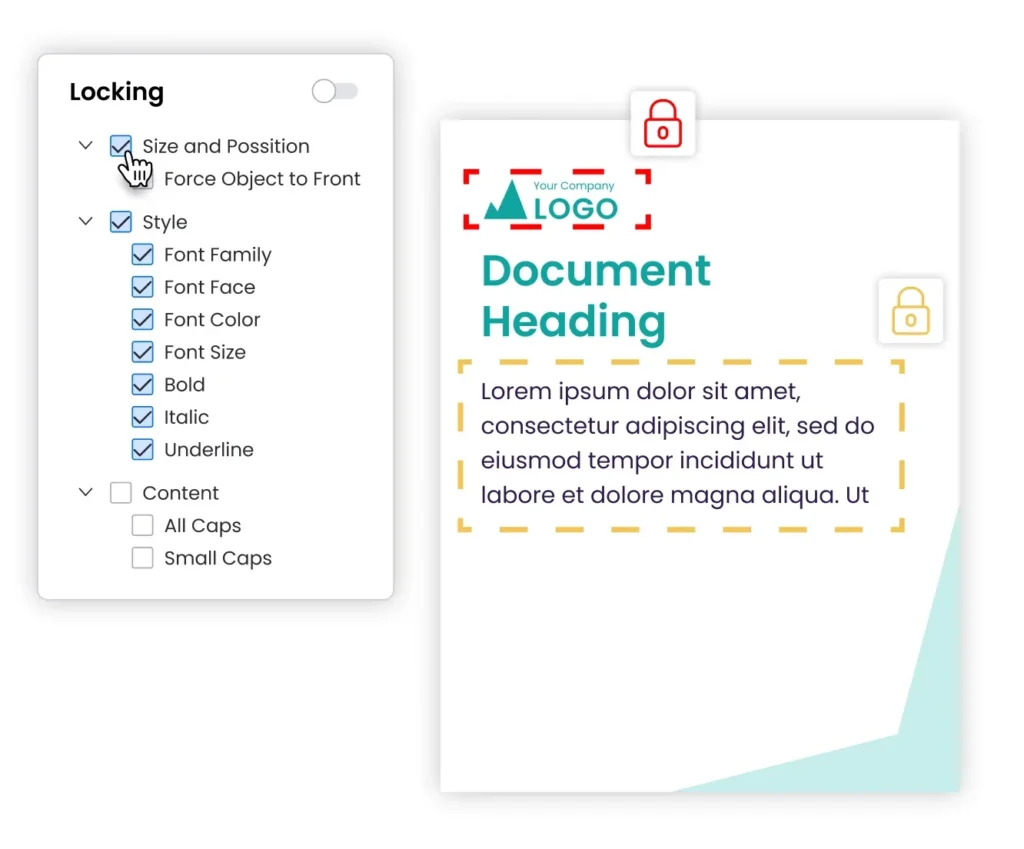
To make this work, you need a platform that lets you lock templates (or specific parts of them) so logos, colors, disclaimers, and layouts stay fixed no matter who’s editing. You get brand consistency built in from the start, and reviewers only need to check what changed.
For the fields that do need updating, set up personalization fields for things like names, regions, product details, or dates. Marq’s smart fields take this a step further by pulling data directly from your CRM integrations or spreadsheets, so teams aren’t manually typing details into every asset by hand.

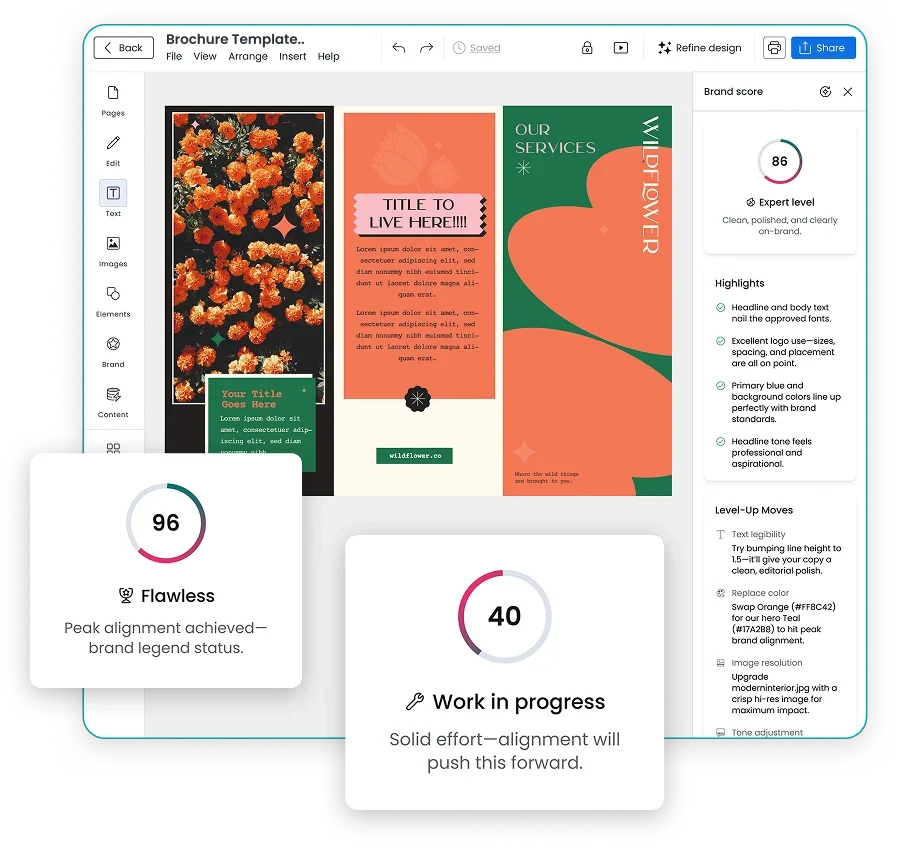
Marq’s AI Brand Guardian adds another layer of control, flagging logo, color, and typography violations in real time as content is being created. Issues get caught before the asset ever hits the review queue, not during it.
For fixed design elements, admins can set up the template once and control exactly which fields sales teams, regional offices, and partners can edit. Your review queue shrinks because most of what comes through is already on-brand.

And say your team already uses a DAM to manage approved assets. Marq’s DAM integrations with platforms like Aprimo, PhotoShelter, and MediaValet ensures your approved brand elements and files flow directly into templates without anyone hunting for the latest version.
Sotheby’s International Realty used this model to stop manually reviewing every flyer and sales sheet, freeing the design team to focus on strategic work instead of production edits.
Schedule a demo to see how Marq helps teams approve faster without losing brand control.
Step 4: Define roles, routing, and tiered approval paths
Once the first draft’s ready, the asset should have a documented path from creation to sign-off: who reviews it, in what order, and how long they have.
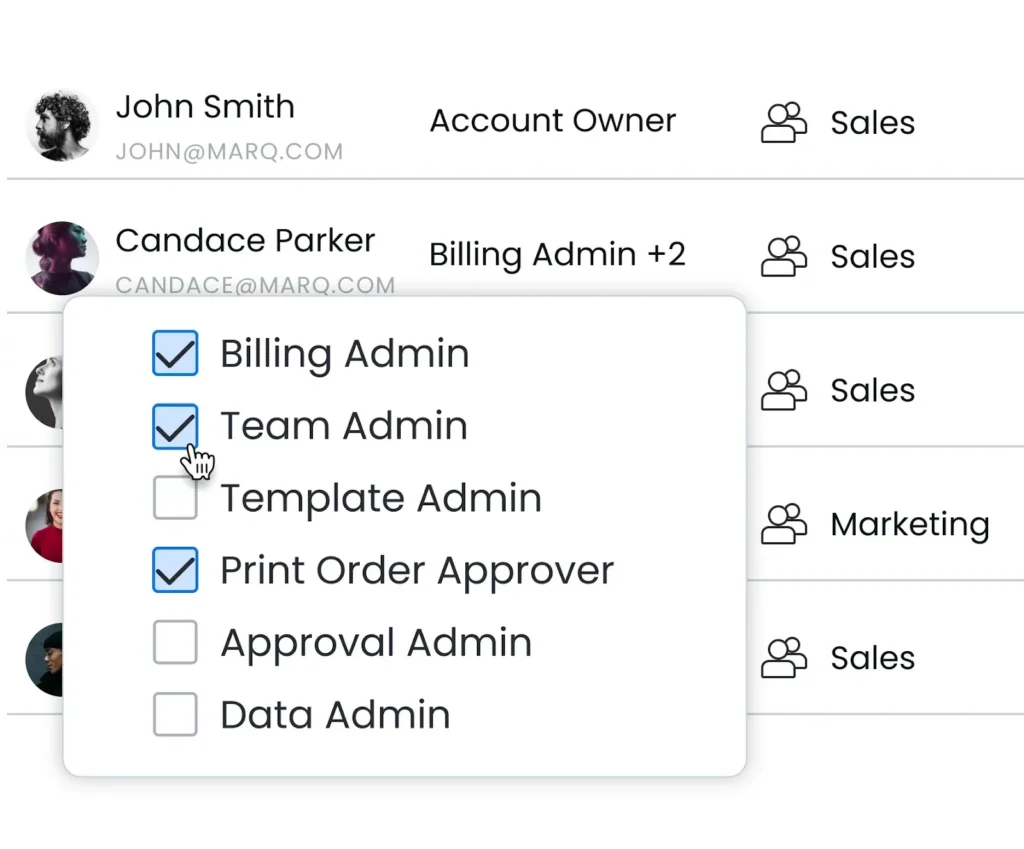
But that path doesn’t have to look the same for every asset. For example, a social post repurposing existing copy doesn’t need legal review, but a new product brochure with regulatory claims does.
Create tiered paths based on risk and content type:
- Low risk (templated social posts, internal updates): Brand lead sign-off only.
- Medium risk (event flyers, sales sheets, email campaigns): Brand lead + one additional reviewer.
- High risk (campaign launches, regulated content, co-branded materials): Full sequential review, including compliance and legal.
For global teams, decide upfront whether regional content follows the same approval chain as HQ or gets a separate, faster track for localized materials.
Assign backup operators for every review stage and set service-level agreements (SLAs). People go on leave, miss notifications, and get pulled into other priorities. Without a contingency plan, one absent approver can stall a campaign launch.
Step 5: Review and improve quarterly
No matter how well you’ve built your workflow, you’ll still hit hiccups along the way.
Every quarter, look at where assets are getting stuck, which stages take the longest, and where rework keeps happening. Then act on it:
- Shorten SLAs where reviews are dragging
- Remove review stages that no longer serve a purpose
- Add audit trails for regulated content so you know who approved what and when
The more often you do this, the less time your team spends stuck in approval limbo.
Tracking the impact of your optimized marketing approval workflow
Once your workflow is in place, you need to know if it’s actually working. Here are the metrics worth tracking:
- Approval cycle time. Measure the average days from brief to final sign-off, broken down by content type. Low-risk assets should move through in 2-3 days. High-risk content with legal review should take no more than 5-7. If high-risk content is taking two weeks, the problem is usually unclear ownership or missing backup approvers and not the content itself.
- Revision rounds per asset. Count how many times an asset goes back for edits before it’s approved. If your team is averaging three or more rounds, the problem is usually upstream: vague briefs, missing brand assets, or compliance requirements that weren’t locked into the template from the start. Every extra round adds days to your cycle time and reduces your team’s capacity for higher-value work.
- First-time approval rate. Track the percentage of assets approved on the first submission. This is your clearest signal of whether locked templates and standardized briefs are working. A low first-time approval rate means reviewers are still catching things that should have been prevented before the asset reached them.
- Off-brand content reaching external audiences. Track how often unapproved or outdated assets make it to customers or partners. If that number isn’t trending toward zero, your workflow still has gaps, usually in how non-designers access and edit content outside the approved template system.
How Marq helps marketing teams approve faster without losing brand control
Almost every approval issue in this guide comes back to the same root cause: too many people touching assets they shouldn’t need to edit.
Marq solves this at the source. As a brand enablement platform, it lets brand teams build locked templates where anything from logos and layouts to CTAs, legal copy, and compliance disclaimers stays protected. Sales reps, regional offices, and partners only see and edit the fields you’ve assigned to them. Less to change, less to review.
From there, reviewers can leave feedback directly on the asset, collaborate in real time, and track every version and approval so you always know who signed off on what. Marq also integrates with work management platforms like Asana, Wrike, and Monday.com, so approval routing fits into the tools your team is already using.
Marq’s analytics also show you which templates are being used, which content is outdated, and where approvals are getting stuck.
Want to see how Marq can shorten your approval cycles? Schedule a demo to speak to our brand templating experts.
FAQs
1. What is a marketing approval workflow?
A marketing approval workflow is the step-by-step process an asset follows from creation to final sign-off. It defines who reviews, in what order, and what needs to pass before content goes live.
2. Why do marketing teams need a formal approval workflow?
Without a formal approval workflow, teams run into version mix-ups, missed compliance checks, and off-brand content reaching customers. A formal workflow gives every asset a clear path and every reviewer a defined role.
3. What’s the difference between a manual and automated approval process?
Manual processes rely on email chains and shared folders. Automated processes use templates, role-based permissions, and defined routing to move assets through review without manual follow-up. Manual works for small teams but breaks at scale.
4. Who should be involved in a marketing approval workflow?
The stakeholders involved depend on the type of content you’re producing and the industry you’re in. At the very least, you need a requester, a designer, a brand lead, compliance or legal for regulated content, and a final approver. Agencies may also include a client approval stage, and larger enterprise teams often add a traffic manager to keep everything on track.
5. What are the most common mistakes when setting up a marketing approval workflow?
Some of the most common ones include assigning too many reviewers to every asset, not standardizing briefs, having no backup approvers, and treating all content types with the same level of scrutiny. A better approach is to tier your review paths by risk so low-risk content moves fast and high-risk content gets the attention it needs.