7 Best Creative Management Software for Scaling Teams (2026)

Creative teams spend a lot of time on tasks that aren’t creative.
Chasing approvals. Resizing assets for different formats. Rebuilding templates because no one can find the original. All of this slows down campaign launches, adds operational overhead, and pulls high-value creative talent away from work that drives growth.
Creative management software removes much of this friction. It brings planning, management, creation, review, and distribution into one place so teams can move faster with fewer handoffs and less back-and-forth.
This guide breaks down the 7 best creative management tools, covering what each platform does well, where it falls short, and what real customers say about using them.
The factors we considered when ranking these creative management tools
We evaluated each platform using the same set of criteria to keep comparisons fair and grounded in real-world use:
- Creative automation: Does it reduce repetitive work through smart fields, data merge, or automated content creation?
- Template workflows: Can teams build, organize, and share templates while clearly defining what users can and cannot edit?
- Collaboration and approvals: Does it make feedback, review, and sign-off easy before content goes live?
- Ease of use for non-designers: Can non-designers like sales reps or field marketers create on-brand content without relying on the creative team?
- Content distribution: Can teams publish, share, and print content directly from the platform?
- Enterprise scalability: Does it support 500+ users without breaking down on permissions, performance, or cost control?
Best 7 creative management software in 2026: At a glance
| Creative Management Software | Best For… | Key Strengths | G2 Rating |
| Marq | Scaling creative operations with brand control | Locked templates, smart fields, approval workflows, DAM integrations | 4.5 |
| Canva Enterprise | Teams that value ease and adoption over brand governance | Fast onboarding, 1.6M+ templates, strong security | 4.7 |
| Templafy | Teams in compliance-heavy industries | MS Office-native creation, document automation, compliance workflows | 4.4 |
| Frontify | Keeping brand standards accessible across creative teams | Brand guidelines hub, DAM, asset search, analytics | 4.5 |
| Bynder | DAM-connected content creation and distribution | Governed asset repository, Bynder Studio, 164 integrations | 4.5 |
| Adobe Express | Adobe-first creative teams | Adobe ecosystem integration, template library, brand kits | 4.5 |
| Visme | Visual content creation | Data visualization, brand kit, AI design tools | 4.5 |
1. Marq: Best for scaling creative operations with brand control
Marq is a brand enablement platform built for teams that need to create large volumes of content across different departments, regions, or locations.
It combines template management, creative automation, and collaboration features in one platform, so non-designers can create on-brand content without relying on the central team or a separate content library software for managing brand assets.
This helps creative leaders scale content production without losing control over quality, harming brand consistency, and risking compliance issues.
Key features
- Lockable brand templates with granular permissions
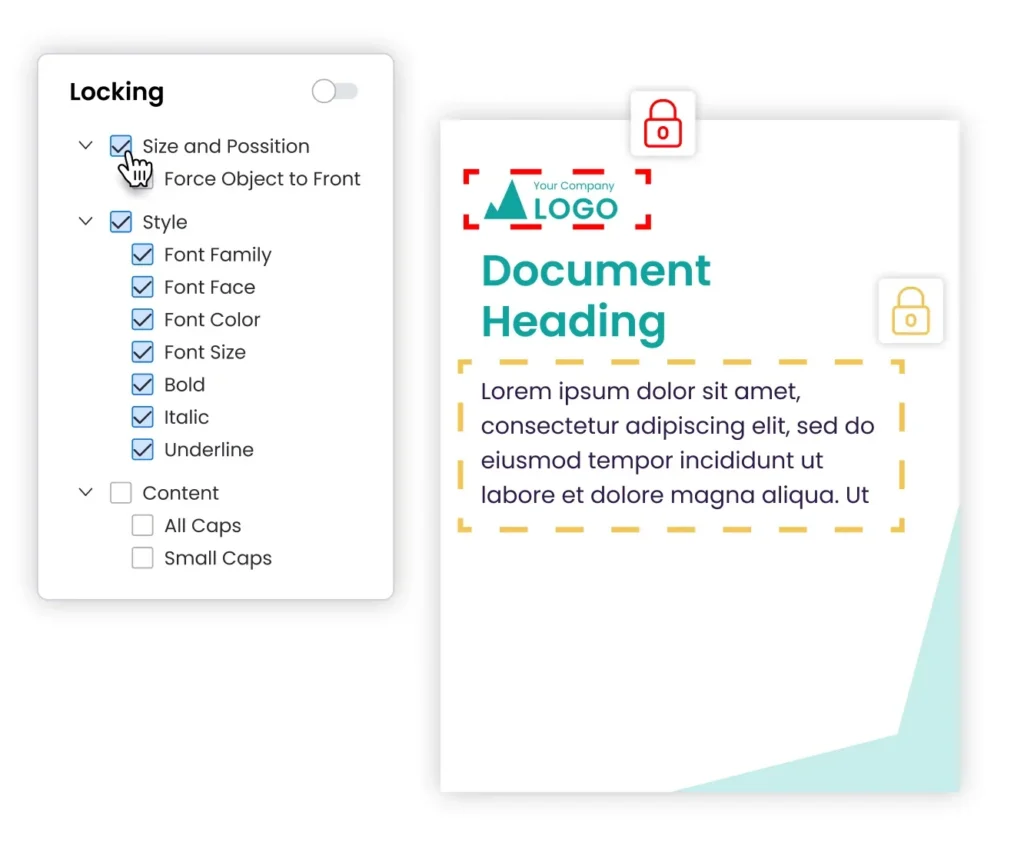
Marq’s Content Design feature lets designers build templates with locked brand elements like logos, fonts, and colors, while defining exactly which areas non-designers can edit.
Locking works at multiple levels. Full locking makes templates completely non-editable. Partial locking lets non-designers make controlled edits, such as resizing without moving elements or editing text without changing the font.
Creative teams can also import existing InDesign files and convert them into brand-safe templates so they can get up to speed quickly without rebuilding from scratch.
- Creative automation
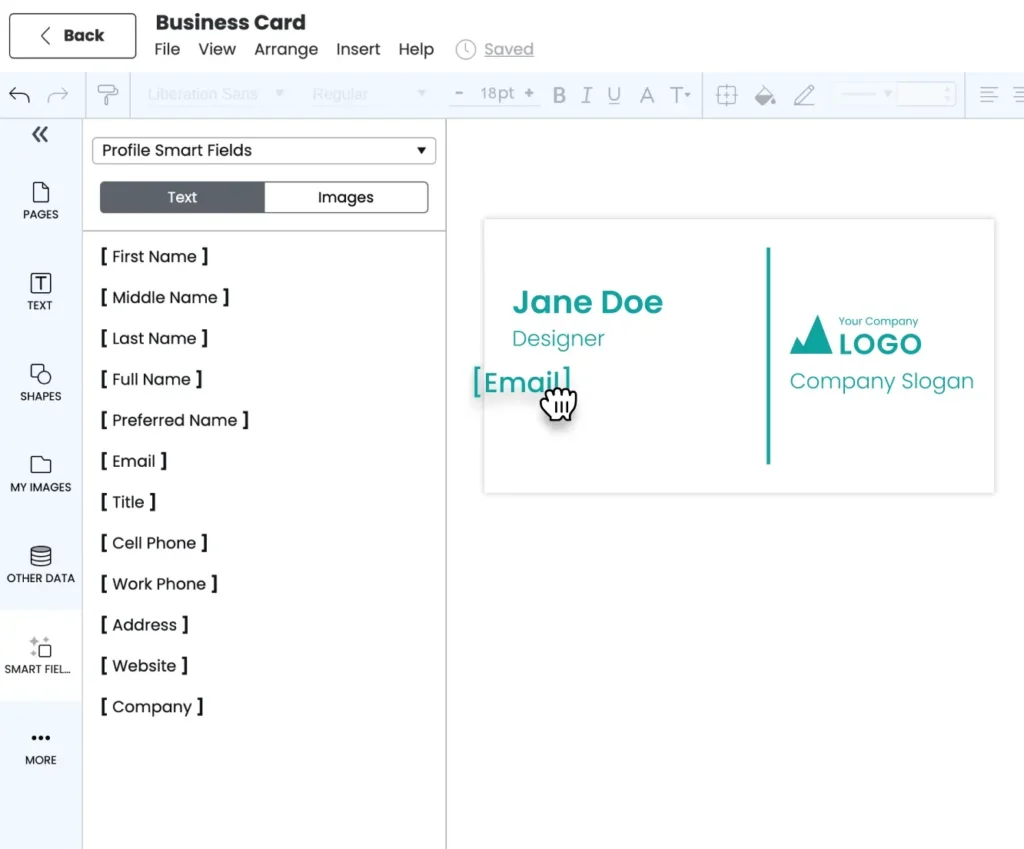
Marq’s smart fields remove manual data entry from templates to automate content personalization within guardrails. Admins set up fields once and the template populates the right information for every user automatically.
Marq supports five types of smart fields:
- Profile fields: Pull each user’s name, title, phone, email, and headshot directly from their account.
- Team fields: Insert company-wide details like company address and taglines across all templates at once.
- Custom fields: Create custom user fields and pull unique values into templates.
- System fields: Insert project-specific details like the creator’s name, project name, date, etc.
- Data automation fields: Connect to a Comma-Separated Values (CSV) file, Google Sheet, Extensible Markup Language (XML) file, or Multiple Listing Service (MLS) feed to auto-populate content like product specifications, property listings, and sales proposals.
- Marq AI
Marq AI reduces brand errors and approval delays that slow creative teams at scale.
The Brand Guardian runs in the background during content creation and flags issues like incorrect logo usage, off-brand colors, and typography violations in real time. Users fix problems as they work, so content reaches the approval stage already clean.
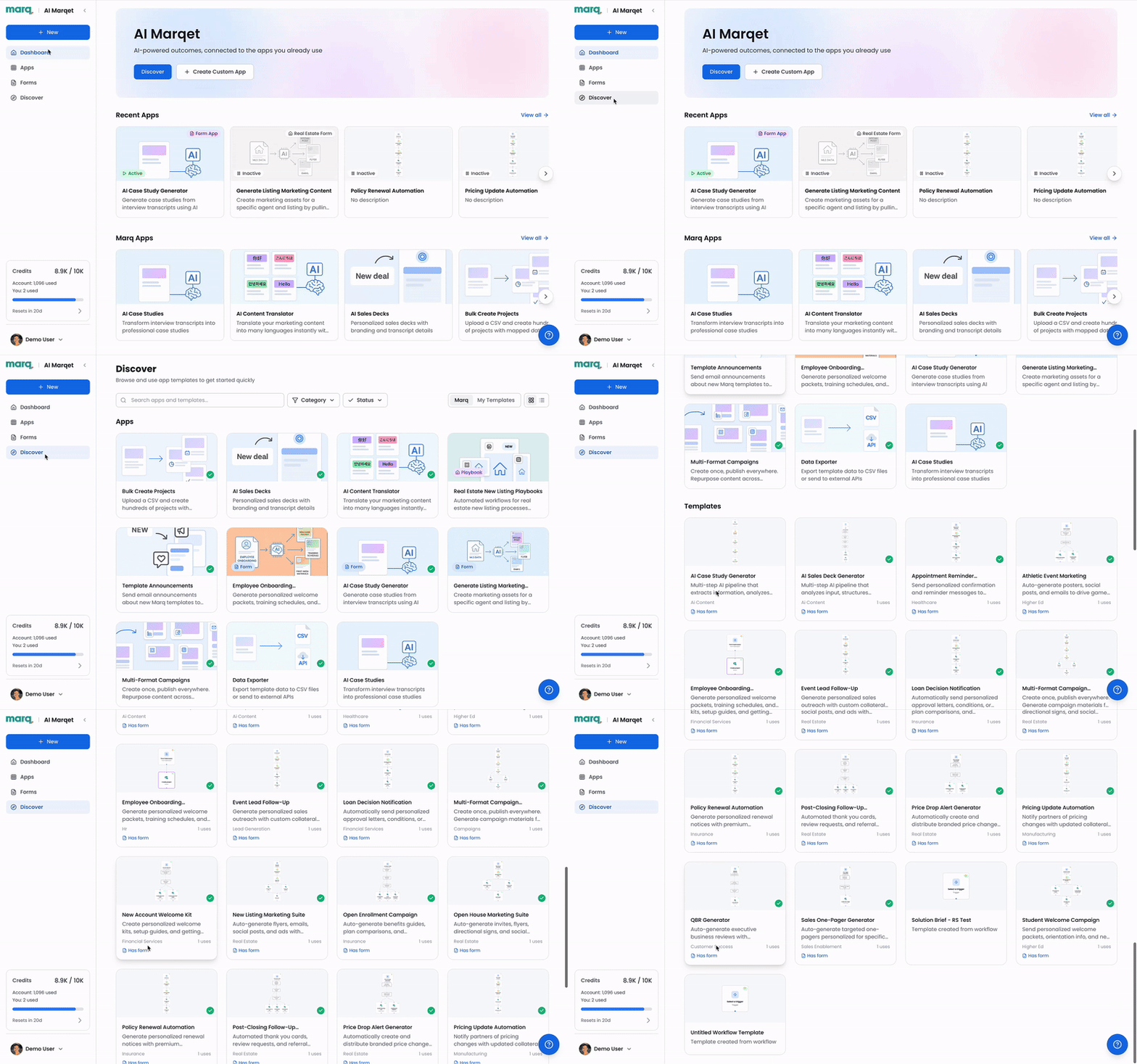
AI Marqet lets admins trigger workflows that automatically generate multiple content pieces from a pre-configured template set whenever a business event occurs, such as a new deal, listing, or campaign. This helps teams ship content faster without manual setup or coordination.
- Approval workflows
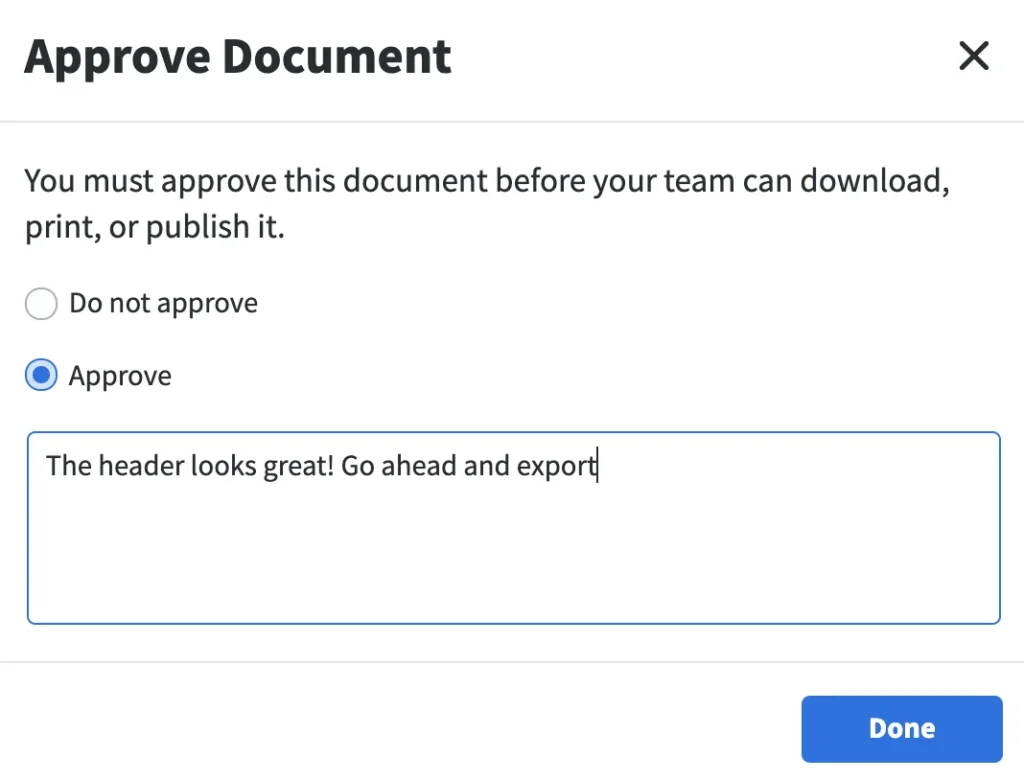
Marq builds the review process directly into the creative production workflow. Before anyone downloads, prints, or publishes a project, the system routes it to a designated approval admin for sign-off. Reviewers approve or reject content and add feedback directly.
Power users who consistently create compliant content can bypass approval entirely and publish without entering the queue.
Pricing
You can contact Marq’s team to get a personalized quote.
Where Marq shines
- Marq brings the full creative workflow into one platform: Teams centralize assets, create templates, personalize content, manage approvals, and distribute materials without switching between platforms.
- Reduced revision cycles: Marq locks critical brand elements and auto-populates data through smart fields. This removes common errors from the process, like incorrect logo versions, outdated pricing, and missing disclaimers.
- Broad integration ecosystem: Marq connects to Digital Asset Management (DAM) systems such as Bynder and MediaValet, Customer Relationship Management (CRM) platforms such as Salesforce and HubSpot, and project management tools such as Asana and Wrike. Such a strong integration network connects creative work directly to the rest of the business instead of running it in silo.
Where Marq falls short
- Overkill for lean teams: The depth of governance and automation is too advanced for teams with no distributed content needs.
- High-touch creative work: Marq supports systematic, repeatable content production rather than one-off campaign design.
Customer reviews
Alex Felsenstein from Yext says, “Our creative team exists to present Yext in a consistent, buttoned-up way. Marq helps us do that by giving our reps the freedom to personalize their own assets while still adhering to our brand guidelines.”
Malia Hostetler from PT Solutions shares, “Now, when our sales team needs something, they don’t have to wait. They can open a template, drop in the details, and get it out the door the same day.”
Who Marq is best for
- Distributed teams that want to manage the entire creative process in a single platform with brand guardrails built in each step.
2. Canva Enterprise: Best for teams that value ease and adoption over brand governance
Canva Enterprise builds on Canva’s easy-to-use design platform with team management, admin controls, and multiple brand kits for larger organizations. Teams can get started quickly using templates, but maintaining consistent on-brand output at scale is difficult.
Key features
- Content creation breadth: Canva offers more than 1.6 million templates for social media posts, presentations, print materials, short-form videos, and other formats. Its drag-and-drop editor helps non-creative teams create content quickly without needing design expertise.
- Brand kits: Canva Enterprise stores logos, colors, and fonts in brand kits that apply across all designs. Admins can use these kits to build templates for teams and keep every piece of content on-brand. The Enterprise plan includes up to 1,000 brand kits.
- Team collaboration and approvals: Multiple users can work on a design at the same time, leave comments, and share files directly within Canva. The Enterprise plan supports basic approval workflows, although the process stays simpler and less structured than what you get in dedicated creative management tools.
- AI-assisted creation: Canva includes AI tools for generating text, creating images, and suggesting templates, all built directly into the design workflow.
Pricing
Canva doesn’t publish pricing for its Enterprise plan. Contact their team for a quote.
Where Canva shines
- Fast onboarding and broad adoption: Teams start using Canva quickly with minimal training. This makes it easy to roll it out across departments, especially when they need to create content fast.
- Strong security standards: Canva Enterprise supports MFA, ISO 27001, SOC 2 Type II, SSO, SCIM, audit logs, and AI admin controls. This makes it a strong fit for companies in regulated industries where security matters as much as features.
Where Canva falls short
- Weak workflow governance: Template locking is only partial. Users can still edit important elements in many cases, which leads to brand inconsistency over time.
Customer reviews
Edwin M. shares, “Hands down the “brand-in-a-box” setup—our colors, fonts, logos, even the snarky little tagline are all locked in, so everyone from the intern to the CEO can crank out slick, on-brand graphics without pinging the design lead every five minutes.”
Vishal D. says, “Integration is limited and may not fit well into complex enterprise systems.”
Who Canva Enterprise is best for
- Small and mid-sized companies that prioritize team adoption and speed over structured brand governance.
3. Templafy: Best for teams in compliance-heavy industries
Templafy is a document generation platform built for large enterprises that need to create compliant, on-brand documents at scale within Microsoft 365. It works especially well across regulated industries, such as legal, financial services, and insurance.
Key features
- MS Office-native document creation: Templafy works directly inside Microsoft Word, PowerPoint, Excel, and Outlook. Users create documents without leaving these tools and pull from pre-approved templates with built-in brand and compliance rules.
- Advanced document automation: Templafy automates multi-step document creation by populating smart fields and applying conditional logic.
- Compliance and approval workflows: Role-based access controls and audit trails give creative teams visibility into every document produced. Designated reviewers can approve or reject templates before they reach end users.
Pricing
Contact Templay’s sales team for a personalized quote.
Where Templafy shines
- Compliance-heavy document workflows: Financial services, insurance, and legal teams that produce high volumes of regulated documents benefit from Templafy’s built-in governance and audit capabilities.
- MS Office ecosystem: Teams using Microsoft 365 get the most value from Templafy since they can create and manage documents directly inside the tools they already use, without switching platforms.
Where Templafy falls short
- Not built for visual marketing collateral: Templafy is a document automation platform. Flyers, social posts, visual campaigns, and other creative formats are outside its scope.
- Steep adoption curve: Non-technical users often require training, which slows adoption compared to other creative workflow tools in this list.
Customer reviews
Andrzej C. shares, “The automated document generation features and dynamic content reduce repetitive work and save a lot of time.”
Ishika J. says, “It can be pricey and may require training for full utilization.”
Who Templafy is best for
- Enterprises in regulated industries that need to create compliant documents directly within the Microsoft 365 environment.
4. Frontify: Best for keeping brand standards accessible across creative teams
Frontify is a brand management platform that brings brand guidelines, digital asset management, and templates into one place. Its primary strength is making brand standards accessible and consistent across internal creative teams, agencies, and external partners.
Key features
- Brand guidelines hub: Frontify lets brand teams build interactive guidelines portals, which covers tone of voice, visual identity, logo usage rules, color systems, and typography. Teams can share these portals with partners and internal stakeholders who need to understand and apply the brand correctly.
- Digital asset management: Frontify includes a DAM for storing, organizing, and distributing brand assets. Users can quickly find what they need using image, keyword, and natural language search.
- Template creation: Frontify templates lock in elements like sizing, layout, and design rules to keep branding consistent across different departments and regions. Teams then fill these templates with dynamic information to create personalized content at scale.
- Performance analytics: Frontify tracks how teams engage with brand guidelines and templates, including page views, downloads, shares, and version updates.
Pricing
Frontify uses a custom pricing model based on monthly active users. Teams need to contact their sales team to get a personalized quote.
Where Frontify shines
- Agency and partner-facing brand portals: Frontify is well-suited as the platform that shows external collaborators how to use the brand, with assets, rules, and templates in one place.
- Powerful asset search: Users find what they need using image, keyword, or natural language search. This lets creative teams spend less time hunting for files and more time producing content.
Where Frontify falls short
- Limited self-serve production at scale: Frontify organizes and governs assets well, but it’s less suited for high-volume, localized content production that distributed teams need day-to-day.
- Poor usability: The interface requires too many clicks for simple tasks, template editor is clunky, and user management is confusing as per the reviews from Frontify’s customers. Non-technical users and those coming from tools like Canva and Adobe often find the experience frustrating.
Customer reviews
Olivia H. says, “Frontify is a great tool for having all our brand assets in one place. It’s great at organizing and creating cohesive tool kits for certain marketing activities.”
A G2 reviewer shares, “The UI/UX could use some refinement. At times, it takes too many clicks to complete simple tasks, particularly when using the template function. This can be frustrating and time-consuming, both for us and our end users.”
Who Frontify is best for
- Organizations that prioritize asset management and brand guidelines over high-volume content production.
5. Bynder: Best for DAM-connected content creation and distribution
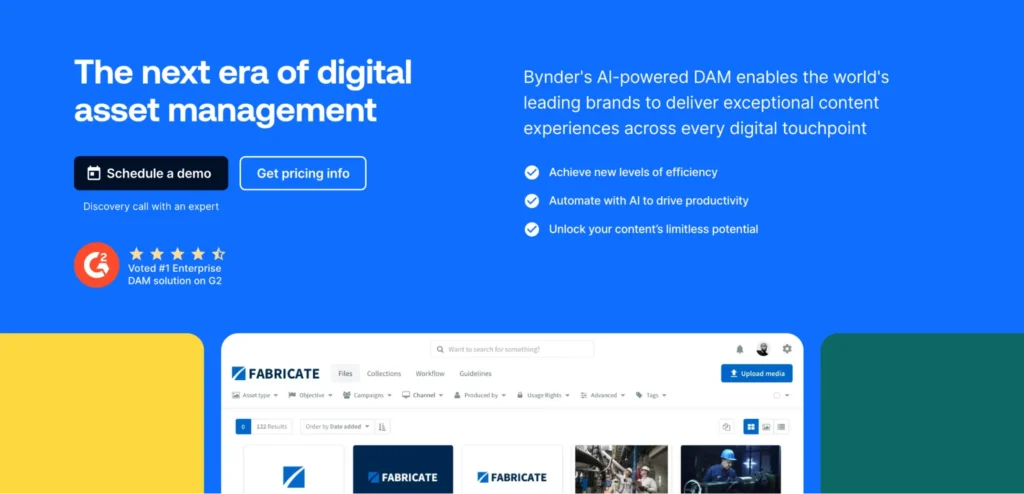
Bynder is an enterprise digital asset management platform that covers the full content lifecycle. It helps large organizations create, manage, and distribute content at scale while maintaining control over brand standards.
Key features
- Governed asset repository: Bynder centralizes all digital assets in a single, version-controlled library. Admins control which assets go live, replace outdated files instantly, and prevent teams from using unapproved materials across channels.
- Permission frameworks and access control: Granular role-based permissions define who can access, download, modify, and distribute each asset.
- Approval workflow: Creative teams route assets through structured review and approval steps before they enter the live library or reach an audience.
- Bynder Studio: Bynder scales content creation across digital and print formats using AI and automation. Designer-approved templates let team members customize content without design skills, while locked elements keep brand standards consistent across every market and output produced.
Pricing
Contact Bynder’s sales team to get a quote.
Where Bynder shines
- Full content operations in one platform: Bynder covers asset storage, creative production, approval workflows, and distribution, reducing the number of disconnected tools creative teams rely on.
- Extensive integration ecosystem: Bynder’s marketplace includes 164 integrations spanning CRMs, e-commerce, project management, and social media software.
Where Bynder falls short
- Primary strength is DAM, not templating: For teams that need advanced template locking, smart fields, or CRM-connected content personalization, Bynder’s creation capabilities are more limited than platforms built specifically for those workflows.
- Complex for smaller creative teams: Bynder targets enterprise content operations.Teams without significant asset management needs may find the platform more than they require.
Customer reviews
Odaris I. shares, “What I like best about Bynder is its flexibility and the way it can be tailored to support our specific workflows and organizational needs. The platform is intuitive, scalable, and provides a centralized, reliable source of truth for our assets, which is critical given the volume and variety of content we manage.”
Jeff O. says, “Search can be inconsistent and seem to take its own shot on things and not be super accurate. Also, the ability to crop and resize images could be easier.”
Who Bynder is best for
- Enterprise teams that need asset management and creative production in one place.
6. Adobe Express: Best for Adobe-first creative teams

Adobe Express is a lightweight content creation tool within the Adobe Creative Cloud suite. It helps non-designers create marketing content quickly using a large template library that covers social posts, presentations, flyers, short-form videos, and more.
Teams store brand colors, fonts, and logos in shared brand kits, while admins lock key design elements to keep content consistent.
For organizations outside the Adobe ecosystem, its value drops. It also offers weaker brand governance compared to Marq and Templafy and doesn’t scale well for large, distributed teams.
7. Visme: Best for visual content creation
Visme is a visual content creation platform covering presentations, infographics, documents, charts, social media graphics, and other creative formats. It includes a centralized brand kit, AI design features that generate on-brand content automatically, strong data visualization, and real-time collaboration.
Teams with complex creative management needs like granular permissions and structured approval workflows will find it falls short. It also works better for individual contributors and lean teams than large distributed companies.
How to choose the right creative management software
The platform you choose shapes how content moves through your organization. These are the questions worth asking before you decide.
Does it cover all steps of the creative management process?
Most platforms solve for one part of the creative workflow. Design tools handle creation. DAMs handle storage. Project management tools handle approvals. The problem is that content doesn’t move cleanly between them.
Every handoff between disconnected tools adds delays, creates version confusion, and puts more coordination burden on the creative team.
A strong creative management platform covers the full cycle in one place; template creation, editing permissions, review, approval, and distribution.
Marq owns this end-to-end workflow. Creative teams build and govern templates, non-designers create within guardrails, approval admins sign off before anything publishes, and content distributes directly from the platform.
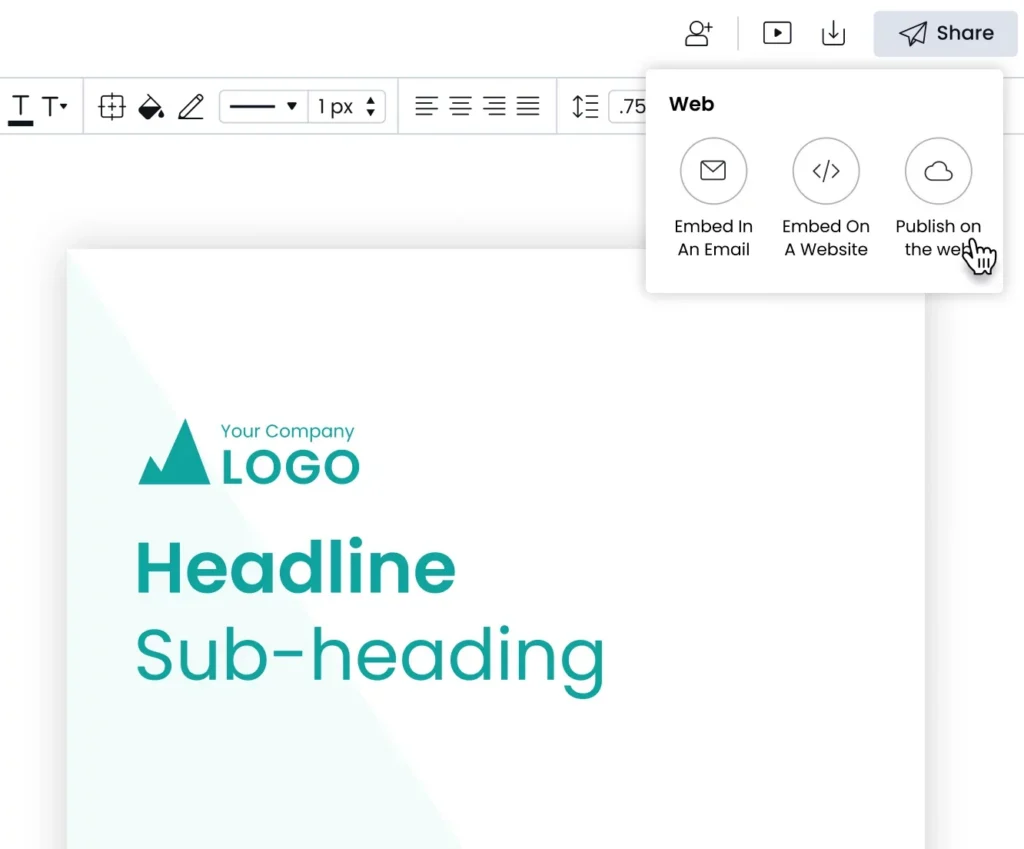
Can non-designers create compliant content without a creative team bottleneck?
When non-designers need compliant content fast, they will find a workaround unless the right template is accessible and easy to use. The solution is not tighter restrictions. It is a governed self-serve system that builds compliance directly into the template itself.
Marq embeds compliance into templates by locking critical elements while keeping specific zones editable. This lets non-designers create compliant content without relying on a designer for every request.
Does it measure creative output?
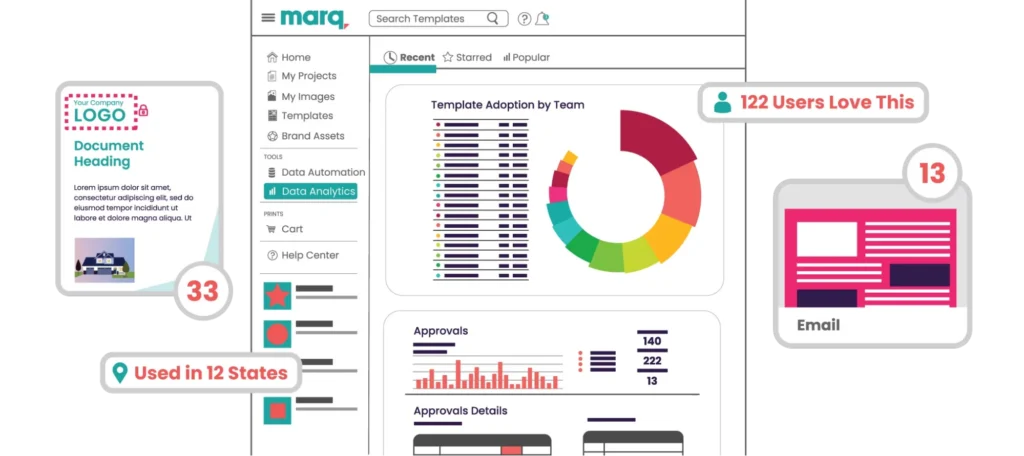
Creative teams invest a lot of time building templates, setting up workflows, and training non-designers. But without usage data, there is no way to know if any of it is working. Which templates actually get used? Which ones sit untouched? Where do projects stall in the approval queue?
A strong creative management platform answers these questions with built-in analytics. Look for template adoption tracking, content freshness reporting, approval status visibility, and team-level usage.
Marq’s Analytics tracks all of this across the organization. Creative leaders gain the visibility to make smarter decisions about where to invest their team’s time, which workflows to scale, and what content to build next.
Does it keep feedback and approvals inside the workflow?
Sending the wrong content version costs more than the time it took to create it. Look for platforms with built-in review and approval workflows, in-asset comment threads instead of scattered email feedback, and audit trails that track every version.
Marq’s approval workflow lets creative teams review, comment on, and approve content before it reaches the audience, with full version history attached to every project.
Final word on Marq
Most creative management tools solve only part of the problem, whether it’s asset storage or document automation.
Marq brings the full creative process together by defining who creates content, what they can edit, how approvals flow, and how content is delivered consistently and on time.For marketing and creative leaders managing distributed teams, Marq is a strong fit, especially in industries where brand integrity and compliance are non-negotiable. Book a demo to see it in action.