Brand automation: Solutions, examples, and more (a leadership guide)

Your central brand team is relatively small. Your distributed network of advisors, producers, branch managers, regional marketers, and other teams is not. As more people create content across the organization, central marketing has less control over what gets published, while requests for design support continue to grow.
That creates an imbalance. Local teams need to move quickly and create content for their markets, but every new asset still needs to meet your brand standards. Without a scalable way to manage that process, the central team ends up reviewing, fixing, and recreating work that could have been handled locally.
This article explains how brand automation helps marketing teams manage that gap, which design tasks teams can automate, how to measure the impact, and what to consider when choosing a platform.
Why brand management becomes difficult as organizations scale
As a company grows, the central marketing team has to support more people, locations, and content requests without becoming the bottleneck for every asset.
A campaign that once needed a handful of versions can turn into dozens of local adaptations across different channels. More teams also start creating content themselves, which means marketing has to balance publishing speed, local relevance, and brand control.
That creates a few recurring pressures for the central team:
- Content requests keep increasing: Campaigns, new products, events, sales materials, and internal communications all add to the workload. The central team spends more time handling routine requests and less time on higher-priority brand work.
- More teams start creating their own content: Sales reps, branch managers, regional marketers, partners, and other contributors need materials for their audiences. They may start with approved assets, but they still need to adapt them for their specific use case.
- Every channel creates more versions: A single campaign can require assets for email, social, print, presentations, web, and other channels. Each version adds another file for teams to produce, review, update, and keep aligned with the original.
- Local teams need to make changes: Branches, dealers, and regional teams often need to add local information or adapt messaging. When they cannot make those changes themselves, requests go back to the central team. When they can, marketing has less visibility into what gets published.
- Approvals take more time: As the number of assets and contributors grows, brand and compliance teams have more work to review. The result is a longer queue for everyone, including teams waiting on routine changes.
The pressure eventually reaches a point where adding more work means adding more people. One SVP of Marketing at a US-based regional bank described the problem this way:
Pro tip
“We’re at our max capacity as a marketing department… if we go through one more acquisition or we get any bigger, it’s going to get unattainable.” – SVP of Marketing, US-based regional bank
That is the scaling problem brand automation addresses. The goal is to give distributed teams more ways to create and update content while keeping the parts of the brand that marketing needs to control under central oversight.
What brand automation looks like in practice
Brand automation can reduce the repetitive work involved in creating and managing branded content. Instead of asking the central team to handle every edit, update, and approval, it builds those steps into the way teams create content.
- Template automation: Marketing creates the master template and controls which elements people can edit. Local teams update the headline, image, or phone number without changing the logo, colors, or required messaging.
- Approval workflows: Content goes to designated reviewers before it is published or downloaded. This gives marketing and compliance a clear review process without requiring them to manage every part of the creation process manually.
- Dynamic content population: Templates can pull information from a data source and use it across multiple versions. The design stays consistent while details such as locations, names, or other variables change.
- Asset distribution: Teams can access approved, current assets where they create content. This reduces the need to search through old files or recreate materials from outdated versions.
- Brand controls: Marketing can specify what contributors can change and keep required elements in place. Additionally, brand controls might include revision history showing revision dates and the editor’s e-signature.
Together, these capabilities turn brand management from a process that depends on constant manual oversight into one that supports distributed teams while keeping central marketing in control.

Scale brand automation with Marq
Give distributed teams more freedom to create while keeping templates, editing controls, approvals, and brand standards under central control.
Brand automation vs. marketing automation
Marketing automation helps teams decide when and where to send content. Brand automation helps determine what that content looks like and who can create or change it.
Organizations may already use platforms such as Marketo, HubSpot, or Salesforce for campaign execution. Brand automation typically works upstream, helping ensure the content entering those campaigns follows brand standards.
| Comparison | Brand automation | Marketing automation |
| Primary Focus | How branded content gets created and managed | When content is sent and who receives it |
| Main Users | Brand, creative, marketing, and distributed teams | Marketing operations, demand generation, and campaign teams |
| Controls | Templates, editable fields, brand elements, approvals | Campaigns, audiences, triggers, and workflows |
| Example | A regional marketer updates an approved template with a local office address, while all core brand elements remain unchanged | The marketing team sends an approved campaign to prospects in a specific region based on their location or behavior |
| Role in the Workflow | Upstream: creates and governs the content before distribution | Downstream: distributes the content to the right audience |
Six ways organizations use brand automation to scale
Brand automation becomes useful when it takes repeatable work out of the central team’s hands without giving up brand control. The six use cases below show where organizations can reduce manual work, support distributed teams, and keep content current as they grow.
| Use Case | What Gets Automated | Outcome to measure |
| On-brand content creation | Creating assets from approved templates | Fewer routine design requests and more consistent output |
| Approval workflows and editing permissions | Review, sign-off, and editing permissions | Clearer oversight without reviewing every step manually |
| Dynamic content and variants | Populating fields across multiple versions | Faster creation of accurate, localized content |
| Local and regional execution | Location-specific edits within defined controls | Local relevance without losing brand consistency |
| Template management and updates | Managing and updating approved templates | Fewer outdated assets in circulation |
| Content distribution across teams | Sharing current content across teams | Fewer version issues and manual handoffs |
1. Automated brand-compliant content creation
A regional team needs a flyer for an open house tomorrow. Without a scalable process, they either wait for a designer or recreate a similar asset themselves. That puts the central team in the position of either handling another routine request or reviewing work after it has already been created.
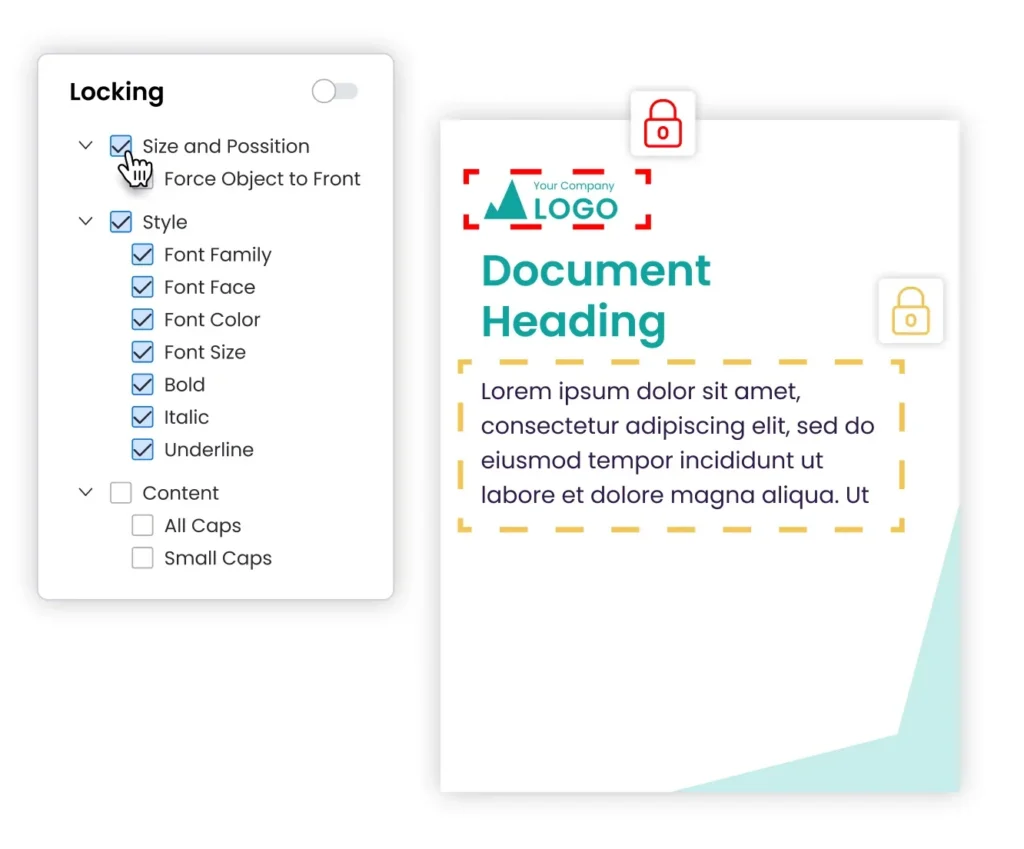
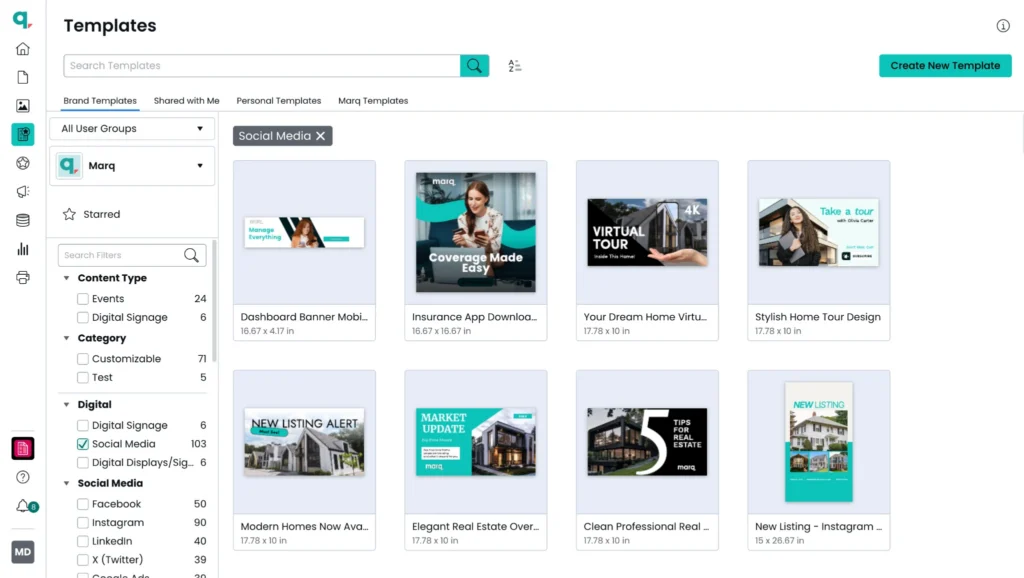
Marq lets central marketing create approved templates and control which elements contributors can change. A designer can set up the core layout once, while local teams can create their own versions without rebuilding the asset from scratch. This lets distributed teams produce content from approved templates instead of sending every routine variation to the design queue.
2. Approval workflows and editing permissions
As more people create content, marketing needs a consistent way to review materials that require approval. Sending files by email or asking teams to update a shared spreadsheet can make it difficult to see what is waiting for review, who needs to act, and whether the latest version has been approved.
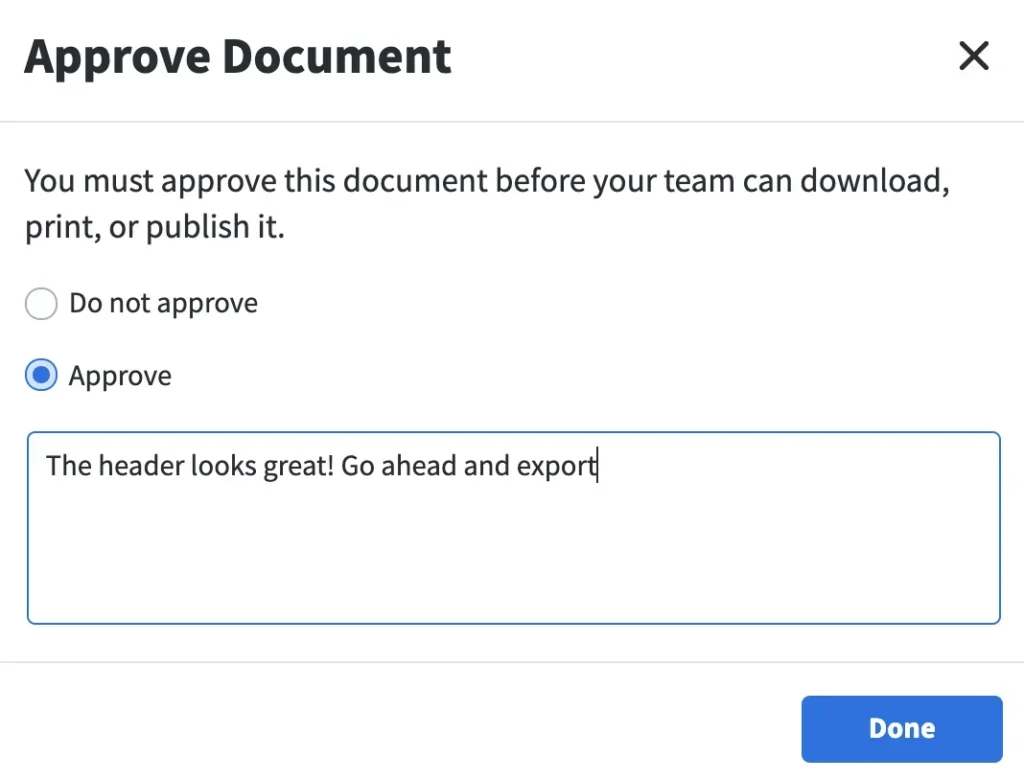
Marq’s approval process gives teams a defined workflow for submitting content for review before they download or publish it. Reviewers can approve or decline a project and leave feedback, giving central marketing visibility without taking over the entire creation process.
3. Dynamic content population across versions
Many organizations create the same type of asset for different locations, products, regions, or customers. Manually changing names, addresses, rates, disclaimers, and other details in each version takes time and creates more opportunities for errors. The challenge becomes even greater when those details change after the assets have already been created.
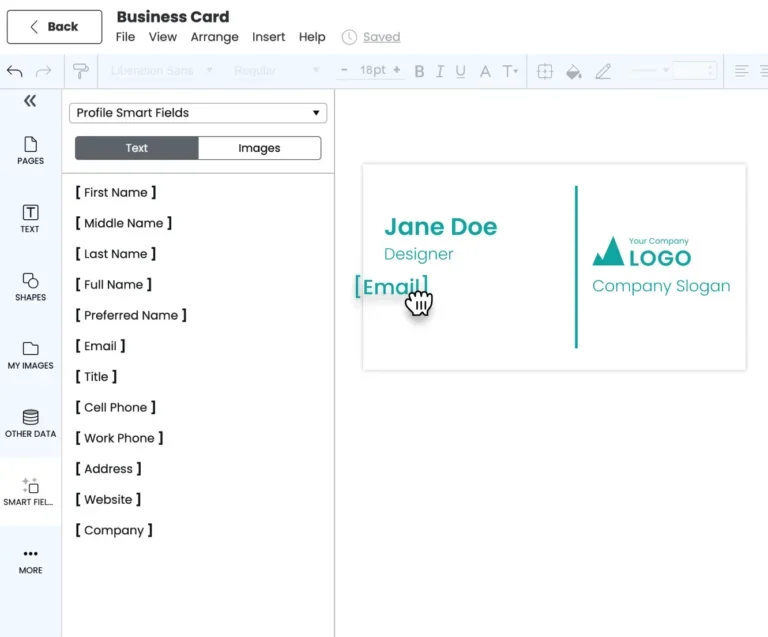
Marq Smartfields can pull variable information into templates, allowing teams to create multiple versions without manually entering every field. This can support use cases such as location-specific marketing materials, provider information, financial offers, or regional content where the design stays consistent but the details change.
4. Local and regional marketing execution
Distributed teams need to adapt content for their markets, but central marketing still needs to decide which parts of the brand can change. Giving every contributor complete editing access can produce off-brand work, while sending every local request back to headquarters overloads the central team.
Marq lets admins choose which elements contributors can edit. A regional team can update a local address, agent photo, or offer while central marketing maintains control over the core design and brand elements.
One multi-site healthcare provider described the challenge this way:
Pro tip
“We have 500+ clinics across 26 states. We’ve struggled to get them the resources they need hyperlocally in a way that’s scalable for our team.” – Senior Marketing Manager, multi-site healthcare provider
This approach is relevant for distributed organizations such as real estate teams, where agents regularly need to adapt approved materials for their local markets.
5. Template management and current versions
Keeping templates current becomes harder when teams save local copies and continue using files created months ago. A brand refresh, updated disclaimer, or change to a product offering can leave the organization with multiple versions of the same asset in circulation.
Marq gives central teams a place to manage approved templates and keep the latest versions available to contributors. This reduces the need to track down outdated files across local drives and shared folders. It also gives marketing more control over which templates teams use when they create new content.
6. Collaboration and content distribution across teams
Brand content often moves between marketing, sales, regional teams, and other departments before it reaches the customer. When each group keeps its own files, teams can end up working from different versions or asking marketing to resend assets they already have.
Marq gives teams access to approved content in one system, so marketing can manage the source materials while other teams create what they need from them. Its distribution features support routes such as web publishing, social sharing, email HTML, print, and direct mail, reducing manual handoffs between departments.
This gives central marketing more visibility into how content moves through the organization while allowing sales and regional teams to work without turning every request into a new design project.
What to track for success
The right KPIs show whether brand automation is reducing the workload on central marketing, helping distributed teams publish faster, and keeping more content within brand standards.
| KPI | What It Tells You | What to Look For |
| Time to publish | How quickly teams can move from request to finished content | Shorter turnaround times, especially for routine assets |
| Request queue length | How much work still depends on the central team | Fewer repetitive requests waiting for design support |
| Template usage rate | How often teams use approved templates instead of starting from scratch | A growing share of content created from approved templates |
| Approval turnaround time | How long content takes to move through review | Reviews completed within the agreed timeframe |
| Off-brand incidents caught pre-publish | Whether brand controls are catching issues before content goes live | More issues caught during the process and fewer reaching the market |
| Template adoption by location or segment | Which teams are actually using the system | Consistent adoption across regions, branches, or business units |
| Design hours reclaimed | How much creative capacity automation frees up | More time redirected from repetitive production to work that requires creative judgment |
Review these metrics by location, team, and content type rather than relying only on organization averages.
A high overall adoption rate can still hide teams that continue to depend heavily on the central brand team. Pairing adoption data with request volume and turnaround time gives marketing leaders a clearer picture of where automation is reducing workload and where the process still needs attention.
Three brand automation platforms
Brand automation platforms solve different parts of the content workflow. Some help teams create and localize content within brand controls, while others focus on storing and distributing approved assets or centralizing brand guidelines.
The right choice depends on where your current process breaks down and how much control you need over distributed content creation.
| Platform | Best For | Key Strengths |
| Marq | Governed content creation and automation at scale | Approved templates, Smartfields, data merge, approval workflows, InDesign import |
| Frontify | Brand guidelines and design systems in one portal | Brand portal, guidelines, DAM, approvals |
| Bynder | Asset storage and distribution | Enterprise DAM, AI tagging, rights management, integrations |
1. Marq: Brand-compliant content creation for distributed teams
Marq is built for organizations that need distributed teams to create content without putting every request through the central creative team. It combines approved templates, element-level editing controls, data-driven personalization, and approvals in one workflow.
- Approved templates with editing controls: Central marketing chooses which elements contributors can edit and which remain locked.
- Smartfields and data population: Templates can populate details such as contact information, locations, disclaimers, or other variables based on the content being created.
- Data population from supported sources: Teams can populate document fields from CSV, Google Sheets, CRM, XML, or MLS data to create personalized variants.
- Approval workflows: Marketing and compliance teams can review content before other teams use or distribute it.
- InDesign import: Designers can bring existing InDesign layouts into Marq and turn them into templates, allowing the central team to preserve the original design while making approved self-service possible.
Marq also supports AI-assisted content creation within the same environment, giving teams additional ways to support content creation workflows across distributed teams, without going around the controls set by central marketing.
Give your teams more control with Marq
Bring templates, approvals, personalization, and brand controls into one workflow so distributed teams can create content without adding more work for marketing.
2. Frontify: Best for brand guidelines in one portal
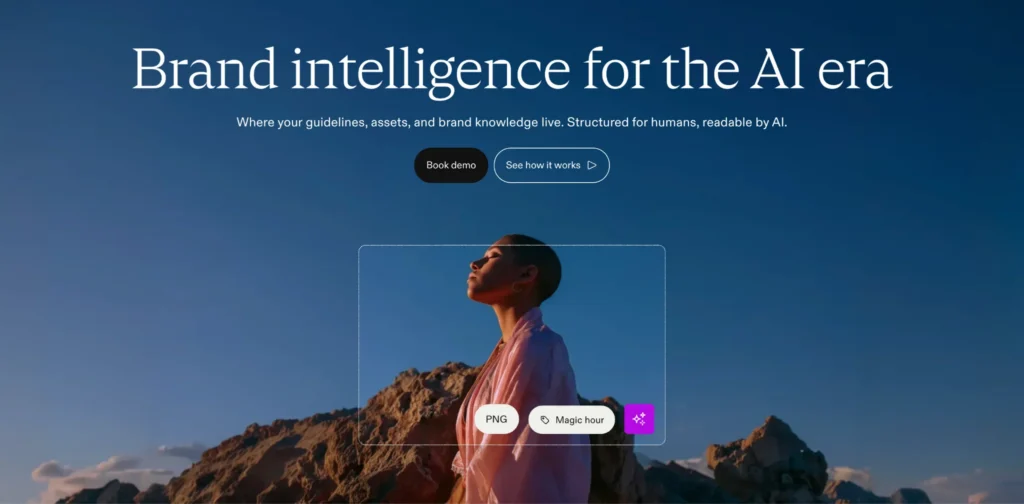
Frontify brings brand guidelines, assets, and design systems into one central portal. It helps teams find the latest brand information and gives stakeholders a shared reference point for how the brand should be used.
If the main challenge is helping people understand and access brand standards, Frontify addresses that need. Organizations that need extensive self-service content creation and data-driven localization should also assess how well the platform handles those production workflows.
3. Bynder: Best for storing and distributing approved assets
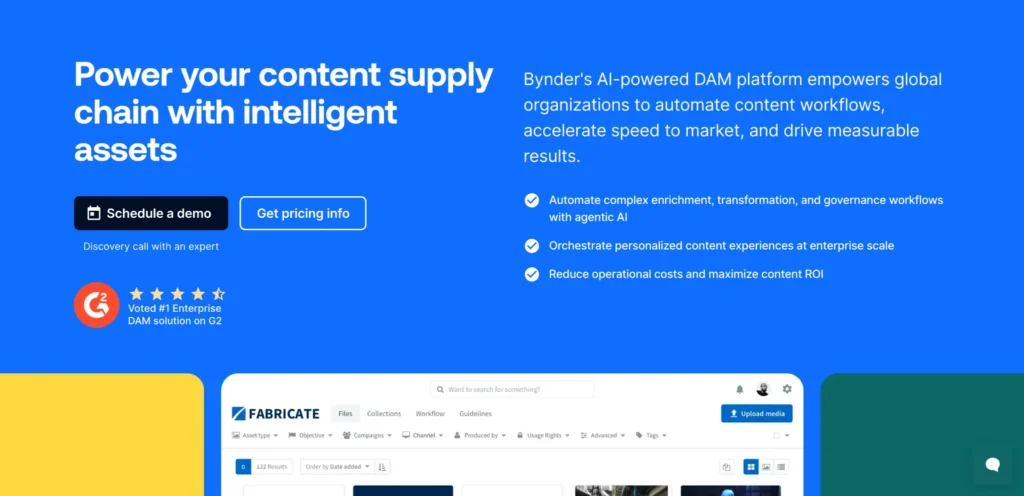
Bynder is an enterprise digital asset management platform focused on storing, organizing, governing, and distributing approved assets. Its strengths include metadata, rights management, integrations, and large-scale asset libraries.
However, Bynder’s extensive features and customization options can make the platform feel overwhelming for new users and admins. Teams may need additional training and onboarding time to get comfortable with its more advanced capabilities.
Fidelity National Financial: An example of successful brand automation
Fidelity National Financial manages content across more than 23,000 employees and 80-plus subsidiaries. Before Marq, marketing materials lived across local hard drives, teams worked in silos, and employees had to personalize content for thousands of sales executives manually.
The company created a central library of approved templates for print and social content in Marq. It also connected templates to data so SmartFields could populate details such as a sales representative’s contact information and photo, while admins could update master templates and make changes available across the organization.
Local teams could personalize content within the controls set by central marketing instead of creating materials from scratch. This gave teams more independence while giving admins greater control over how the brand was used across subsidiaries.
The company now has more than 800 registered users across 29 subsidiaries using Marq. Adoption also expanded beyond sales, with employees such as escrow officers creating their own materials in the platform.
Teams that previously worked separately could now create content in the same system, while central marketing could manage templates, updates, and brand controls from one place. This helped the organization support more contributors without adding a comparable amount of manual work for the central team.
According to Matt Sweet, Product Marketing Manager at Fidelity National Financial, Marq also helped teams collaborate more closely.
Pro tip
“We have 12–15 people designing and creating templates in the system, and before Marq they wouldn’t have collaborated with each other because of our competitive environment.” – Matt Sweet, Product Marketing Manager, Fidelity National Financial
Ensure brand consistency with automation
Your distributed network keeps growing, and so does the amount of content it needs to create. Marq helps central marketing support more contributors and content with approved templates, element-level editing controls, Smartfields for data-fed personalization, approval workflows, and centralized template management. Local teams can create and adapt content themselves while marketing maintains control over the brand.
FAQs
What is brand automation?
Brand automation is the use of software to automate content creation and management, so distributed teams can create content at scale while maintaining brand standards.
What are three common forms of brand automation?
Three common forms are template controls, approval workflows, and dynamic content population.
Is brand automation important?
Yes. As content volume and contributors grow, manual brand control breaks down. Automation applies brand rules during creation and can reduce routine production work for design teams.
What process cannot be automated?
Brand strategy requires human judgment. Software can apply the rules you set at scale, but people still decide the positioning, voice, and creative direction. Automation carries out repeatable tasks; it doesn’t replace the judgment behind them.