How marketing leaders scale multi-location marketing with AI

Multi-location marketing teams often face a scaling problem. More locations mean more demand for local content, but the central design team can’t manually create and review every flyer, social post, or campaign asset. Giving regional non-design teams more freedom to produce their own content speeds things up, but without the right guardrails, it can lead to inconsistent branding.
Generative AI seems like a natural solution. It helps non-design teams create content faster and produce variations for different locations without relying on the central design team for every request. But the same speed that makes AI useful can make it harder for central teams to maintain control. When anyone can create content in seconds, central teams need a reliable way to ensure that content still meets brand standards.
IAB’s data reflects the same concern. Over 70% of marketers reported at least one AI-related incident in their advertising efforts, including issues with off-brand content.
That’s where governance comes in. Without guardrails, AI can multiply inconsistent content just as quickly as it produces new content. Governed AI gives distributed teams more freedom to create while keeping brand standards in place.
This article looks at how marketing teams can put those guardrails in place without slowing down the non-designers creating content.
Why distributed teams should use AI to scale multi-location marketing operations
Marketing teams supporting multiple locations face several recurring pressures. Here’s why each one shows up, and what it costs the business.
Content demand keeps outpacing production capacity
In Adobe’s survey of more than 1,600 marketers, 62% reported that content demand had grown at least fivefold over the previous two years, and 71% expected it to grow more than fivefold by 2027.
For a fixed-size central team supporting multiple locations, rapid growth in content demand can create a backlog and push locations to produce their own materials, increasing the risk of inconsistent branding.
Brand consistency erodes as more people create content
As a brand expands to more locations, regional non-design teams take on more of the work of creating customer-facing content, making brand consistency harder to maintain. Without a shared system, teams use whatever tools, templates, and assets they have access to.
A sales rep might create a flyer in a familiar design tool, a regional marketer might interpret the brand guidelines differently, or a local designer might reuse an outdated asset from a shared drive.
Each instance may seem minor on its own. Across dozens of locations, those small differences add up. Customers can end up seeing different versions of the brand depending on where they interact with it, creating a fragmented brand experience.
Manual approvals slow everything down
Adobe found that 47% of marketers say creating, reviewing, approving, and activating one piece of content can involve 51 to 200 people; 18% say it can involve more than 200.
The same study ranks lengthy approval processes among the top three barriers to content production, alongside time constraints and siloed collaboration.
When reviewers check every asset for correct logos, disclaimers, and formatting, approvals create a backlog.
As content demand increases, review queues lengthen, slowing campaigns, delaying local teams, and leaving central teams with less time for higher-value work.
A 6-step framework for scaling multi-location marketing with AI
Marketing teams need to produce more content without losing brand control. The six workflows in this framework show where AI can reduce repetitive production work across a distributed organization.
| Step | Objective | Outcome |
| Train AI on brand tone and guidelines | Configure AI instance with a brand’s tone of voice and visual identity | AI produces and reviews content against real, specific brand standards instead of generic output |
| Automate personalization with data | Connect templates to dynamic data like names, prices, and locations | Hundreds of on-brand assets generate from one template and one data source |
| Build self-service content workflows | Let distributed teams generate projects without routing every request through central marketing | Central teams govern templates while local teams create projects when needed |
| Automate content creation from scheduled data checks | Generate content automatically when new information becomes available, with no request or ticket needed | Content is ready the moment a new listing, hire, or update is available, with no one having to ask for it |
| Flag brand errors before content becomes customer-facing | Let creators run a brand check or include one within the approval workflow | Fewer brand inconsistencies reach customers, reducing manual review |
| Localize across markets | Translate approved templates into multiple languages without rebuilding them | Global teams publish localized content while brand elements remain intact |
Step 1: Train AI on brand tone and guidelines
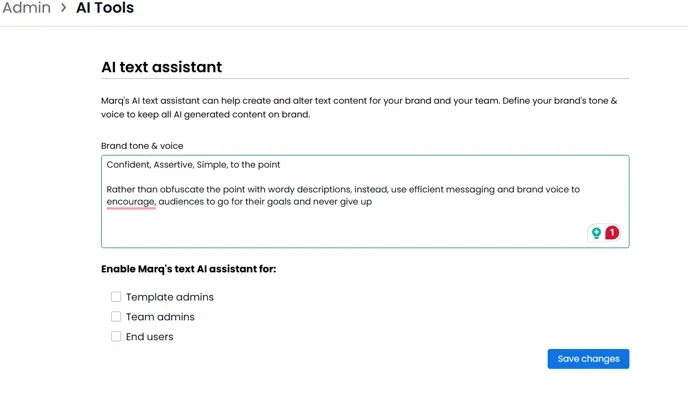
AI needs clear instructions to produce content that reflects a brand. Those instructions can cover tone of voice, approved messaging, colors, typography, and logo use. Without that context, AI may generate generic content that reads well but does not reflect your brand identity.
Marq configures written and visual guidance in separate tools. In AI Assistant, administrators describe the brand voice, then add instructions for specific audiences and use cases. AI Assistant uses those instructions when it helps ideate or rewrite copy.
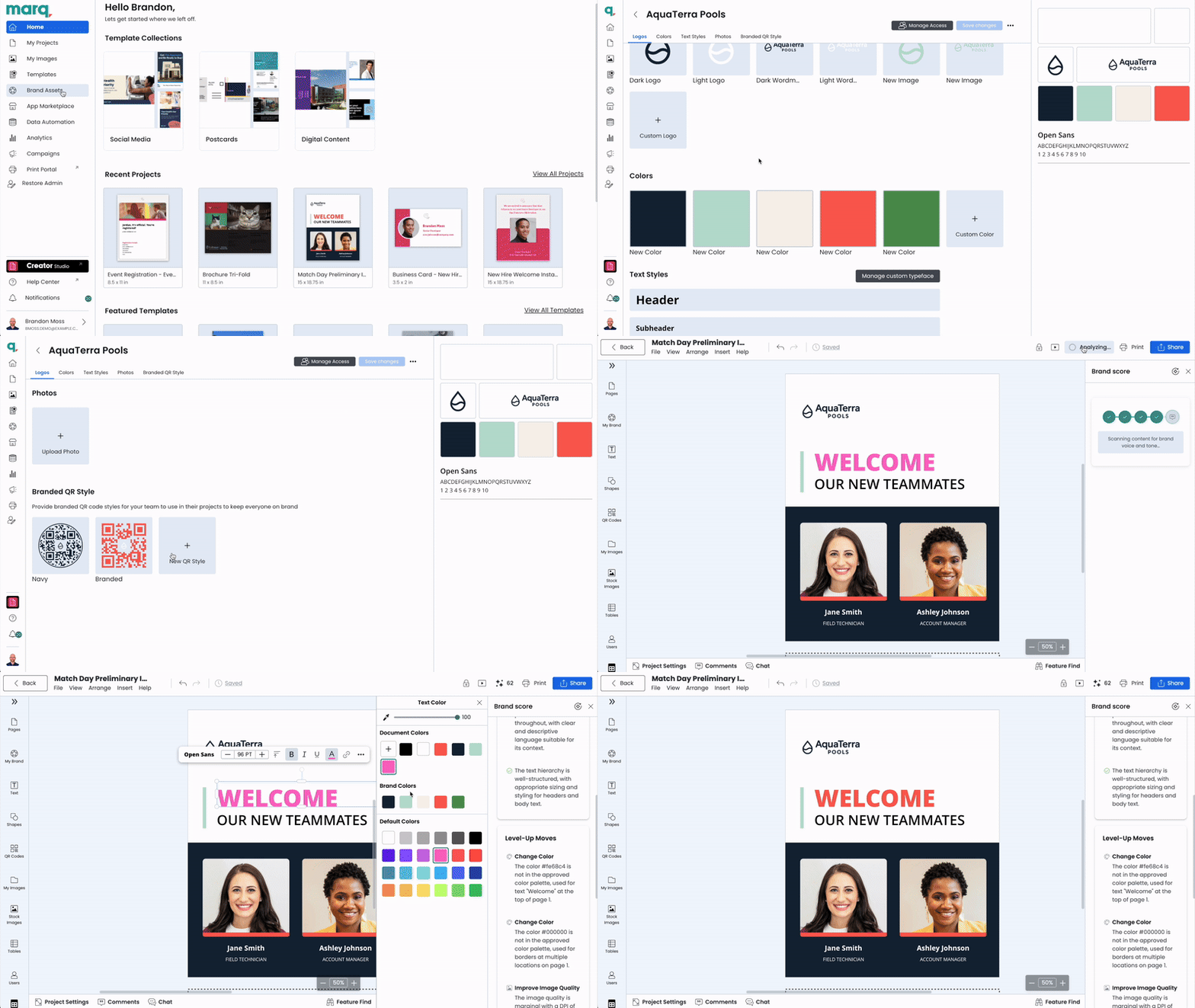
Administrators configure Brand Guardian with brand colors, typography, logo rules, custom guidelines, and example projects. Creators can then run a brand check, or teams can include one in a configured automation, to identify potential issues before publication.
Step 2: Automate personalization with data
Once brand rules are set, the next step is to connect templates to dynamic data, such as names, prices, and locations, rather than have someone retype the same details into every asset. This creates the foundation for AI content personalization at scale.
Marq’s Creative Automation can populate Smart Fields from CSV files, Google Sheets, XML files, and MLS data. For example, a real estate brokerage can connect listing data to a property-flyer template instead of re-entering each listing. With one spreadsheet of new listings, a rep can generate a complete set of on-brand property flyers in minutes instead of requesting updates for each one individually.

Step 3: Build self-service workflows for faster content creation
After connecting templates to data, distributed teams still need a way to create projects without routing every request through central marketing. AI Forms, part of Marq’s AI Marqet suite, provide that workflow.
A team member completes a form with the required details, and AI Forms uses those inputs to generate a populated Marq project from a configured template in seconds.
For example, a real estate agent can select a listing from a connected data source, choose a format such as a flyer, social post, or brochure, and generate a populated project without editing the underlying template or waiting for a central designer.
What this means for marketing leaders: Self-service changes the role of the central team. Instead of spending its time creating and reviewing every local asset, the team sets the standards, builds the templates, defines approval rules, and decides what regional non-design teams can create on their own. This reduces the central team’s production workload while giving local teams more freedom to move quickly within clear brand boundaries.
Step 4: Automate content creation from scheduled data checks
With scheduled automation, content can be created when a connected data source meets defined conditions, without waiting for a request.
Marq’s AI Marqet Playbooks monitor connected data sources on a schedule, typically every six hours, and create content at the next scheduled check when specific conditions are met, such as a new listing being added, a new employee joining, or a price change.*
* Playbooks are configured with support from the Marq team during initial setup, not switched on by end users. Once live, they run automatically on the defined schedule.
Step 5: Catch brand errors before customers see them
Content quality remains a concern when teams use AI for production. In Marq’s 2025 survey of midmarket-to-enterprise marketing leaders, 60% of Senior Marketing Executives named content quality as the top risk of using AI in marketing.
Creators can run Brand Guardian to compare a project with configured brand guidelines before publication. For example, it can flag an off-brand color and recommend the approved hex code. Its recommendations are advisory and can be overridden by Admins, who set the threshold for ‘on-brand’.
Step 6: Localize content across markets
For companies operating across countries, translation creates another challenge. Rebuilding an asset for each language adds production time and can introduce brand inconsistencies across markets.
Marq’s AI content translation, an app within the AI Marqet suite, helps teams translate marketing content into 50+ languages directly on the platform. Teams set up smart fields in a template, add the original content, choose the languages they need, and review the translated versions without asking a designer to recreate each asset.
The translation process keeps brand elements like colors, typography, images, and layouts intact. For content that needs human translation support, teams can connect the same templates with Crowdin, Lokalise, or Blend to manage professional translation workflows.
KPIs for marketing leaders scaling multi-location marketing
AI should let regional teams create content quickly across locations, while giving central marketing teams the control to keep every asset on brand.
Use the metrics below as a starting point and adjust them to fit your team. First, measure your current performance, then track how it changes over time instead of comparing it with a preset target.
| Metric | How to Define It | Owner | When to Track It |
| Time-to-publish | Time from request to live asset, across all locations | Marketing Ops | Per asset, review monthly |
| Approval cycle time | Time between submission and final approval | Brand Admin | Monthly |
| First-check brand correction rate | Share of projects that don’t meet brand standards on the first review | Brand Admin | Monthly |
| Content production volume | Assets created, by location, team, or region | Marketing Ops | Monthly |
| Template adoption rate | Share of projects created from central templates, rather than built from scratch | Marketing Ops | Quarterly |
| Self-service ratio | Share of projects created by regional teams without a central request | Marketing Ops | Monthly |
| Design team request backlog | Open requests waiting on a designer | Central Design Lead | Tracked routinely |
| Cost per asset | Total production cost ÷ assets produced | Marketing Ops | Quarterly |
Marq: AI for multi-location brand management
Marq combines each step from this framework together – templates, automation, and optional brand checks in one platform, reducing the need to connect separate tools. Teams can apply different templates and brand profiles across locations, subsidiaries, or sub-brands, while the brand is managed centrally.
1. Creative automation populates governed templates with connected data
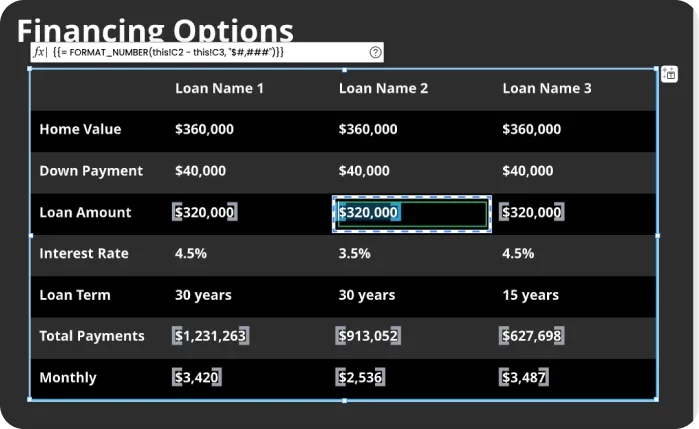
Creative Automation connects templates to supported data sources, including CRM data, CSV files, Google Sheets, XML files, and MLS data, reducing manual entry of pricing, contact, and location details.
Teams can use formulas to calculate record-specific values, such as rate cards or mortgage estimates.
2. AI Marqet generates projects from forms, workflows, and scheduled data checks
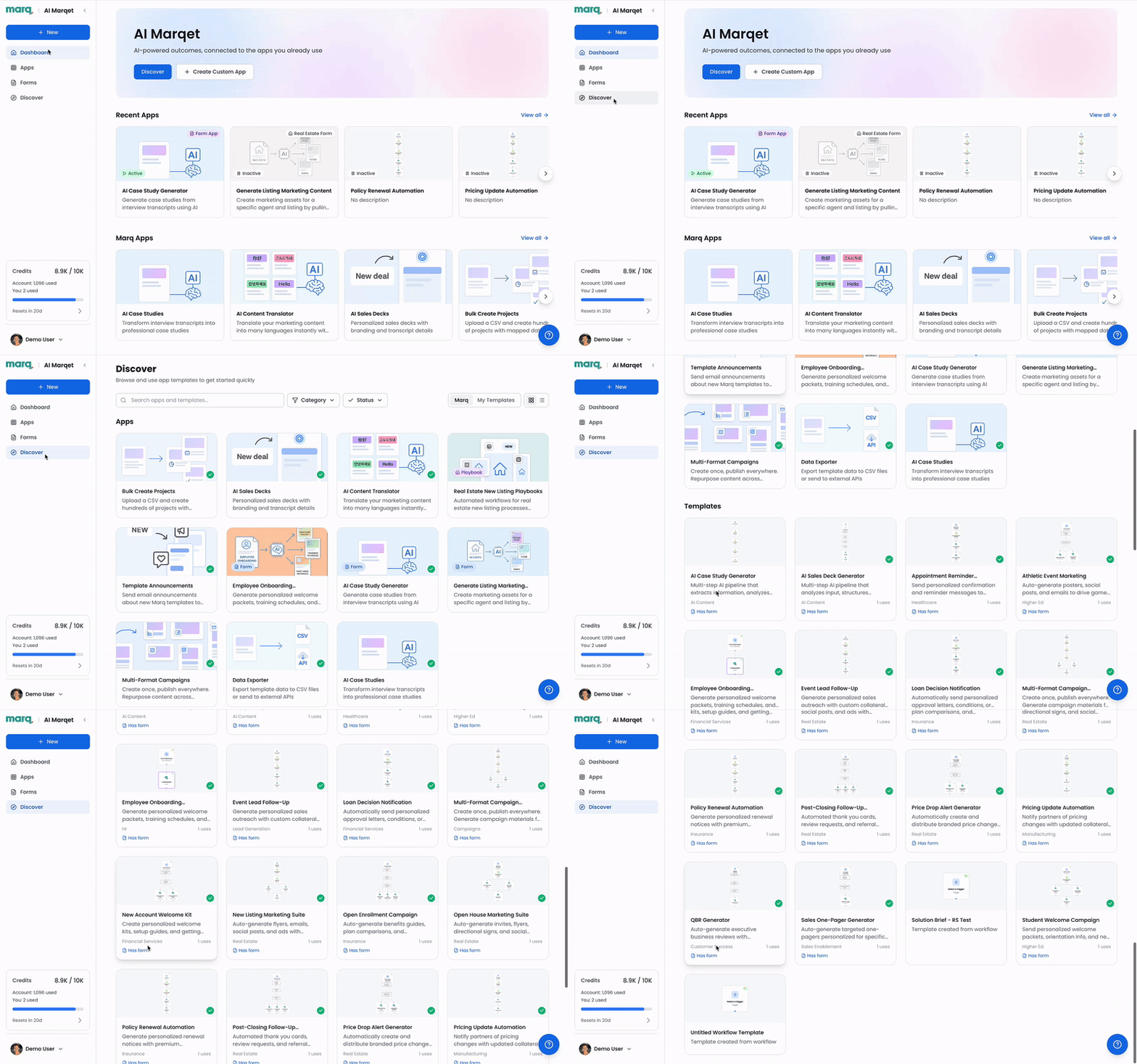
AI Marqet includes ‘Apps’ supporting different workflows:
- AI Forms let a team member submit a short form that generates a populated Marq project from a configured brand template.
- Workflows handle more complex, multistep processes. In the AI-assisted App Builder, teams describe the intended process in plain language, and AI generates the initial workflow structure for review and configuration.
- Playbooks check connected data on a schedule and generate projects during the next check when configured conditions are met.
3. Brand Guardian catches errors before they reach customers
Creators can run Brand Guardian to compare a project with configured logo, color, typography, and custom guidelines. Brand Guardian flags potential issues and provides advisory recommendations before approval or publication.
Brand Guardian also supports multiple brand profiles, so companies with different subsidiaries or sub-brands can apply the right standards to each asset.
See how Marq simplifies multi-location brand management.
Scale multi-location marketing with AI
AI can handle repetitive production work, giving marketing teams more time for campaign planning, brand governance, and performance analysis.
Marq combines approved templates, data-driven personalization, AI-assisted brand checks, approval workflows, and translation for teams managing content across locations and channels. It helps local teams create content faster while giving central teams the controls they need to protect brand consistency.
Book a demo to see how Marq works for your brand.
FAQs
1. Who should own AI governance in a multi-location marketing team?
Governance usually sits with the central marketing or brand team, who create templates, define brand rules, and set the threshold for what counts as “on brand.” Local and regional teams then create within those guardrails.
2. How do you measure whether AI is actually helping, not just producing more?
More content doesn’t necessarily mean better performance. If teams produce more assets but spend more time correcting them, AI may be increasing output without improving the overall process.
Track production metrics such as time to publish, content volume, and self-service rate alongside quality metrics such as first-check brand correction rate. This shows whether AI is helping teams move faster without sacrificing brand consistency.
3. Does AI-generated marketing content need human review before publishing?
Not every asset needs the same level of review. For routine, templated content, automated brand checks can catch common issues such as incorrect colors, logo misuse, or off-brand copy before publication. Regulated, legal, or otherwise high-stakes content still needs human review to ensure it meets the necessary regulatory and compliance requirements.