Multi-location brand management: Scale without losing brand control

For marketing leaders managing distributed companies, brand inconsistency is usually an operational problem, not a creative one.
Local teams reuse outdated files to meet deadlines, non-designers recreate content in whatever tools they have available, and approved assets get buried across shared drives. The result is a growing number of collateral that look slightly different from one location to the next.
Multi-location brand management solves this by building standards and guardrails into the systems teams already use.
This article explores why consistency becomes harder to maintain as companies grow, how marketing leaders can balance local speed with central control, a step-by-step framework for scaling brand execution, and the software that supports it.
3 common reasons brand consistency breaks down across locations
For multi-location teams, brand consistency starts to erode when local content demand outpaces the systems used to create, approve, and distribute it. The strain usually appears in three ways.
1. Local teams reuse outdated assets to meet deadlines
Most off-brand content starts with a tight deadline. A sales rep or regional coordinator needs a flyer, social post, or presentation the same day. Instead of searching for the latest version, they reuse the last file they can find.
That file may often contain an old logo, outdated messaging, or retired colors. Each time someone edits and saves it, another version enters circulation. Over time, outdated assets become harder to separate from approved ones, making consistency harder to maintain across locations.
In a Marq survey of more than 400 brand-management experts, respondents estimated that consistently maintaining their brand could increase overall growth by up to 20%
Relying on outdated assets makes that consistency much harder to achieve.
2. Brand updates do not reach every location at the same time
A rebrand launches on a Monday. The central marketing team has the new files ready that morning, but a regional team does not see the update for weeks. By then, they have already printed brochures, shared presentations, or published materials using the old brand elements.
This is a widespread problem. According to Canto’s State of Digital Content 2026 report, 35% of content and creative professionals aren’t confident their teams always reach for the latest approved assets.
Updates often rely on announcements, emails, or shared folders, but those channels do not guarantee that every team uses the latest version. Old assets stay in circulation because no system replaces them or removes access to them.
The result is inconsistent customer experiences, extra work for central marketing teams, and less control over how the company appears across locations.
3. The design team becomes a bottleneck
Many companies expect the central design team to create or review every asset. That works for a while, but as more locations need content, requests quickly pile up.
Johns Hopkins University faced the same problem.
A creative strategy team of four served thousands of staff, and wait times stretched to three or four weeks when the queue was heavy. People who couldn’t wait went around the team, hiring a freelancer or building it themselves. Each workaround opened the door to brand mistakes.
The challenge of control vs flexibility for marketing leaders
Marketing leaders need to protect the brand without forcing every local request through the central team. Local teams need enough freedom to adapt approved content for their markets. This balance is central to effective franchise brand management.
- Overly centralized systems route every local change through central marketing. As the number of clients or requests grows, the marketing and creative team is often forced to function as a service desk. They spend the bulk of their time on logo swaps and address changes while local teams wait for routine assets.
- Ungoverned self-service systems let users change brand elements without oversight. Versions multiply, teams work around brand standards under deadline pressure, and central marketing loses visibility into published content.
- Controlled flexibility lets local teams change addresses, agent photos, and regional offers while keeping logos, colors, and layouts fixed.
Marq supports controlled flexibility by letting designers lock logos, colors, and layouts once while leaving selected fields editable. Local teams can update approved content without sending every request to central marketing.
See how digital brand governance works in practice.
6 best practices for managing brand execution across every location
The table summarizes a six-step framework for controlled flexibility. The sections below explain how to apply each step.
| Step | Objective | Expected outcome |
| Set non-negotiable brand standards | Define the rules that cannot change anywhere | A clear line between what’s fixed and what’s flexible |
| Standardize through governed templates | Turn approved designs into locked, editable templates | Consistency at scale without slowing teams down |
| Build a centralized asset hub | One source of truth for every approved asset | Teams stop recreating and start reusing |
| Enable local teams within guardrails | Let field teams self-serve safely | Speed for the field, control for the brand |
| Automate personalization with data | Auto-fill location, contact, and compliance details | Personalized assets without manual re-entry |
| Add approval and governance workflows | Route the right content through review | A safety net for high-stakes or regulated content |
Step 1: Set non-negotiable brand standards
Before choosing software, decide which elements each location can change. Logo, primary colors, and typography are usually fixed. Photography style, regional offers, and contact details usually flex by location.
Document these decisions in a short reference that teams can use during production. Tie each rule to your brand marketing strategy so teams understand its purpose.
Step 2: Standardize content through governed templates
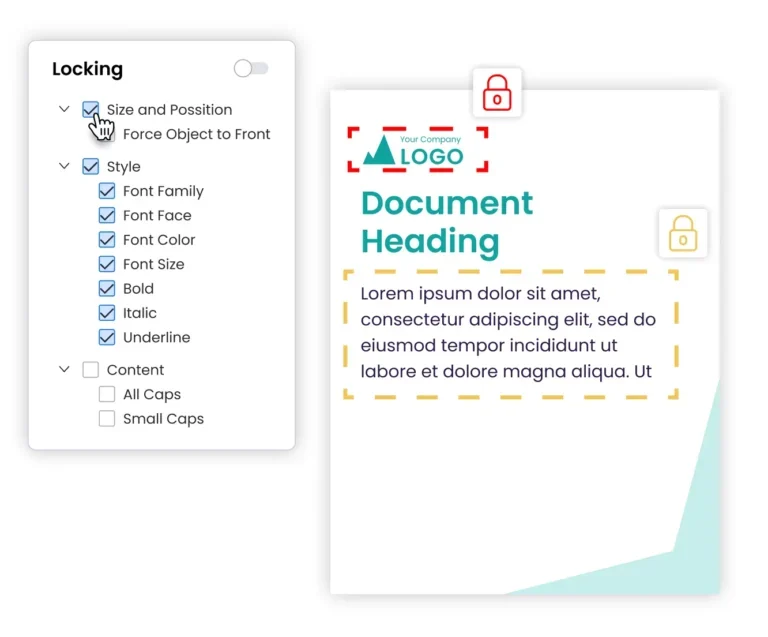
Guidelines tell people what to do. A locked template limits what they can change. Turn approved designs into templates with locked brand elements and editable fields for local teams.
When a local team opens a governed template, they can’t drag the logo, change the font, or recolor the header. They can update the headline, swap the property photo, and add their contact block. The template preserves the fixed brand elements by default. Every approved template, logo, and image needs one home. When people know exactly where to find the current version, they stop making their own. A central hub kills the “which file is right?” question that drives inconsistency.
Marq is purpose-built for this. Designers can import packaged InDesign files into Marq, configure locks, and convert the project into a reusable brand template. Now non-designers can customize for their own needs independently.
See how brand governance works when it’s built into a template instead of a static brand guideline.
Step 3: Create a centralized asset and template hub
Keep approved templates, logos, and images in one searchable hub. When teams can find the current version, they are less likely to recreate it or use an outdated file.
The efficiency case is direct. When an approved asset is hard to find, teams tend to rebuild it instead of reusing it. A single, searchable library gives them one place to look first. Pair your hub with a DAM integration so stored, approved assets actually reach the teams who need them.
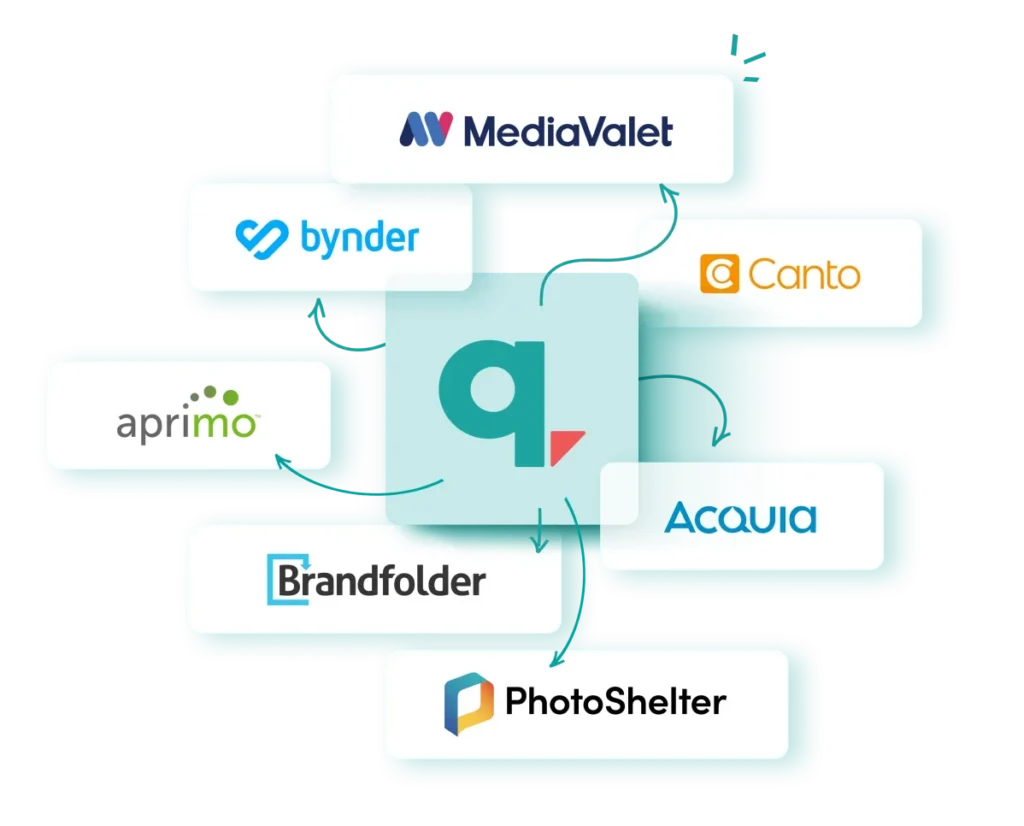
Connecting a DAM to Marq lets a representative place approved assets directly into a lockable template.
Step 4: Enable local teams within guardrails
In Marq, admins can share approved templates with specific groups, so each regional office or department accesses materials relevant to its work or subbrand.
Beth Fritzinger of Johns Hopkins described creating template collections “just for a certain department that only they have access to.” Separate collections give the alumni and athletics teams access to templates approved for their departments.
Step 5: Automate personalization with data
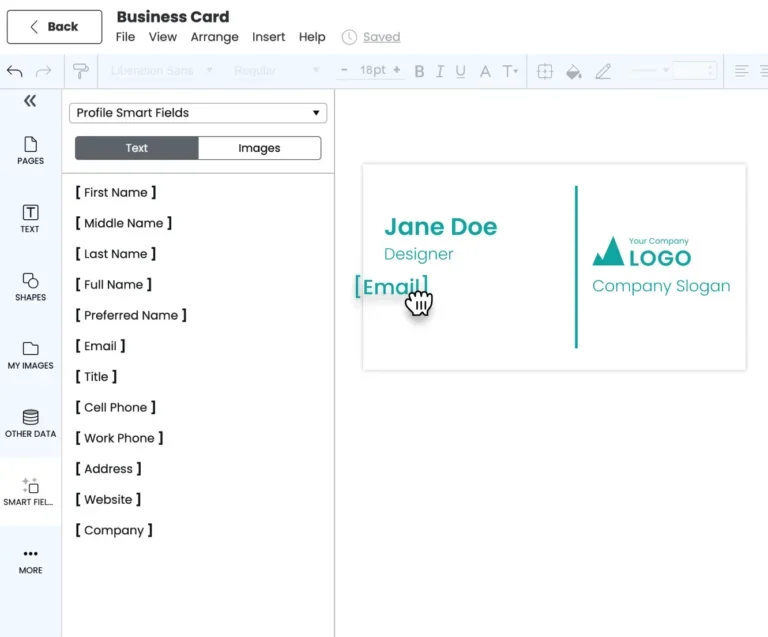
Manual personalization takes time and invites errors. Smart Fields in Marq cut down on both by filling template placeholders automatically. When someone creates their own copy of a template, Marq matches the fields to their account.
Marq offers a few types of Smart Fields, each suited to a different kind of information:
- Profile fields carry each person’s details, such as name, title, headshot, phone, and email, so each rep’s copy automatically shows their information without manual entry.
- Team fields hold shared company details like headquarters address, company name, and slogan.
- Custom fields cover anything the standard options don’t. You create them yourself, and each user gets their own value.
- Data automation fields pull from a connected source like a Google Sheet, XML, or MLS feed. Map the columns to your template, and each row populates its own on-brand asset.
Fidelity built templates with smart fields that automatically add a rep’s contact info and photo, so salespeople personalize their own collateral with zero design work.
Step 6: Implement approval and governance workflows
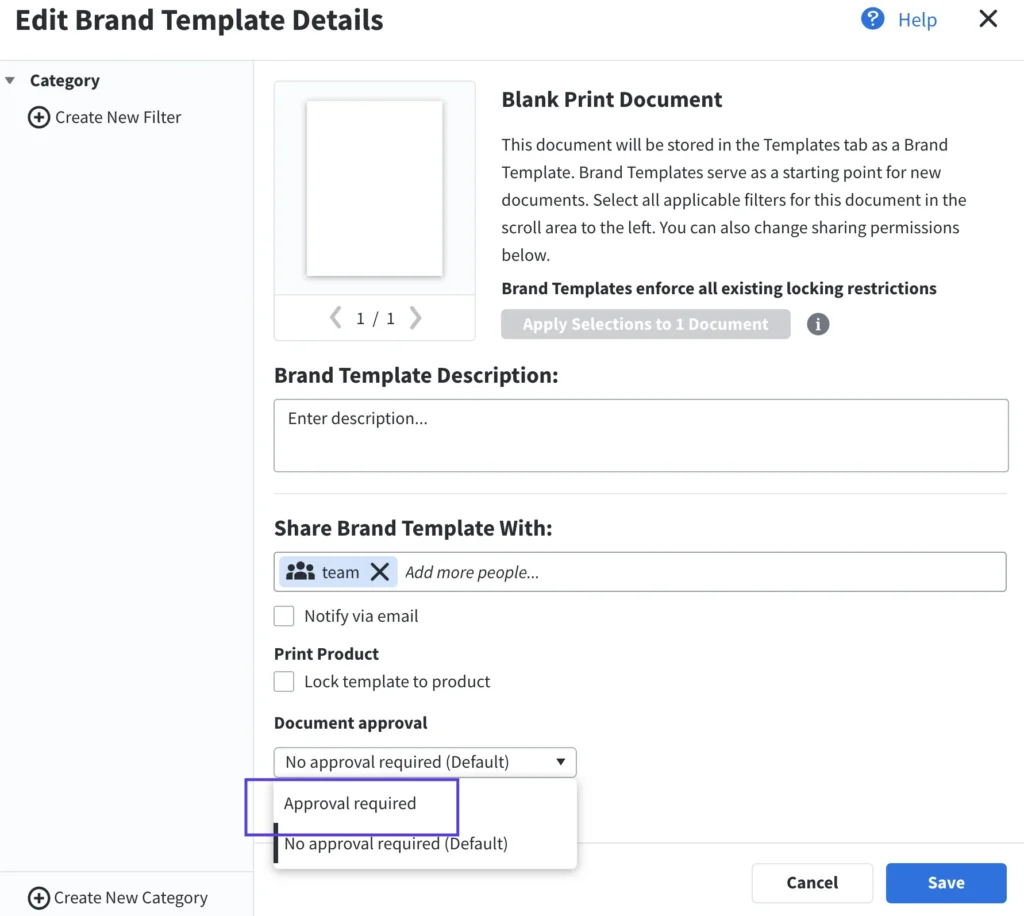
High-stakes or regulated content, such as legal disclaimer changes and compliance-sensitive campaigns, needs review before publication. In Marq, admins can require users to request approval before downloading, printing, or publishing a project; users then select an approval admin.
The point isn’t to slow everyone down. Locked templates can support routine content creation without review. Use approvals for content that needs additional scrutiny. Learn how to support brand compliance without turning every design request into a bottleneck.
Book a demo to see how Marq supports governed, self-serve content creation across locations.
Key metrics marketing leaders should track across locations
Track the following metrics to determine whether your multi-location brand system is working.
- Content turnaround time: Measure the time from request to finished asset. Longer turnaround times can signal a bottleneck.
- Template adoption rate: Measure the share of eligible team members who use governed templates. Low adoption can indicate that templates are difficult to find, too restrictive, or unsupported by training.
- Self-service asset volume: How many assets do local teams produce without routing work through the design team?
- Off-brand incident rate: How often does off-brand content reach the market? Track incidents before and after rolling out templates. A decline can indicate that the governance system is working.
- Design team capacity reclaimed: Track changes in hours spent on routine requests or request volume.
- Revenue and growth signals: Track brand recall, lead quality, and regional performance over time. These business indicators provide context alongside the operational metrics above.
For a deeper list, see these brand metrics worth monitoring.
Mistakes to avoid when implementing brand control across locations
Several implementation choices can slow a rollout.
Locking everything down
If templates leave no room for local edits, teams may return to old files or free tools brand stewards are trying to retire. Lock brand elements and leave approved local fields editable. Control without flexibility tends to push rogue content creation where you can’t see it.
Treating a DAM as the whole solution
A digital asset management (DAM) system can centralize approved assets, but storage alone does not surface or place those assets into new content. Connect a DAM to Marq so representatives, partners, and regional marketers can more easily activate approved assets in governed templates.
Explore how brand enablement and DAM work together.
Rolling out without training or a clear owner
Purdue appointed a senior designer as its Marq lead, built a test group, and ran training before a university-wide rollout. Without an owner and training, teams can struggle to adopt a new system. Name an owner, start with a pilot group, and expand after teams use the workflow successfully.
Ignoring the content requester’s need for speed
If the on-brand workflow is slower than the workaround, local teams may use the workaround instead. Make the governed workflow faster than copying an old file. Avoid the branding mistakes that come from designing for control while overlooking speed.
Case studies of multi-location brands managing brand control
Here is how three organizations in different industries use Marq to manage multi-location brand work.
@properties | Christie’s International Real Estate
@properties supports 3,500+ agents across 44 offices in four states. Their previous template vendor took four to six weeks to produce a single template – which delayed time-sensitive listing materials. With Marq, their team uploads an InDesign file, locks the branding, and hands agents a ready-to-use template in minutes.
“It could easily take 4-6 weeks to get one template created, let alone upload it… content is only as good as you can distribute it.” – Natasha Patla, Chief Marketing Officer, @properties | Christie’s International Real Estate
Agents now create postcards, brochures, and social posts from approved templates and publish or print them independently. Explore Marq for real estate.
Fidelity National Financial
Fidelity National Financial has 23,000 employees across more than 80 subsidiaries and multiple distinct sub-brands. Before Marq, marketing files lived on scattered hard drives, and personalizing materials for 2,000 sales executives was slow and error-prone. Marq gave them one central repository and smart fields that auto-fill each rep’s photo and contact details.
The result: 800+ non-designers access the tool across 29 subsidiaries, including escrow officers who create on-brand content. See Marq for financial services.
Purdue University
Purdue’s Marketing and Communications team supports 13 schools and colleges across six campuses, along with 2,000+ staff and 106,000+ students. Once the team was asked to focus on bigger university-level brand work, they gave campus partners a way to self-serve: a library of over 340 governed, on-brand templates, available university-wide. Partners have since exported around 40,000 documents on their own.
“It’s just been totally transformative. Marq has not only allowed us to produce better quality pieces, but also a higher quantity of pieces because it’s just so easy and convenient to use.” – Andrea Mattingly, Communications Director for Student Programs, Purdue University
That self-sufficiency freed the central team to scale up to 129 active brand-building projects at once. More on university branding.
The best software for scaling multi-location brand management
Different platforms support different parts of the workflow. The following comparison looks at three options and the teams they may fit.
1. Marq
Marq is a brand enablement platform that supports governed content creation among teams that need to scale production with speed and control. Designers lock brand elements in templates, local teams self-serve their content needs and personalize approved fields, and Smart Fields can populate mapped template fields from a data source, instead of manual edits.
It’s the brand control layer that lets large teams open up content creation while staying on brand.
Strengths:
- Template governance: Templates with locked elements, editable fields, and specific access permissions.
- Brand Kits and Smart Brand Mapping: Apply approved logos, colors, and fonts for multiple brands onto mapped elements in a template or project.
- Smart Fields and data automation: Populate mapped template fields with profile data or connected data sources like a spreadsheet, CRM, or DAM.
- Template sharing and access controls: Share brand templates with specific users or groups and control who can access them within their own portal.
- Integrations: Connect Marq with supported DAM, CRM, storage, and workflow tools so governed content works with your existing creative workflow. See the full integrations list.
Limitations:
- Marq is less suited to open-ended design. If your team needs to start with a blank canvas and freely explore layouts, concepts, and visual directions, Marq may feel restrictive. It works best when teams need a clear structure around how content gets created and distributed.
Best for:
- Distributed teams in brand-sensitive or regulated industries that need governed, self-serve content creation across many locations.
2. Canva
Canva is a strong choice when the priority is making content creation easy for everyone. Its intuitive interface and wide adoption mean most people can pick it up quickly without much training. For small teams without dedicated designers, that ease of use can make everyday content creation much simpler.
Strengths:
- Large template library: Canva offers more than 4.5 million ready-made templates across a wide range of formats.
- Easy drag-and-drop editing: Its drag-and-drop editor lets non-designers swap images, edit text, and adjust layouts without needing specialist skills.
- Built-in AI features: Canva’s AI features can generate and edit designs, images, text, and other elements directly in the editor. Teams can also use AI to adapt designs and apply brand styles, which can speed up local content creation.
Limitations:
- Limited brand controls on lower tiers: Key brand management, team administration, and security features are reserved for Canva’s Enterprise plan, which can make the full governance setup costly for smaller companies.
- Harder to control local variations: Canva gives teams plenty of creative freedom, but that can make it harder to keep every location within approved brand standards as the number of users and assets grows.
Best for:
- Small-to-mid teams that prioritize design freedom and ease of use over governance.
Frontify
Frontify is a strong DAM for hosting guidelines, logos, and brand rules in one accessible place. If your priority is a single reference point for what the brand looks like, it does that well.
Strengths:
- One place for brand standards: Frontify gives every location access to the same brand guidelines, approved assets, logos, and usage rules, reducing the chance that teams work from outdated or inconsistent files.
- Controlled access for local teams: You can give regional offices, agencies, and other external partners access to the resources they need without giving everyone control over the full brand library.
Limitations:
- Frontify works well for storing and distributing approved brand assets, but it gives non-designers less room to adapt those assets into location-specific content. Teams may still need design support when they want to change layouts, add local details, or create new versions of existing materials.
Best for:
- Organizations that want a polished library for their brand guidelines and reference assets.
Ensure brand consistency across every location with Marq
Marq gives you one place to build and control governed templates, auto-fill approved data with Smart Fields, and assign role-based access so each team edits only what it should. The result is on-brand content that local teams can create without sending every request to the design team.
See how Marq supports on-brand content across locations. Book a demo today!
FAQs
Who should own multi-location brand management internally?
Assign one owner, usually in brand or marketing operations, who decides what gets locked, who gets access, and when templates change. The right person is whoever manages the templates and can approve brand standards.
How to get local teams to use the templates instead of working around them?
Make the template faster to use than the workaround. Pre-fill logos, colors, and contact details so teams can create assets without searching for common elements.
Before launch, have a few non-designers create assets with the templates and flag anything they can’t customize or anything they still need. Fix those gaps before rollout. After launch, review usage by team. Low usage usually points to a missing template, a field that needs to be editable, or a template that’s difficult to find.
How to keep templates current as the brand evolves?
Review the library on a set schedule and update master templates from a central location. Retire outdated templates as new versions are released so teams don’t have two versions in circulation.