Creative operations steps, metrics, and platforms

Creative teams are being asked to support more campaigns, channels, and distributed teams without a matching increase in headcount. As requests pile up, routine edits, resizes, and one-off assets consume the time designers need for higher-value creative work. Creative operations helps teams manage intake, priorities, production, and approvals so they can handle growing demand with the resources they already have.
This article explains how to build a workable creative operations process, which platforms support each part of the workflow, which metrics reveal bottlenecks, and how organizations increase output without overloading their creative teams.
Why efficient creative operations becomes necessary as teams scale
A two-person design team can manage work through email and a ticketing system. That approach starts to break down as the company adds channels, offices, and teams that need marketing materials. Each addition brings more requests, versions, and reviews, putting all of that extra work on the same small team.
Here is how the pressure builds:
- More channels and markets mean more versions. One campaign now needs print, email, social, and web sizes, plus a version for each region or office. A single brochure turns into 15 files.
- More requesters mean more intake work. Requests arrive through email, chat, texts, and hallway conversations. Someone has to sort them, ask for missing details, and decide what goes first.
- Unclear decision rights mean longer reviews. Nobody knows who has final say, so marketing, legal, and the requester all weigh in. In a sample of more than 1,600 marketers (Adobe, 2025), 89% said content goes through three or more approval stages, and 58% said reviews and approvals take up more than 40% of their time. That is time spent waiting and re-editing instead of producing.
- Designers get pulled into repeat work. Updating contact details, swapping headshots, and resizing flyers takes time away from higher-value design work..
- Requesters wait, then improvise. A sales rep with a client meeting tomorrow won’t wait two weeks for a flyer. They open an old file, change it in PowerPoint or Canva, and send it. The flyer reaches the client with a stretched logo or an outdated disclaimer.
Marketing teams often lack the resources to keep up with growing demand. In a survey of 401 CMOs and marketing leaders, 54% reported insufficient resources, with marketing budgets averaging 7.8% of company revenue. As companies add locations, product lines, and channels, the workload keeps growing.
Much of that workload comes from producing the same types of assets repeatedly. A marketing manager and graphic designer at a mortgage company described her scope this way:
“I help all of our loan officers with marketing. So I would do like open house flyers, co-branded flyers, business cards, and all that.“
– Marketing manager and graphic designer, mortgage company
Benefits of creative operations
Requesters know when to expect a finished asset, and designers face fewer interruptions. The gains show up in four places.
Routine requests move faster
A single intake form that asks for the deadline, size, channel, and approver means designers stop chasing missing details. Requesters can make repeat pieces like event flyers and social posts from pre-approved templates without waiting for a designer. At Johns Hopkins University, staff now turn around a flyer in a day or less, down from a lead time that could reach three to four weeks.
Designers spend their time on work that needs a designer
Time spent updating phone numbers leaves designers less time for campaign work. Once campus partners at Purdue University started making their own materials from a library of more than 350 templates, the Marketing and Communications team took on as many as 129 active brand projects at a time. Clear roles make that shift easier to manage; our guide to creative team management covers how to structure those roles.
The brand looks the same in every office
Locked logos, colors, and disclaimers mean a flyer from the Phoenix office matches one from Denver. In insurance and financial services, that also means fewer pieces bounce back from compliance for an outdated disclosure or an altered logo.
Leaders can see capacity and plan ahead
Tracking every request in one place shows which teams ask for the most, which asset types take longest, and where reviews stall. That data supports a headcount request, a change to review rules, or a decision to template an entire asset category.
Shared visibility also makes design collaboration easier, because designers and requesters work from the same status instead of chasing each other for updates.

Make creative operations easier to scale with Marq
Give your team a clearer path from request to delivery while reducing repetitive design work and unnecessary review cycles.
How to manage creative operations: 5 steps for marketing leaders
Creative operations management covers far more than any one tool. The five steps below build on each other: map the work, assign owners, set up one source of approved assets, turn repeat requests into templates, and decide what needs review.
1. Audit your current creative workflow
Pull the last 90 days of requests from every intake channel, including email, chat, and project boards. Log each one with the asset type, requester, due date, delivery date, and number of revision rounds.
A real estate brokerage might find that listing flyers, open house signs, and agent bio sheets make up most of its volume. A university might find that event posters from 20 departments fill the queue every September.
Then trace one typical request from submission to delivery, including every handoff, and mark where it sits idle. Our overview of the creative process breaks down the stages to map.
Pro tip:
Replace scattered intake with one request form. Make the deadline, channel, dimensions, audience, and approver required fields so designers don’t have to chase details.
2. Define ownership across the team
Many review delays start with one unanswered question: who has the final say? The Responsible, Accountable, Consulted, and Informed (RACI) chart helps answer that question. It assigns four roles to each task
- Responsible (does the work)
- Accountable (makes the final call)
- Consulted (gives input)
- Informed (gets updates)
Atlassian recommends exactly one accountable person per task so decisions don’t conflict.
| Asset type | Responsible | Accountable | Consulted | Informed |
| Local event flyer | Office marketing coordinator | Regional marketing manager | Office manager | Brand team |
| Product sheet with pricing | Product marketer | Director of product marketing | Sales operations | Brand team |
| Insurance flyer with rates | Designer | Compliance lead | Legal | Requesting agent |
Share the chart with requesters too. Because the chart identifies the compliance lead as the rate-sheet approver, a sales rep knows whom to contact as a deadline approaches. Product design teams use the same approach in DesignOps.
3. Keep approved brand assets in one library
A regional manager needs the company logo, asks a colleague, and gets a 2019 version from an old email. Repeat that across 30 offices, and multiple versions of the same logo end up in circulation.
Store approved logos, photography, fonts, and legal disclaimers in one library, usually a digital asset management (DAM) system. Retire outdated versions, set expiration dates for licensed photos, and give each team access to the assets it needs.
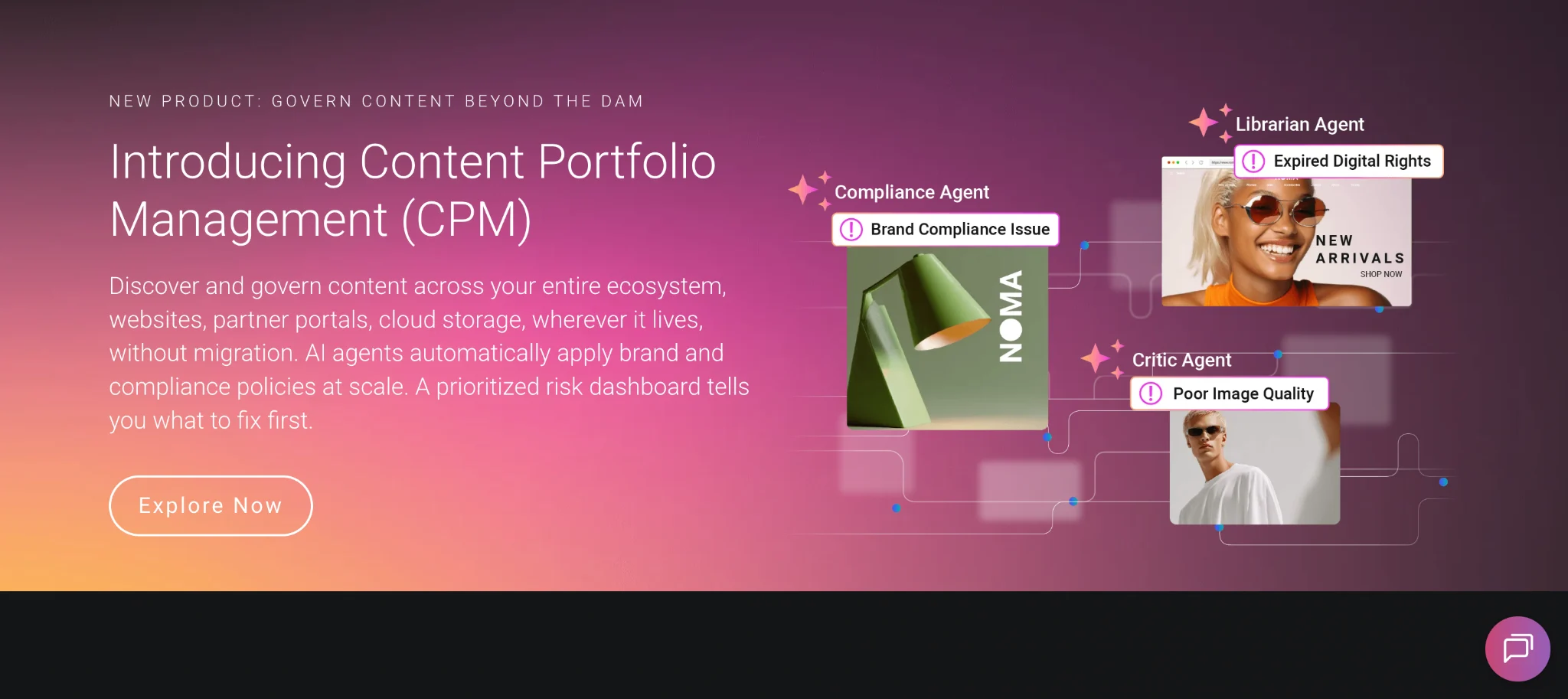
A central library keeps approved assets in one place, but people still need to use those assets to create materials. Connect the DAM to the platform where teams create content, so users can pull approved files directly into templates instead of downloading and editing them elsewhere.
Marq connects to DAM systems such as MediaValet, allowing template users to access approved images from the DAM within their templates. The DAM stores the approved files, while Marq gives teams a controlled way to use them in branded materials.
4. Turn your most common requests into brand-safe templates
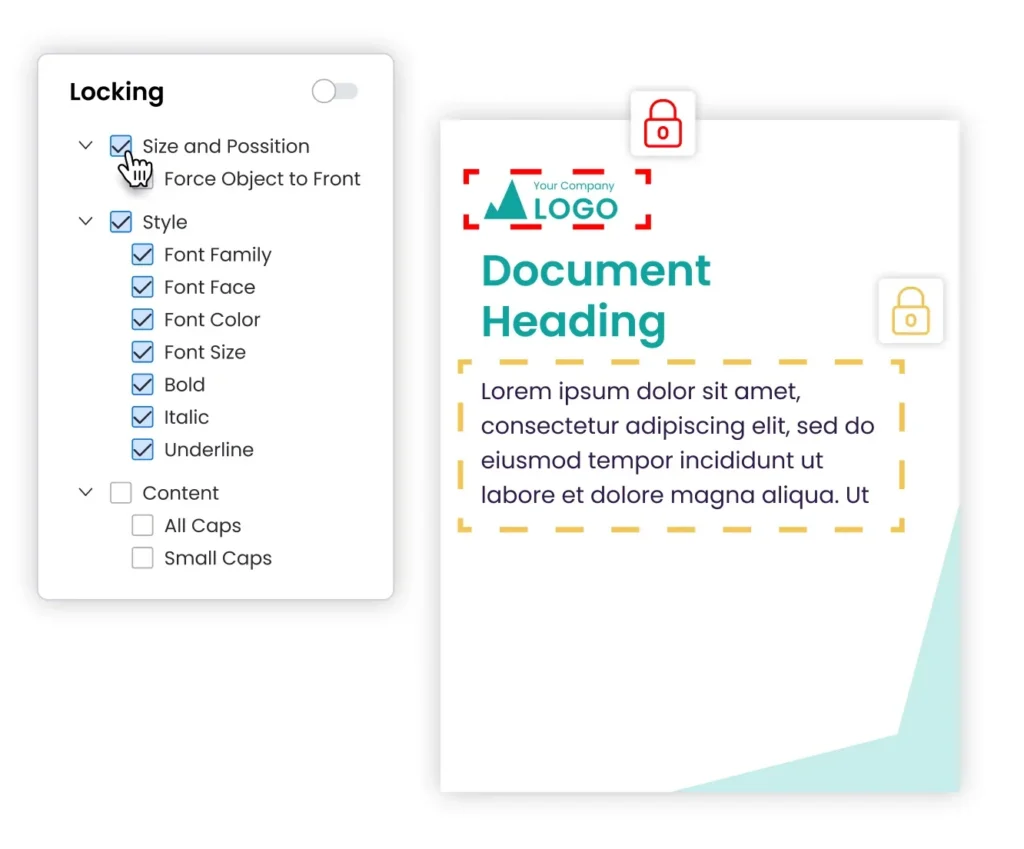
Take the top five to ten asset types from your audit. A designer builds each one once, locks the logo, colors, fonts, and legal copy, and leaves the headline, photo, and contact details editable. Requesters fill in the editable fields, then export the finished piece.
A marketing manager at a multi-state insurance carrier described why she needed this kind of setup:
“We needed a place to house marketing materials that then I don’t have to touch every single time…I’m not sending them a Canva template, and then they end up moving things around or whatnot.“
– Marketing manager, multi-state insurance carrier
Templates save time only when people use them, and that depends on how easy they are to fill in. A head of marketing at a global manufacturer put it bluntly:
“No one’s bloody using this thing, right? And…trying to fit stuff into a PowerPoint template is the first thing that’s just going to turn people off…So for me, it’s a usability thing, not a functionality thing.”
– Head of Marketing, global manufacturer
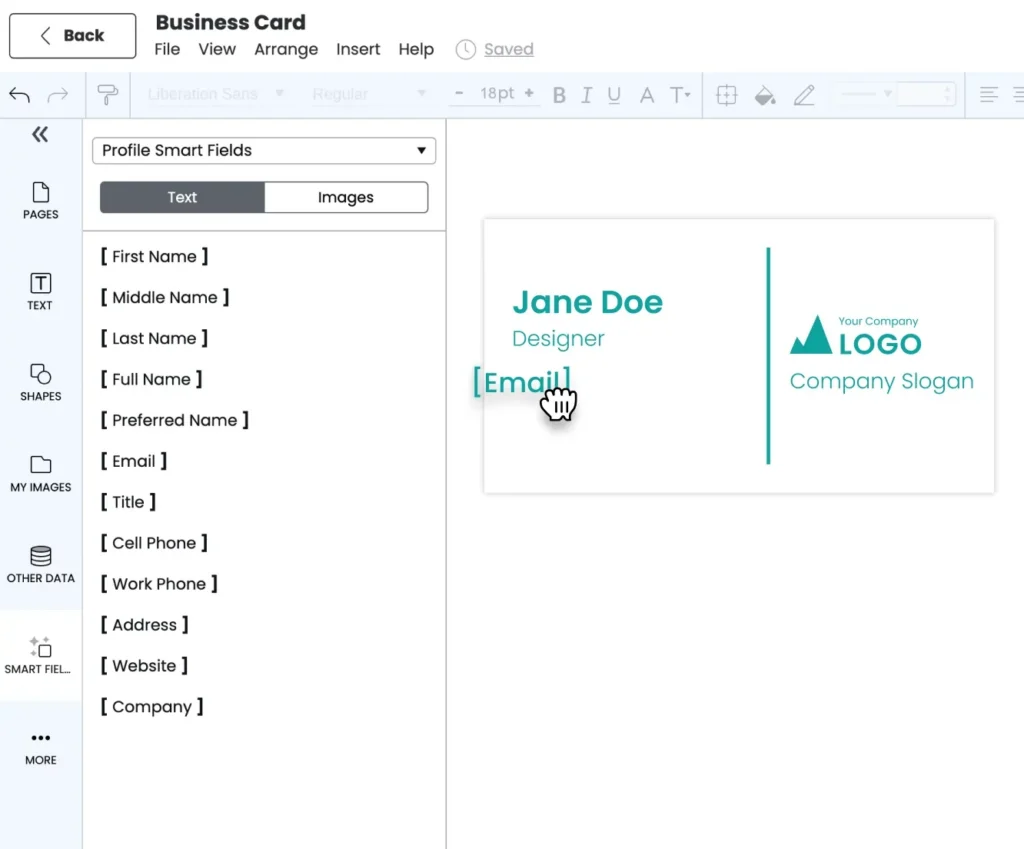
In Marq, designers keep working in Adobe InDesign, upload the file as a template, and choose which elements to lock. Smart Fields fill in the right logo, disclaimer, or contact block based on the user’s department, location, or role, so a Phoenix agent and a Denver agent open the same template and each get their own office details.
5. Decide which creative pieces need approval and which don’t
A full review of every piece delays even routine changes. Sort assets into tiers by risk:
- No review: pieces built from a locked template where only approved fields change, like an event flyer or a social post.
- Spot check: pieces with a new headline or body copy, reviewed by marketing within one business day.
- Full review: pieces with rates, performance claims, or regulated disclaimers, which go to compliance or legal.
A mortgage company might let loan officers publish co-branded flyers from governed templates with no review, while every rate sheet goes to compliance. Reviewers then spend their time on the pieces that carry legal risk.
Revisit the tiers each quarter alongside the metrics later in this guide. Asset types that never fail review can move down a tier.
3 best platforms to execute your creative operations system
No single creative operations platform covers every step. Many enterprise teams combine a work management tool for requests, a DAM for approved files, and a templating platform for repeatable production.
| Platform | Best for | Standout features | What it hands off |
| Airtable | Creative ops leads who want a custom intake and production tracker | Request intake, project tracking, workflow automation | Approved briefs to designers; links to files stored in a DAM |
| Aprimo | Large enterprises in regulated industries managing the full content lifecycle | Planning, budgeting, DAM, work management, personalization, and content intelligence | Governed, approved assets to channels and production tools |
| Marq | Lean creative teams supporting many non-designers across locations | Locked templates, Smart Fields, data automation, and distribution | Finished on-brand pieces to print, web, and social |
Airtable
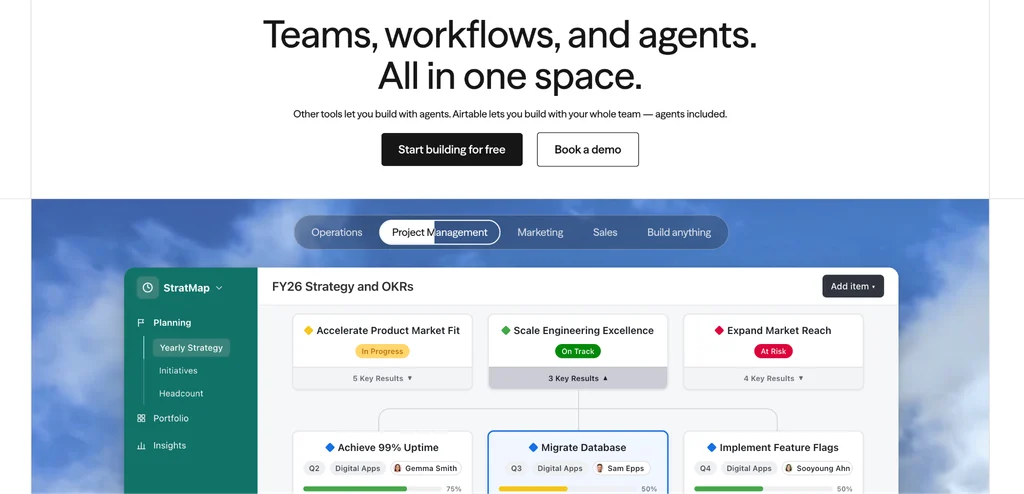
Airtable is a no-code database and app builder that many creative teams use as their request and production tracker. Its design and creative solution routes incoming requests to designers based on skills, workload, and project type, generates structured briefs from stakeholder requests, and tracks reviews.
It connects to Adobe Creative Cloud, Figma, Frame.io, Dropbox, Box, and DAM systems including Bynder. Airtable positions itself as a system that connects the tools a team already uses.
Best for: creative ops leads who want to build a custom intake form, production board, and capacity view without engineering help.
Pros:
- Grid, kanban, calendar, and timeline views of the same request data
- Automations for routing, notifications, and status updates
- Integrations across creative and marketing tools
Cons:
- Teams build the system themselves, so setup takes planning. In a sample of 3,298 G2 reviews, Airtable averages 4.6 out of 5, and 261 reviewers flagged a steep learning curve.
- Several reviewers note that bases get cluttered as more people build in them without admin rules.
Aprimo
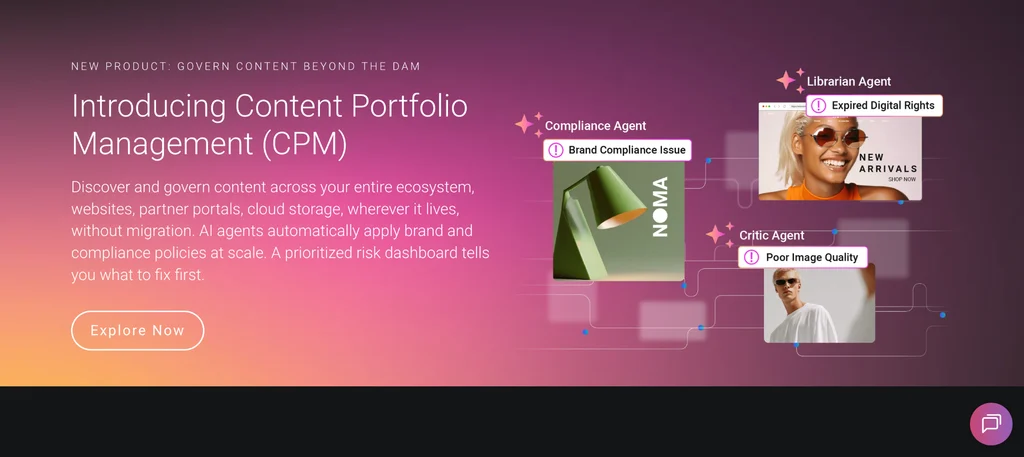
Aprimo is an enterprise content operations platform built around a DAM. Its modules cover digital asset management, Productivity (work management and reviews), Plan and Spend (budgets), personalization, and content intelligence.
The May 2026 release added search across DAM and work items in one place, a shared markup and annotation viewer, reverse image search, and AI agents for metadata and invoice processing.
Best for: large enterprises, especially in life sciences and financial services, that need one system for asset governance, audited reviews, and marketing spend.
Pros:
- Covers planning, budgeting, assets, reviews, and delivery in one platform
- Review workflows include claims and reference management with audit trails
- Detailed search, metadata, and version control for large asset libraries
Cons:
- In a sample of 331 G2 reviews, Aprimo averages 4.3 out of 5, and 75 reviewers cited a steep learning curve during setup.
- Reviewers describe long implementations that need upfront taxonomy and permissions planning.
Marq
Marq is a brand enablement platform built for the production step: turning approved designs into locked templates that non-designers adapt on their own. It suits organizations where a lean creative team supports hundreds of agents, advisors, campus departments, or clinic staff.
Marq connects to DAMs, CRMs, and workflow tools, and request intake, resource planning, and enterprise-wide asset storage stay in those systems.
Key capabilities:
- Locked brand templates: Admins lock logos, colors, fonts, and legal copy, then choose which fields users can edit.
- InDesign-to-template workflow: Designers upload InDesign files and turn them into templates without rebuilding them.
- Smart Fields: Templates fill in the right logo, disclaimer, or contact details based on a user’s department, location, or role.
- Data automation: Teams connect a spreadsheet, CRM, or MLS feed to generate hundreds of personalized pieces, such as a flyer for every listing or a postcard for every branch.
- DAM integrations: Users drop approved images from the DAM into templates, and DAM permissions carry over.
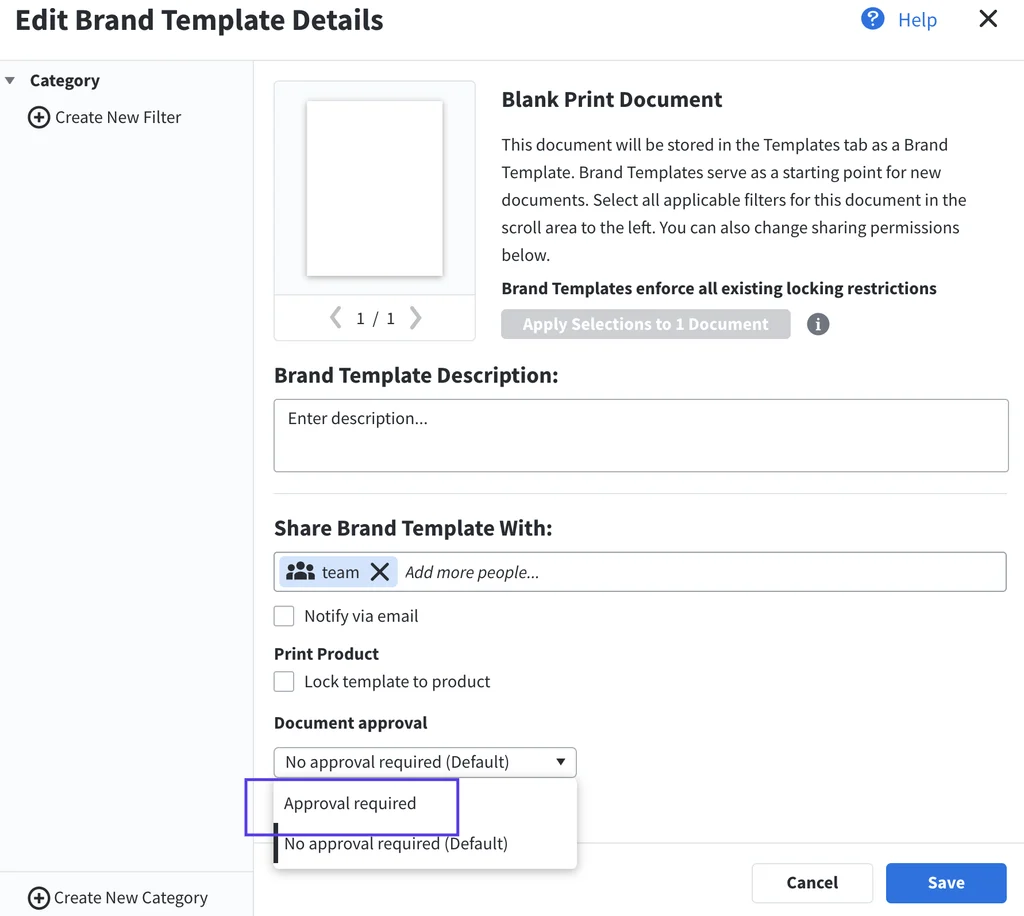
- Approval workflows: Admins route pieces for approval before a team member can export them.
- Analytics: Reports show template adoption, content freshness, and approval status, filtered by person, team, or location.
- Distribution: Users send finished pieces to print, publish them to the web, or share them on social media.
In practice, real estate brokerages build listing flyers from MLS data, universities give each department its own template collection, and financial services firms auto-fill each advisor’s photo and contact details. One-off campaign work that requires custom design still belongs with a designer in Adobe or another professional design suite.
Best for: marketing and brand leaders at multi-location or multi-brand organizations in real estate, higher education, financial services, insurance, healthcare, and manufacturing.
Purdue University’s marketing team gave campus partners Marq templates after taking on larger brand projects. Tammy Weaver-Stoike, Director of Marketing Operations, described the split:
“It was a great solution for both sides. We could create the templates and maintain control over the design and branding, and our partners could easily use the templates to create what they needed on their own.”
– Tammy Weaver-Stoike, Director of Marketing Operations, Purdue University
Automate repeat creative work with Marq
Turn approved designs into locked templates with Smart Fields, letting distributed teams create personalized materials while keeping brand elements consistent.
Metrics creative operations leaders should track
Six metrics show whether creative ops is working. Five metrics come from your request or project tracker. Self-serve share combines tracker data with numbers from your templating platform.
| Metric | What it tells you | How to calculate it | Where the data comes from |
| Request turnaround time | How long requesters wait | Delivery date minus request date, averaged by asset type | Request tracker or work management tool |
| Revision cycles per asset | Whether briefs and review rules are clear | Rounds of changes before final approval | Work management or proofing tool |
| On-time delivery rate | Whether the team meets its commitments | Assets delivered by the due date ÷ total assets delivered | Work management tool |
| Capacity utilization | Whether designers are overloaded | Hours booked ÷ hours available, per designer | Resource planning tool |
| Rework rate | How often finished work comes back | Assets reopened after delivery ÷ assets delivered | Work management tool |
Track turnaround time and on-time delivery weekly, and review the rest each quarter. Self-serve share needs both halves of the fraction: template exports from your templating platform and the total request count from your tracker.
Marq Analytics covers the template side. It reports template adoption, content freshness, and approval status, filtered by person, team, or location. These reports show which templates people use, which ones need a refresh, and which pieces sit waiting for approval.
Pro tip:
Break turnaround time out by asset type. An average of five days can hide a two-week wait for brochures behind same-day social posts.
For a longer list of measures, see our guide to creative KPIs.
Examples of successful creative operations in practice
Three organizations in real estate, higher education, and healthcare changed how routine requests move through their teams. Each team cut wait times from weeks to a day or less.
@properties | Christie’s International Real Estate
@properties | Christie’s International Real Estate supports more than 3,500 agents across 44 offices in four states. Its designers used to build custom materials agent by agent, with a lot of back-and-forth. The team tried a template vendor, but each new template took four to six weeks to arrive.
The marketing team now uploads InDesign files to Marq, locks the brand elements, and has templates ready for agents within minutes. Agents and affiliates build postcards, tri-fold brochures, and branded materials, then send them to print, publish them to the web, or share them on social. The marketing team also uses the quality of those materials to recruit agents.
Johns Hopkins University
Johns Hopkins University has nine schools across four campuses and a four-person creative strategy team serving thousands of staff. During busy periods, staff waited three to four weeks for content. Staff who couldn’t wait hired freelancers or made materials themselves, often without the right fonts, colors, or logos.
The team now builds a template for each type of collateral it used to create repeatedly. Smart Fields preload the correct logo for each school, and department-only collections give groups like alumni relations and athletics their own templates. Staff now produce on-brand flyers in a day or less.
PT Solutions
PT Solutions is a physical therapy provider with 4,500 employees and 550 locations in 25 states. As the company nearly doubled in size, its creative team received more than 300 requests a month, many of them simple and repeatable. Outdated flyers with stretched logos circulated, and newly acquired clinics needed dual-branded materials during each transition.
The team paired Marq templates with MediaValet brand portals. Clinic and regional staff pull approved assets from MediaValet inside the Marq editor, and finished materials go back into MediaValet. Sales reps who used to wait two to four weeks for a flyer now produce their own the same day, and regional and clinic teams complete more than 300 projects themselves each month.
Manage brand content at scale with Marq
Creative operations gives a growing organization a repeatable way to take in requests, assign them, review them, and deliver the finished pieces. Many of those requests involve repeat work: flyers, social posts, bio sheets, and product sheets that vary by location or person.
Marq handles that repeat work. Designers turn approved layouts into locked templates, creative automation fills in local details from Smart Fields and connected data, and agents, advisors, and department staff produce finished pieces without opening a ticket. Request intake, resource planning, and asset storage stay in the work management and DAM tools you already use, and Marq connects to them.
Book a Demo to see how Marq fits into your creative operations system.
FAQs
What is creative operations?
Creative operations is the function that manages how creative work gets requested, assigned, produced, reviewed, and delivered. It covers intake, ownership, approval rules, asset libraries, templates, and the metrics that show where work slows down. Large organizations often have a dedicated creative ops lead or team inside marketing.
What is creative operations management?
Creative operations management covers the daily work of triaging requests, balancing designer workloads, setting review rules, maintaining templates and asset libraries, and reporting on turnaround time and capacity.
What is the difference between design operations and creative operations?
Design operations (DesignOps) usually supports product and UX design teams with design systems, research operations, and tooling for people who design software. Creative operations supports marketing and brand teams producing campaigns, collateral, and branded content. Some companies put both under one leader.
What is the difference between creative operations and marketing operations?
Marketing operations runs the systems behind campaigns, including the CRM, marketing automation, lead routing, and attribution. Creative operations runs the production of the assets those campaigns use. Both often report to the CMO and share tools, such as a CRM that feeds contact details into branded templates.