5 Best Canva Enterprise Alternatives & Competitors (2026 Ranked)

Canva Enterprise is widely popular with large teams.
But many organizations struggle to design content with it at scale without breaking brand rules.
Fortunately, there are several Canva Enterprise alternatives that support structured, brand-safe content creation across departments: Marq, Visme, Adobe Express, Templafy, and Frontify.
In this guide, we’ll break down each platform’s core features, pros, cons, pricing, and other details to help you choose the right software for your enterprise needs.
Top 5 Canva Enterprise Alternatives (Side-by-Side Compared)
| Name | Best for | Standout feature | G2 Rating |
| Marq | Brand enablement and distributed content creation | Locked templates with smart fields for automated personalization at scale | 4.5/5 |
| Visme | Data-heavy presentations and infographics | AI-powered chart builders | 4.5/5 |
| Adobe Express | Adobe-native teams | Creative Cloud integration | 4.5/5 |
| Templafy | Microsoft-native enterprises | Compliance automation | 4.3/5 |
| Frontify | Brand guideline management and asset storage | Centralized brand hub | 4.5/5 |
Marq: Best for brand enablement at scale

Marq is a brand enablement platform that helps non-designers create personalized content at scale while the brand team stays fully in control. Compared to Canva Enterprise, it focuses less on open editing and more on structure and guardrails around branded content.
Your brand team can turn approved designs (e.g., from Adobe Indesign) into locked templates. From there, marketing, sales, local, and partner teams can customize their own flyers, sales assets, social posts, and one-pagers by editing only the fields they’re allowed to touch.
This helps enterprise teams across different departments and regions work fast without relying on brand ops to clean up files before they go live.
As for cost, enterprise and SMB teams can get a custom quote tailored to their organization’s unique needs.
Learn more about Marq’s pricing here.
Key features
For enterprises operating across markets and departments, content creation quickly becomes hard to govern. Marq is built to support global and distributed teams that need both speed and brand control.
Here are the core features to expect:
Locked templates with multi-level, role-based access
Marq lets brand teams lock certain parts of a template and then control editing by role.

For example, a store manager can update the address, opening hours, and local offer in a flyer, while the logo, layout, and brand colors stay locked. Only the brand team can change the design or publish the master template.
This stops them from accidentally publishing off-brand content. You don’t waste time and money reworking designs, and your brand team isn’t stuck in approval loops that slow down launches.
Automated personalization with smart fields
Marq makes it easy for distributed enterprise teams to personalize content without manually editing dozens of files.
Using Marq AI, you can pull data straight from your CRM, spreadsheets, or other systems and automatically fill names, locations, pricing, and product details into templates.
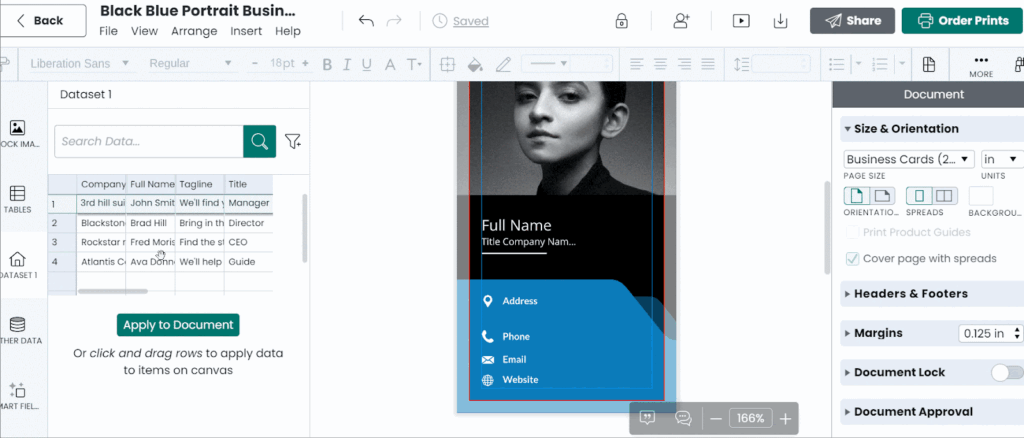
If you need to create local or regional versions, Marq can generate them in bulk instead of one by one. Its creative automation can even handle large-scale translations for multi-language campaigns.
For example, let’s say a national real estate network uploads a list of 400 agents with names, photos, territories, and contact details. Marq then generates 400 personalized flyers and social posts in one run, each one automatically filled and formatted correctly.
Imagine if this were done manually. Central marketing gets stalled on repeatable requests, and reps wait for materials while leads go cold, directly delaying revenue.
Automating the entire process removes production bottlenecks, shortens time-to-market, and helps sales teams get what they need while opportunities are still interested.
DAM integrations for approved asset access
Marq connects directly to your Digital Asset Management (DAM) systems, including MediaValet, Bynder, Brandfolder, and others.

Your approved logos, images, and videos are right there inside the editor, so teams can find and drop them into templates without downloading files or hopping between tools.
This keeps everyone using the latest assets, so old logos or outdated images don’t accidentally slip back into decks or one-pagers.
For example, a large healthcare provider’s regional team might want to create clinic brochures inside Marq. They would only be able to use the facility and treatment images that the legal team has already approved in the company’s DAM.
Because Marq is connected to the DAM, outdated or unapproved assets never appear in the editor. That reduces compliance risk and protects both the brand and the budget.
Alternatively, Marq offers native asset storage and content management for teams that don’t have a separate DAM. You can upload and organize approved assets directly in Marq, then lock them into templates so only the right files get used.
Content distribution and usage analytics
Marq lets you publish and distribute content in lots of ways without exporting to separate tools.
You can generate custom shareable URLs, link content directly to your social accounts, send HTML for email campaigns, and order prints right from the platform itself. 
It also includes built-in analytics so you can see which templates and assets are being used most, which content is stale, and where adoption is strongest.
For example, a global retail brand launches a new campaign and publishes templates to regional portals through Marq. The brand team can see, in one dashboard, which countries are using the new templates and which regions are still pulling last quarter’s assets.
With Marq’s analytics, the team can track usage and spot adoption gaps. They can step in quickly to make sure the right content reaches the market, instead of discovering too late that half the regions were using outdated materials.
Where Marq shines
- Letting non-designers create content without breaking the brand. Marq is built for teams who want sales reps, agents, and local teams to create their own flyers and one-pagers, but not redesign them. Templates stay locked, so people can update photos and text without changing backgrounds or deleting brand elements.
- Removing manual, repetitive production work. Marq is strong when teams are producing the same types of assets every day, like agent flyers, social posts, listings, or localized versions. Instead of resizing, duplicating, and editing files one by one in Canva, teams can generate variations in bulk and personalize them automatically.
- Giving distributed teams a safe way to self-serve. Marq works well when content creation is spread across regions, departments, franchises, or partners. Each group gets access to the right templates and assets in their own workspace, while the brand team keeps control centrally.
Where Marq falls short
- Not for simple brand libraries: If you only need a place to store brand guidelines and assets, Marq will feel like more than you need.
- Not built for individual creativity: If your team mainly works with free-form design, experimenting with layouts and concepts from scratch, Marq might not be the best fit, because it’s for teams that require structure and consistency. While it offers an advanced editor for designers to work with, bespoke graphic design should stay in Adobe. Marq is made to help teams standardize and scale brand-safe content, not act as a creative playground for designers.
- Better for distributed vs. centralized teams: Marq lets non-designers create content safely through templates, roles, and portals. If content demand is easily met by a small, central team, you won’t benefit much from its permissions, automation, or enablement features that help teams scale content.
Customer reviews
The customer quotes below show how Marq makes it easy for enterprise teams (and non-designers) to work with templates and create on-brand content.
“The ability to take our creative files, load them into Marq, and allow our agents to customize the templates themselves has been absolutely wonderful and really takes a load off my marketing team.” – Chrissy Kincheloe, Marketing Director, Berkshire Hathaway HomeServices
“I can log in to Marq, edit an image quickly, export it, and put it into an email. I don’t have to sit there and fiddle with it. It’s just easy to use.” – Madelyn Reynolds, Communications Officer, D1 Training
Who Marq is best for
- Teams enabling non-designers to create content: Sales, advisors, franchisees, faculty, and partners can self-serve flyers, one-pagers, and social posts instead of waiting on design.
- Organizations that need compliance built into templates: Content gets created within guardrails, so legal, brand, and quality standards are protected by default. This is especially important for finance and healthcare firms.
- Marketing and creative teams buried in update requests: Users can swap text, images, and details themselves inside locked templates, so your team stops handling small edits repeatedly.
- Enterprises scaling content across locations and channels: Marq is built for rolling out consistent, localized content across regions, teams, and campaigns.
Visme

Visme is an AI-powered visual content creation platform primarily used for presentations, infographics, and data visualizations.
With its data integrations, Visme is especially useful for incorporating charts, reports, and structured data into visuals.
It’s a good choice if you need a flexible visual editor for internal or client-facing communication, not a platform designed to control how large teams create branded content.
Key features
- Template and asset library: You get access to millions of stock photos and videos, static and animated icons, 3D characters, and over 40 chart and graph types.
- Animation and interactivity: Built-in slide transitions let you control pacing and flow. Add clickable elements, hover effects, pop-ups, flipbook effects, and custom animations to make presentations more engaging.
- AI suite: Visme’s AI Hub includes an AI writer for generating text, an AI image generator for custom visuals, a brand wizard that extracts colors and fonts from your logo, an AI presentation maker that generates slide decks based on a prompt, and more.
Where Visme shines
- Data-heavy content: If your team creates reports, presentations, or infographics with lots of statistics, Visme’s chart makers and data widgets get the job done. You can import data directly into your visualizations from Google Sheets, Microsoft Excel, Google Analytics, SurveyMonkey, and Smartsheet.
- AI presentation maker: The AI generates entire presentations from your prompts. It creates an outline, writes slide text, selects relevant icons and images, builds data visualizations, and adjusts layouts based on the content. You get an AI-generated first draft to edit instead of starting with a blank template.
Where Visme falls short
- Limited creative automation: You can import data into charts, but it’s currently impossible to auto-generate hundreds of personalized decks from your CRM as Marq does. Each template variation still requires manual work.
- Steep learning curve: The interface takes time to learn, and complex projects can slow down performance. Onboarding new team members also requires more training.
By contrast, Marq is built around simple, role-based templates. Most users don’t design at all. They just fill in approved fields, which makes onboarding faster.
Customer reviews
“Building engaging and informative graphic content is super easy and fast using Visme. I use it weekly for small/large group presentations, infographics, charts, etc and consistently get positive feedback and questions about how I generated it!” shares Mikelle K.
“Visme can sometimes be glitchy. I’ve noticed the following glitches, among others: design elements I’ve added will not load on the page I’m viewing, [and] I’ll have to refresh in order for the page to load properly, which slows work time and overall efficiency,” says a user in media production.
Who Visme is best for
Visme is great for marketing and sales teams creating data-driven presentations and infographics that don’t require enterprise-level template governance or automation.
See a detailed comparison of Visme vs. Marq here.
Adobe Express

Adobe Express is a design tool built for speed and simplicity. You get thousands of templates, AI-powered features, and native integration with Photoshop, Illustrator, and other Adobe Creative Cloud apps.
Larger organizations often use Adobe Express as a lightweight layer for quick content updates instead of as a central content system.
It works best when design teams build core assets in other tools (usually part of Adobe’s ecosystem) and use Express mainly to adapt and reuse those assets for everyday requests.
Key features
- AI-powered design tools: Generate images, expand backgrounds, insert or remove objects, and create text effects using Adobe Firefly. The Enterprise plan includes custom AI models trained on your brand assets to generate brand-consistent content.
- Creative Cloud integration: Import and edit Photoshop, Illustrator, and InDesign files directly in Adobe Express. Changes sync automatically through linked assets, so teams don’t need to re-import updated files.
Where Adobe Express shines
- Template locking with granular controls: Lock specific branding elements such as logos, images, and brand colors, and set granular permissions for who can edit what. You also get approval workflows to ensure content is reviewed before publishing.
- Full-featured mobile app: Unlike many enterprise design tools, Adobe Express offers a complete mobile app for iOS and Android. Teams can create and edit branded content from anywhere.
Where Adobe Express falls short
- Limited to Adobe’s ecosystem: Adobe Express works best if you’re already invested in Creative Cloud. Teams using other design software or wanting platform flexibility may find it restrictive.
- Device and licensing limitations: Adobe restricts the number of devices each license can be used on, so costs can escalate quickly, especially for distributed or growing teams.
Marq offers the same template locking and approval workflows, plus web-based access that works on any device or design ecosystem.
Customer reviews
“The options feel limited as soon as I want to customize a design a bit more. Some settings could be more flexible, especially for someone working in design,” says Sara F.
“Unlike Photoshop or other apps, Adobe Express doesn’t offer advanced editing features such as detailed layer control, complex masking, or professional-grade typography and video editing,” shares Herry D.
Who Adobe Express is best for
Adobe-native teams who want a lightweight design tool for creating branded content.
See a detailed comparison of Adobe Express vs. Marq here.
Templafy

Templafy is a document automation and brand management platform built for organizations where Microsoft Office is central to daily operations.
It’s designed for enterprise teams that need strict governance over proposals, contracts, presentations, and other business documents.
Templafy is primarily used by legal, finance, and professional services teams that prioritize document standardization over visual design or marketing.
Key features
- Microsoft Office integration: Templafy lives inside Word, PowerPoint, and Excel as a native add-in. Users access approved templates, insert compliant assets, and auto-populate data without leaving their document.
- Document automation with smart fields: Templafy pulls data from your CRM through API integrations, employee directory, or custom databases to auto-fill client names, addresses, pricing tables, and signatures.
Where Templafy shines
- Built for compliance-heavy industries: Templafy’s audit trails, version control, and governance features benefit financial services, law firms, and professional services.
- Centralized document control at scale: Global teams get consistent templates, up-to-date brand assets, and automatic updates pushed from headquarters.
Where Templafy falls short
- Microsoft-centric workflow: Templafy is built primarily for Word, PowerPoint, and Excel users. While it integrates with other tools, its value drops significantly if you want to work outside Microsoft Office.
- Complex setup and steep learning curve: Achieving full integration can be challenging, with compatibility issues along the way (especially for Mac users). The cost can be quite high, and there’s a noticeable learning curve for those new to the platform.
- Limited creative flexibility: Templafy prioritizes compliance over creativity. Teams producing marketing collateral, social graphics, or print materials will need a separate tool.
On the other hand, Marq combines both, so you don’t need different tools to create on-brand content.
Customer reviews
“Most of what Templafy offers can already be accomplished directly in Word, except for the launch form feature. I also find it quite expensive. Additionally, it can become quite confusing to use at times,” shares Kara V.
“Upload limits (file size constraints) and some UI restrictions can be frustrating when working with large assets,” says Andrzej C.
Who Templafy is best for
Templafy is ideal for Microsoft-heavy, compliance-driven enterprises that need strict document governance, audit trails, and brand compliance across high volumes of proposals and contracts.
Frontify
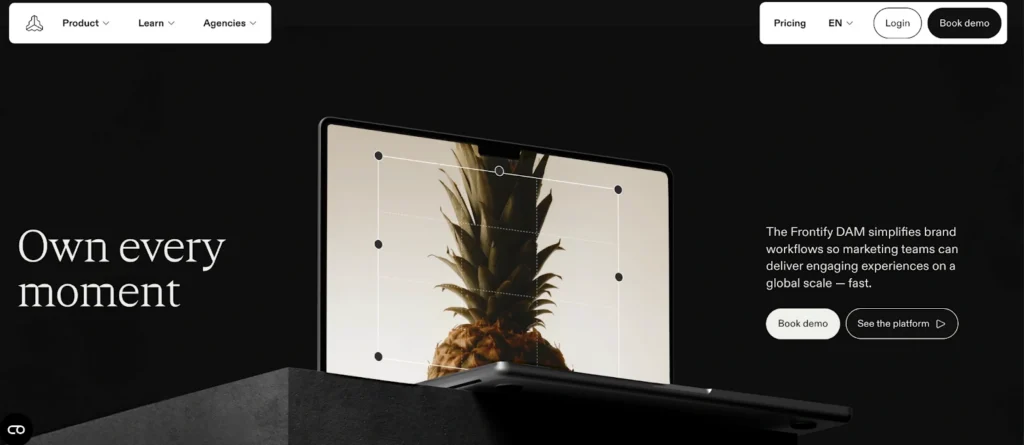
Frontify is best seen as a brand hub and governance layer rather than a design tool like Canva. Teams use Frontify to manage brand guidelines, design systems, and approved assets in one place, so everyone knows what’s on brand and what’s not.
Unlike Marq, Frontify is not built to produce or personalize large volumes of content within the platform.
Key features
- Centralized brand and asset library: Store and share your brand guidelines, elements, and visual identity standards in one place, with approvals and simple review workflows.
- Editable templates with light customization: You can turn designs from tools like Figma, Adobe XD, or InDesign into simple, editable templates. These are great for localization and small updates.
Where Frontify shines
- Strong brand management: Frontify is very good at centralizing brand assets and rules in one place. Teams can easily find how the brand should be used and what’s approved, which is especially helpful for large or multi-brand organizations.
- Good fit for external teams and partners: Agencies, freelancers, and regional partners can be given controlled access to the brand portal, so they always work from the same guidelines and approved assets.
Where Frontify falls short
- Limited content creation and automation: Frontify is not built to be a production tool. Templates support light edits and localization, but you can’t generate or personalize content in bulk or automate creation the way you can with platforms like Marq.
- Less practical for non-designers: Frontify works well for brand and design teams, but feels less intuitive for other team members (e.g., in marketing or sales) who just need to create and update materials quickly.
Marq fills these gaps by giving enterprise teams a content creation layer on top of brand governance. It supports bulk creation and self-serve templates, so non-designers can create and update content without extra help from the brand team.
Customer reviews
“Frontify helped us to get all the brand assets together in one place. After a couple of months we noticed that our employees are more engaged with the brand. The tool is easy to use, and it’s always adding new features and functionalities, which I believe, are based on users feedback.” – Amir L.
“There are limitations to the functionalities, e.g. cropping images or the size of content blocks, or sharing libraries. But they also actively collect feedback and send it to their developer team.” – Kristina H.
Who Templafy is best for
Frontify is best for organizations that primarily need a central brand hub to manage guidelines and approved assets for internal teams and external partners.
Reasons to consider an alternative to Canva Enterprise
Canva Enterprise works well for creative teams that want to create designs quickly.
But once content creation spreads across departments, regions, or compliance-heavy teams, Canva starts to show its limits around control and automation.
Here are three areas where teams outgrow Canva Enterprise (and an alternative tool steps in).
1. Limited template locking and brand control
Canva Enterprise offers brand kits and some template restrictions, but users can still move elements, change fonts, or delete locked objects with workarounds.
Marq solves this with granular template locking and role-based access. Admins control exactly which elements are editable, which are not, and which users can access specific templates.

Any brand updates roll out automatically, so outdated logos and fonts never slip through.
2. No data integrations for large-scale personalization
Canva Enterprise requires manual entry or CSV uploads for personalization.
If you’re producing hundreds of localized flyers, agent headshots, or territory-specific pricing sheets, you’re stuck copy-pasting all the data.
Marq’s smart fields pull data directly from your CRM, spreadsheets, or DAM.
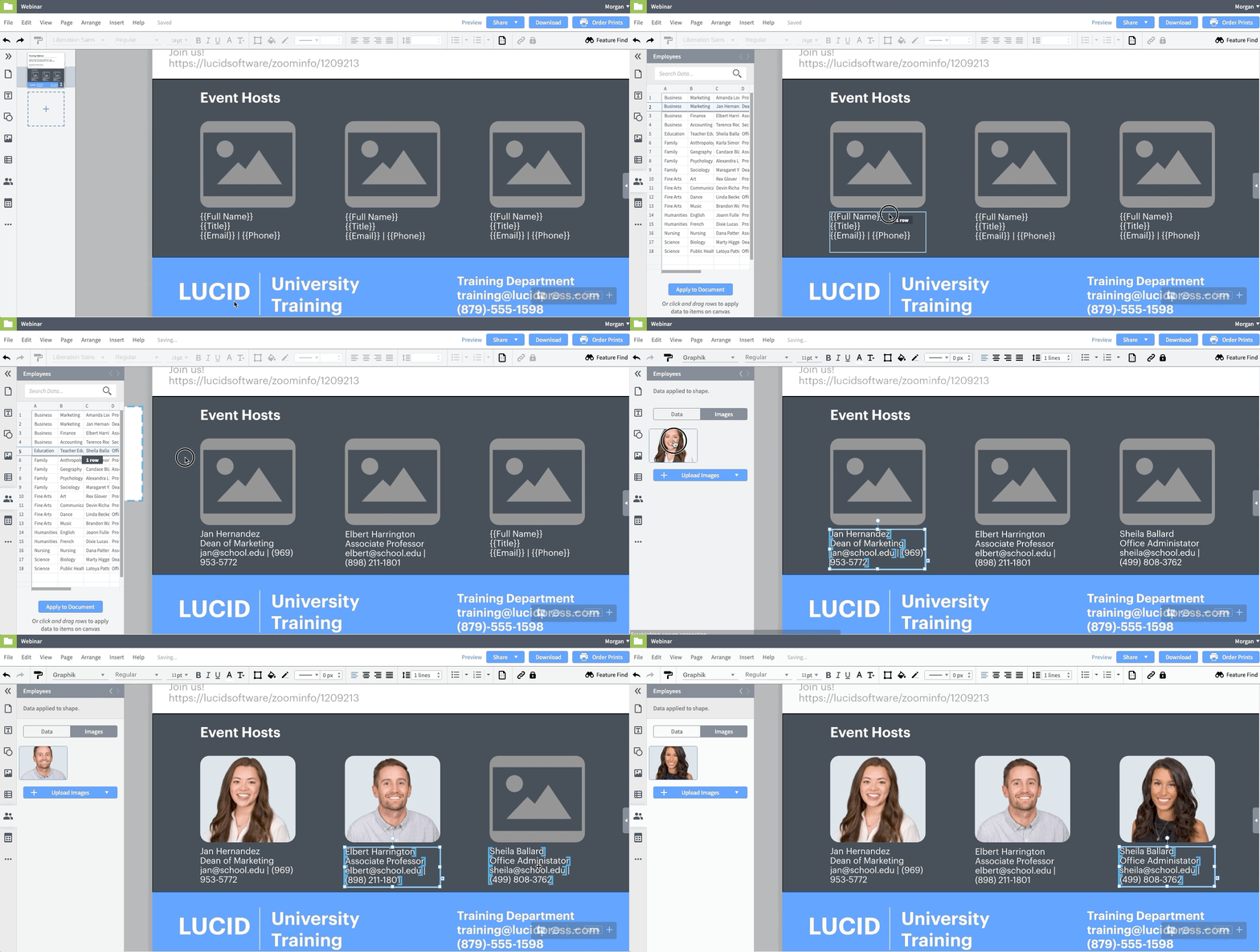
You can upload a CSV with 500 agent names and headshots, and Marq would generate 500 customized flyers in minutes.
3. Weak approval workflows and compliance tracking
Canva Enterprise lacks built-in approval routing or audit trails. If legal needs to review materials before publication, teams resort to Slack threads, email chains, or project management tools.
This slows production and creates compliance risks, especially in regulated industries like financial services and healthcare.
Marq offers multi-step approval workflows with version control and audit trails.

Marketing can route content through legal and compliance before publication, and every change is tracked for regulatory review.
See How Marq Helps You Manage Your Branding Easily
Choosing the right Canva Enterprise alternative comes down to how your organization creates content and how much control and automation you need as you grow.
If your teams are spread across regions or departments, and brand consistency matters as much as speed, a platform like Marq will take you much further than a design-first platform alone.
Book a demo to see how Marq can help your company create on-brand content at scale without slowing down your brand or creative teams.