Free invoice generator online
Using a generic invoice will not do. Instead, use Marq to give your invoice a professional touch with our online invoice generator. This free tool lets you brand your invoices with colors, fonts & graphics that match your brand’s personality. It features customizable templates and an easy-to-use, drag-and-drop design tool. Now you can design and print quality invoices in only a few minutes.
Haven’t signed up yet?
Give us a try.
 Sign up with Google
By signing up you agree to our Terms of Service and Privacy Policy





Free smart invoice templates
Marq can help you get started with a professional selection of free invoice templates. You can choose from a wide range of designs and customize an invoice for your business or organization. Customize by hand or upload your branding to access a collection of Smart Templates automatically customized to fit your brand. Don’t see an invoice template that quite fits? No worries. Make your own invoice from scratch with our intuitive design tools.
Quick and easy
Our intuitive, drag-and-drop editor makes creating on-brand content quick and easy.

Grow your brand
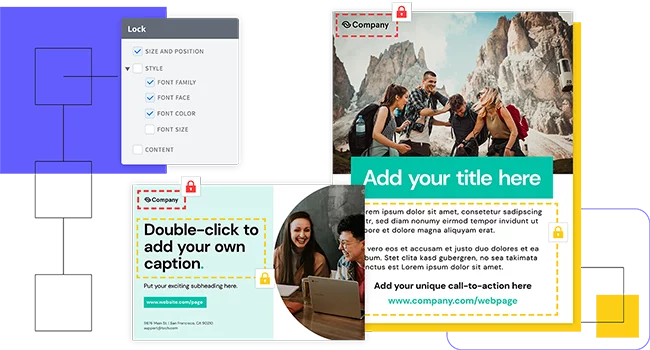
Advanced template locking empowers team members to customize co-owned templates — without going off-brand, in turn helping ensure content remains consistent.
Empower your team
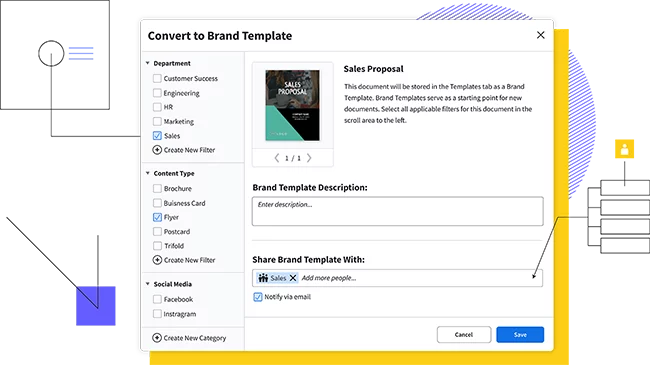
Share templates and brand assets with multiple team members and assign team roles to control who has access to what.
Feature highlights
Our free invoice generator does the heavy lifting for you. There’s no need to hire a graphic designer or spend hours mastering complicated design software just so your invoice bears your logo. Marq offers an invoice creator that gets the job done in only a few minutes, so you can focus on running your business.

Create and design your own free invoice today. Sign up with Marq, and you’ll have full access to our invoice generator — ranging from smart fields to data automation — once you have an account with us. You can also use our handy search tools to incorporate a wide range of free graphics and images in your invoice design.

You can always print & ship copies of your invoice template through our professional print service — but that isn’t the only option available to you. Email your invoice, download it as a PDF, or create a shareable link for an online invoice. Our invoice generator lets you choose the invoicing delivery method that works best for you.

Update one of our templates with your brand’s colors, logo and information and then save it as your own user template to use over and over again. Have a large list of customer information to import? Use our business-level data automation feature to quickly drag and drop information into smart fields. Invoicing will be done in a snap.
How to make an invoice with an invoice generator
When you create an invoice with our invoice generator, it needs to cover all the bases, so payments are quick, efficient and accurate. Good cash flow is the lifeblood of any successful business, and a detailed professional invoice makes meeting that goal easier than ever. What do you need to include in your invoice?
Invoice header and logo:
Keep your invoices clearly labeled with a header identifying it as an invoice so they stand out from other documents. This is important for record-keeping and paying taxes. Your logo should appear at the top of the page near the header, using the same design and layout you use for other documents.
Company name and contact information
The name of your company or organization, along with contact information, needs to be included near the top of the invoice. An ideal spot is to put it right under your logo, so customers and vendors can make the branding connection.
Customer information
On the opposite side of the invoice, include the name and contact details of the customer. Clearly identify who is receiving the invoice to avoid confusion between yourself and your customer.
Invoice number
Use an invoice number as a unique identifier to help you track multiple invoices in your records. It can be structured as anything from a file number to a date-based purchase order number.
Date
If you send out invoices to multiple customers, or multiple invoices to the same customer, you need to include a date issued on each invoice. This will make it easier to track your invoices and receive payments in a timely manner.
Goods/services provided
Every invoice must contain line item descriptions of billable goods or services provided. These line items should include columns listing what is provided, quantity, and unit price. If you’re providing hourly work, columns for quantity and unit price are replaced by number of hours worked and hourly rate. Add the numbers up in each column to form a subtotal.
Itemized fees
Include taxes, shipping, or any additional fees as separate line items on your invoice. These need to be listed separate from the subtotal.
Amount due
Add the numbers from the subtotal (and any fees) into a total amount owed at the bottom of the line item list. Make this number easy to see since this is the amount you need to be paid.
Terms and conditions
Each invoice should include terms and conditions for invoice payment. This section can include such items as additional charges for late payments, preferred payment method, and instructions related to that payment method.
Create all of your on-brand
collateral in Marq


Frequently asked questions
An invoice is a formal document that outlines the details of a sale or service provided, including the products or services, quantities, prices, and total amount due. Invoices are essential for business transactions as they serve as a legally binding record of the agreement between the buyer and seller.